Меняем голос на телефоне в Discord
Discord — это популярное приложение для общения, распространяемое на разных платформах. К сожалению, в самом приложении нет функции изменения голоса. Это можно сделать только с помощью приложений, работающих в фоновом режиме и полностью совместимых с Discord.

Как изменить голос на телефоне в Discord
Это можно сделать с помощью сторонних приложений для изменения голоса в реальном времени. К сожалению, вариантов, способных выполнять изменение голоса в реальном времени и корректно работать совместно с Discord не так много. Мы рассмотрим наиболее стабильные варианты.
Вариант 1: Voice Changer Mic for Gaming
Отличается возможностью записи голоса в режиме реального времени и совместимостью со многими приложениями для общения, в том числе и Discord. Имеет несколько заготовленных голосовых присетов. В основном это голоса знаменитых героев фантастических фильмов и сериалов. Имеющиеся присеты можно настраивать под себя, делая их более или менее выраженными.
Рассмотрим, как работать с приложением Voice Changer Mic for Gaming:
- Выполните установку приложения. Оно есть в Play Market, поэтому проблем с поиском и установкой возникнуть не должно. Мы не будем подробно останавливаться на установке из Play Market.
- При первом запуске появится ознакомительная информация. Закрыть окошко с ней можно только воспользовавшись кнопкой “Назад” на телефоне. Это одна из недоработок разработчика, из-за которой приложение получило пониженные оценки.
- Теперь ознакомьтесь с шаблонами голосовых эффектов, которые можно применить. Выберите среди них любой, наиболее интересный вам.


Теперь вам осталось только созвониться с другом или подключиться к любому голосовому каналу.
Вариант 2: Voicemod
Данное приложение заточено больше на создание небольших клипов с измененным голосом. Однако в нем есть функционал, позволяющий менять голос в режиме реального времени и применять изменения в режиме реального времени. К сожалению, возможность изменения голоса в режиме реального времени в данном приложении слегка недоработана, поэтому некоторые эффекты могут накладываться некорректно. Имейте это в виду при использовании данного приложения.
- Скачайте, установите и запустите приложение. Оно распространяется на бесплатной основе в Play Market.
- При первом запуске запустится обучение работы с приложением. Вы можете его пропустить или пройти полностью на ваше усмотрение. Оно не слишком большое.
- Приложение запросит доступ к камере и микрофону. К камере можете не предоставлять доступ, а вот к микрофону его обязательно предоставить.
- В приложении имеется несколько голосовых эффектов. Выберите среди них наиболее подходящий.

Это были варианты, позволяющие в реальном времени изменять голос в Discord на телефоне. Возможно, вы знаете другие приложения, способные делать это. Если это так, то поделитесь ими в комментариях.
6 Best Voice Changer App for Discord on iPhone&Android

Discord is one of the most favorite apps for professionals in the online field, especially for gamers. A lot of people use Discord for this purpose, and some of them change their voices on Discord due to many reasons like privacy and security. Now, the question is how they change their voice and what is the best voice changer app for Discord. Read this article thoroughly because it is a complete guide on the best apps for Discord on iPhone and Android, their features, pros & cons, and pricing plans.
- Part 1: Best Voice Changer App for Discord on iPhone
- 1. Voice Changer — Audio Effects
- 2. Voice Changer Plus
- 3. Voice Changer Prank Call
- 1. Voice Changer with Effects
- 2. RoboVox Voice Changer
- 3. Best Voice Changer
Part 1: Best Voice Changer App for Discord on iPhone
1.1 Voice Changer — Audio Effects
Voice Changer Audio effects is a mobile-based application for iPhone to change voice for Discord. It provides an easy way of recording voice and applying various cool voice effects like a robot, alien, zombie, and many more in an effortless way.
Just record your voice, apply the voice effect and enjoy the changed voice immediately.
Besides Discord, you can also share your changed voice with your friends using Voice Changer Audio Effects. This application is available on the Apple Store and is very easy to download on your iPhone.

More than 25 different voice effects。
Saves changed voice.
Shares recordings on various platforms.
Simple user interface.
- Simple interface.
- Best for beginners.
- Light application.
- Free to use and Easy to download.
- No further voice editing features.
- Paid built-in features.
Price: The application is free to download and use. However, there are built-in premium purchases that are optional.
1.2 Voice Changer Plus
Voice changer Plus is also a mobile-based voice-changing application for iPhones and iPads. This application allows easy recording and changing the original voice into various sounds in a few simple steps.

Use Voice Changer Plus to surprise your friends and family. Not only for talking purposes, but you can also sing with changed voices. This software has a very simple user interface which eradicates the application of any technical information.
55 different built-in voice effects.
Various background music.
Open saved recordings for further editing.
Free to save and share recordings.
Easy download and installation process.
- Simple processing.
- Intuitive user interface.
- Voiceover support.
- Light and fast application.
- The free version has ads.
- Need subscription for advanced features.
Price: The Voice Changer Plus is a free application available in the Apple Store. Anyone can download and use it for free. For advanced features, you can go with built-in purchases.
1.3 Voice Changer Prank Call
As its name shows, this application is best to have fun with friends and family by changing voice on calls. Voice Changer Prank Call is very keenly designed to convert voice on audio and video tracks. Due to its voice speed, voice effect, and voice setting features, this app is considered a versatile application for Discord users.
You can use its feature to use any changed voice recording as your mobile ringtone. Moreover, the software allows users to share their edited audio or video recordings on different social media platforms directly through the Share button.

Multiple sound effects including a robot, alien, slower, faster, and many more.
Hold to record and release to end system.
Release output in video or audio formats.
HD results in video outputs.
Auto speed up the video playback.
Apply effects on both videos and audio tracks.
- Fast working potential.
- Simple user-interface.
- Free version available.
- No hurdles in downloading and installation process.
- Automatic subscription after first time purchasing.
- Need paid subscription for ultra-modern features.
- Need to be alert before the subscription expiry date.
Price: Voice Changer Prank Call is free to download, install, and use. Optional In-app purchases are available. After subscribing once, this app will be automatically subscribed for the next time.
Part 2: Best Voice Changer App for Discord on Android
2.1 Voice Changer with Effects
Voice Changer with Effects is one of the most commonly used and pure voice-changing applications for Android users. This mobile application offers almost 50 different types of voice effects with a very intuitive and simple user interface.
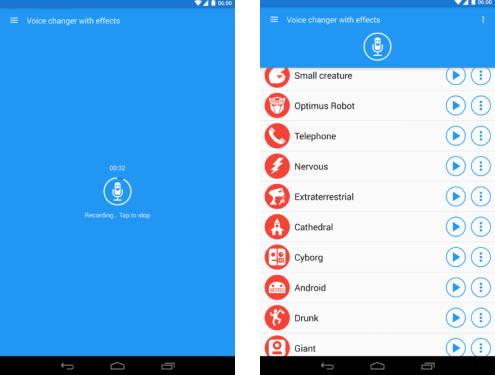
Without any technical knowledge, you can simply record your voice through the record button and apply the voice effect which you want. After these two simple steps, you can easily share your changed voice through Discord or on any other social media platform.
Various voice-changing effects.
Simple to share edited voice.
Require less space on mobile storage.
Apply voice effects to pre-recorded voice recordings.
Can set changed voice recording as ringtone/ caller tune.
- Plain and manageable user interface.
- Fast working speed.
- Contains less storage space.
- Best for beginners.
- Change voice in seconds.
- Make music or effect with a built-in piano.
- Drops a little bit of audio quality.
- Voice changing on video is not available.
Price: This application is totally free to download, install, and use. It is very easy to avail on Google Play.
2.2 RoboVox Voice Changer
RoboVox Voice Changer is another mobile-based voice-changing application containing a huge gallery of voice-changing effects. RoboVox transforms the original sound into funny, scary, robotic, evil, musical, and other notes.
RoboVox Voice Changer can modify your voice while using headphones which makes it suitable for Discord use. It has a completely clean and comprehensive user interface that makes it easy to find different voice effects and other editing options for users.

X-Y control field.
Pitch and modulation customization.
Real-time, parrot, and recording modules.
Save and share outputs as WAV files using email.
Save your modified voice as a ringtone.
Real-time FFT spectral analysis available.
32 nonidentical voice-changing.
- Safe to use.
- Easy and simple operating steps.
- Multiple features available.
- Can change audio file output as WAV file.
- Satisfactory vocoder technology is available.
- Manageable user-interface .
Price: $1.49 for downloading and using this application.
2.3 Best Voice Changer
Best Voice Changer is a smart voice-changing software that records and modifies the voice into totally unrecognizable sounds. You can easily record your voice and transform it into different voices. Other than sound effects, you can also apply background music like a battle, in-plane, and many more.
All Android users can use Best Voice Changer to amuse their family and friends by changing their voice on Discord. You will not need to use any external microphone for it. Your mobile’s microphone will be enough to record your voice to change the sound.

Multiple voices modifying built-in effects.
Different built-in background music.
Instant play the modified recording.
An immediate sharing feature is available.
Change speech speed.
Save recordings as WAV files.
Maintains stats like date of recording, sending date, and recording time.
- Safe and simple application.
- Easily available on the Play Store.
- Easy to use.
- Best for beginners.
- Contains ads.
- Cannot change voice during a phone call.
Price: Best Voice Changer is available on the Play Store free of cost.
Part 3: TopMediai Voice Changer — Best Online Alternative to Change Voice without App
We have seen different voice-changing mobile applications for Android and iPhone. Now, let’s have a look at the best online alternative to the Discord voice changer app.
TopMediai Voice Changer is an online tool that you can use to change your voice without installing the software on your device. This software/online tool is free to use with 100% safety and security.
It offers three different ways of uploading files for changing sounds. You can use your device’s microphone or can upload the pre-recorded file from your device. Moreover, this online tool also offers the Speech from Text option according to your choice.
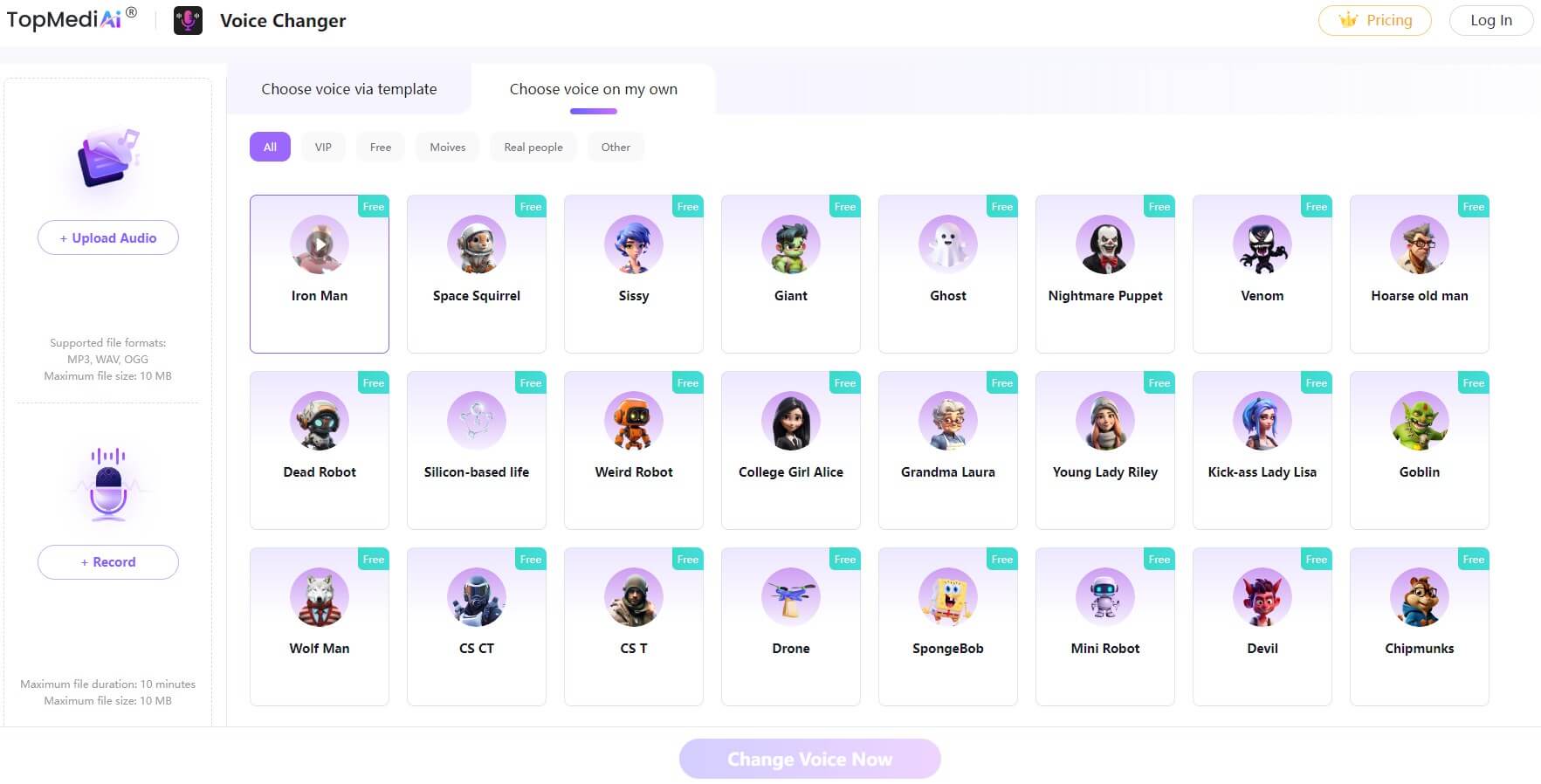
Change Voice Online
Can generate speech from text.
Multiple voice-changing effects with different sounds.
Can generate a customizable sound effect.
Can record sound.
Can change pre-recorded sounds.
- No installation required.
- Free to use.
- Simple steps to use.
- 3 different audio input methods.
- Internet connection is a must for using it.
Price: It is an online tool, so it costs nothing (Free online tool).
Part 4: FAQs about Best Voice Changer App for Discord
1 What is the Best Voice Changer for Discord?
There are multiple voice changer applications available on the internet. All of them can work, but the best ones are mentioned above in this article in detail. The applications like Voice Changer with Effects, Voice Changer Plus, RoboVox Voice Changer, and Best Voice Changer are considered the best for iPhone and Android users, respectively.
2 Which App is Best for Voice Changer?
As mentioned above, the applications that are shared in this article are one of the best mobile applications which can help you to change your voice into different sounds on Discord.
3 How Can I Change My Voice Online for Free?
To change your voice online, you can use TopMediai Voice Changer Online for free. This tool is not below the level of a professional tool. You can use all the built-in effects for free in order to immediately change your original voice into different sounds.
Changing voice automatically while gaming or calling seems amazing but difficult at the same time. In this article, we have tried our best to cover all the best voice changer apps for Discord on iPhone and Android platforms.
We have shared their features, pros, and cons to give you a better understanding of all those applications. Moreover, if you don’t want to install any application on your mobile, then you can use the TopMediai Voice Changer Online tool for free. It is an excellent online tool that can do the job without any hassle.
[2024 Updated!] 6 Best Voice Changer for Discord Mobile Apps
Discord has become one of the most popular communication platforms for gamers, streamers, and online communities. It offers a seamless way to connect with others, voice chat during gameplay, and share experiences. One feature that enhances the Discord experience is a real-time voice changer. These voice changers allow users to modify their voices in creative and entertaining ways, adding a new layer of fun to conversations. In this article, we will explore six powerful real-time voice changer apps available for Discord on Android and iOS.
Part 1. Can You Use A Voice Changer on Discord Mobile?
Yes, it is possible to use a live voice changer for discord mobile. Discord is a popular communication platform that allows users to chat with friends, join communities, and participate in voice calls. While Discord itself does not have a built-in voice changer feature for mobile devices, you can still use a third-party voice changer app in conjunction with Discord Mobile to modify your voice during voice calls. If you want to spice up your Discord, you may check on soundboard for Discord as well.
Part 2. Best Voice Changer App for Discord on Android
With the help of voice changer apps, you can have fun by altering their voices to sound like different characters or adding effects to make their conversations more entertaining. Here are some best Discord voice changers on android.
1. Voice Changer — Voice Effects
Best for Android users who want a library of superhero voice effects
Voice Changer: Voice Effects is a software application or device designed to modify or alter the sound of a person’s voice in real-time. It offers various voice effects and filters that can transform the pitch, tone, and overall character of the voice. Whether for entertainment purposes or practical use, voice changers have gained popularity and are used in different contexts, such as online gaming, prank calls, voice-over work, and creating unique audio content.
Pros
- Wide range of voice effects to choose from
- Can be used in real time with various audio and video apps
- Easy to install and use
- Can create custom voice effects
- Can change the background noise
Cons
- The quality of the voice effects may not be as good as the real thing
- There is a risk of being banned from using voice changers in some online games or applications

2. Voice Changer: Voice Editor
Best for user looking for a simple, straightforward voice changer app
Voice Changer: Voice Editor is an innovative application that allows you to transform and modify your voice in exciting and creative ways. Whether you’re looking to have some fun with friends, enhance your audio projects, or maintain your privacy, this voice editing tool provides a wide range of options to customize your voice.
Pros
- Can be used for fun and entertainment
- Can be used to protect your identity
- Can be used for creative purposes, such as voice acting
- Can be used to improve your communication skills
Cons
- Most of the voices sound similar to each other
- Too many ads
- Error occurred when inserting audio files

3.RoboVox Voice Changer
Best for more advanced voice editing on Android phones
RoboVox Voice Changer is an innovative and interactive real-time voice changer that allows users to transform their voices in real-time, giving them the ability to sound like various robotic characters or alter their voice in unique and exciting ways. This cutting-edge voice changer app leverages advanced audio processing algorithms and artificial intelligence technology to provide users with a fun and immersive experience.
Pros
- Easy to use
- 32 different voice effects
- Real-time voice changing
- Can be used with headphones
- Can save and share output as WAV files
- Real-time FFT spectral analysis
Cons
- Some effects may not sound natural
- Not as many features as some other voice changers
- Can be unstable when using

Part 3. Best Voice Changer App for Discord on iPhone
Voice changer allow users to modify their voices, adding fun and creativity to conversations. Here we will explore the best voice changer apps for Discord on the iPhone. Whether you want to sound like a robot, a celebrity, or a funny character, these apps have got you covered.
1. Voice Changer Plus
Best for makeing prank calls and changing voice of recordings
Voice Changer Plus is an innovative application that allows users to modify their voice in real-time, adding an extra layer of fun and creativity to their audio experiences. With this app, users can transform their voices into various tones and accents and even imitate popular characters or creatures. Whether you want to sound like a robot, a monster, a celebrity, or just want to add a touch of humor to your conversations, «Voice Changer Plus» has got you covered.
Pros
- Free and easy to use
- Wide range of voices to choose from
- Can be used to create funny recordings
- Can be used to set custom ringtones and notifications
Cons
- Some voices are not very realistic
- Can be a bit buggy sometimes
- The lite version does not allow you to save or share recordings
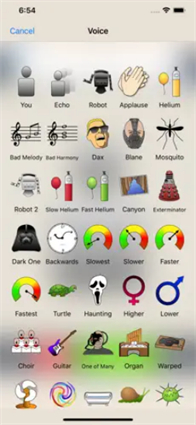
2. Voice Changer — Audio Effects
Best for producing great sound effects and great fun on iPhone
Voice Changer: Audio Effects is an innovative application designed to transform and modify your voice in exciting and creative ways. With this user-friendly tool, you can experiment with various audio effects to alter the pitch, tone, and overall sound of your voice, allowing you to sound like a completely different
Pros
- Free and easy to use
- Wide range of voice effects to choose from
- Can be used in online games, streaming platforms, and discord servers
Cons
- Requires watching ads to remove the watermark
- Not as many voice effects as some other voice changers
- Can be unstable at times

3. Voice Changer Prank Call
Best for prank calling friends and family, recording audio
Voice Changer: Prank Call is an entertaining activity that involves using a voice modification tool or app to alter your voice during a phone call. It allows you to disguise your identity and sound like someone else, such as a celebrity, a cartoon character, or even a robot. With this fun prank, you can surprise your friends, family members, or anyone you wish to engage in a hilarious conversation with without them recognizing your real voice.
Pros
- Can be a lot of fun
- Can be a creative way to prank your friends
- Can be used to make educational or informative calls
- Can be used to improve your vocal skills
Cons
- Can’t do Live mode voice changes without pay
- Does not work for live streams

Part 4. Get the Best Discord Voice Changer for PC with Magic Sound Effects
If you’re looking for the best Discord voice changer for PC with magic sound effects,HitPaw Voice Changer is an AI Voice Changer that allows you to upload your audio/video files to change voice with AI. Besides, it also can modify your voice in real-time. It offers a wide range of voice effects, including male, female, child, robot, alien, and many more. It provides advanced voice manipulation tools, allowing you to create unique magical voices for your Discord conversations.
- Real-time voice changing: You can change your voice in real-time while talking to friends on Discord, playing games, or streaming online.
- Wide range of voice effects: There are over 40 voice effects to choose from, so you can find the perfect one for your needs to have fun on Discord.
- Easy to use: The interface is simple and easy to use, even for beginners.
- Customize your voice: You can adjust the pitch and volume of your voice to get the perfect sound.
- Compatible with Windows & Mac: HitPaw Voice Changer is smoothly compatible with Windows & Mac to boost your experirence on Discord.
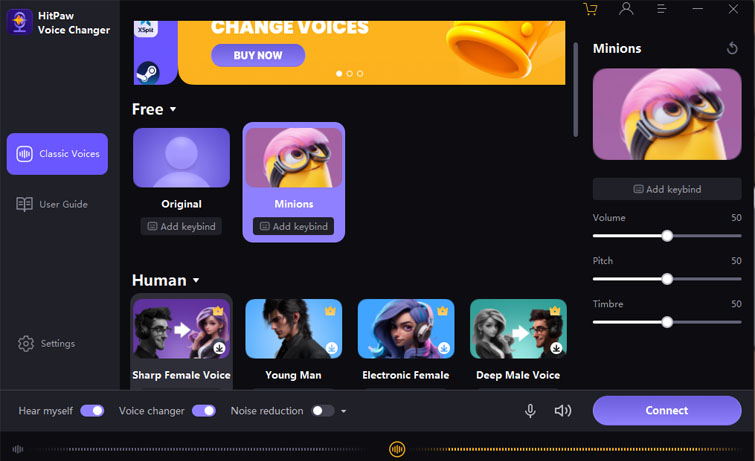
- Step 1: Download and install the HitPaw Voice Changer. Launch the software and select the voice effect you want to use.
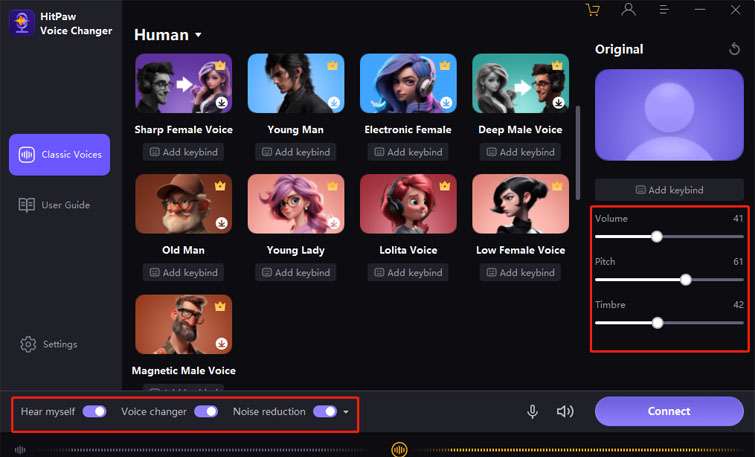
Step 2: Listen to your modified voice with the voice effect applied. You can also make some necessary adjustments or fine-tunements.
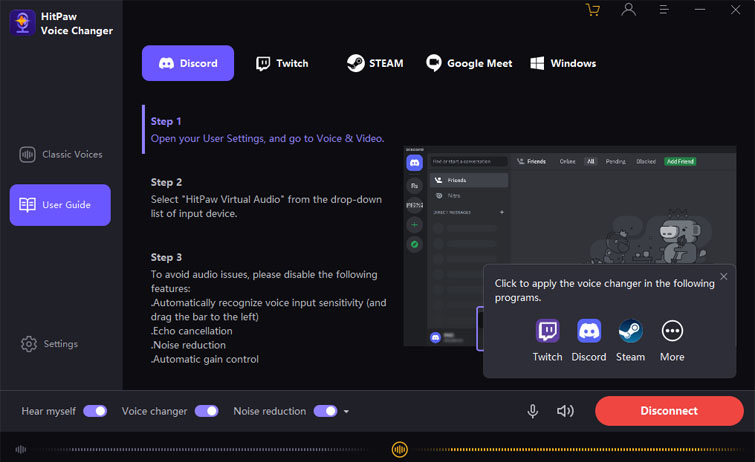
Step 3: If you are satisfied with the robot voice effect, you can run the program that you want to use HitPaw Voice Changer and then go to its Voice Settings.
Conclusion
Real-time voice changer apps provide an opportunity voice changer for discord mobile. You can easily changer your voice into various characters, creatures, or even celebrities. Additionally, HitPaw AI Voice Changer is a versatile voice-changing software that is compatible with Discord.
Home > Voice Changer Tips > [2024 Updated!] 6 Best Voice Changer for Discord Mobile Apps
Select the product rating:
[2024 Update] Best Voice Changer App for Discord Android/iPhone

Discord has become one of the most popular and exciting social networking apps. Lately, the popularity of discord voice changer apps has been through the roof. After all, what is more fun and entertaining than switching out your voice till it becomes unrecognizable on Discord.
The internet is full of such tools where everyone claims to be the best in the business. To help you out, we have scoured the internet and handpicked several best voice changer app for discord for both Android and iPhone users.

- Part 1. Best Voice Changer App for Discord on Android
- RoboVox Voice Changer
- Best Voice Changer
- Voice changer with effects
- Part 2. Best Voice Changer App for Discord on iPhone
- Voice Changer Plus
- Voice Changer — Audio Effects
- Voice Changer Prank Call
- Part 3. Best Discord Voice Changer for PC with 300+ Voices
How To Use Male To Female Voice Changer On Discord.
Part 1. Best Voice Changer App for Discord on Android
Below is an exhaustive list of the best voice changer for discord android apps available in 2021.
1. RoboVox Voice Changer
One of the most popular and best voice changer for discord android that you can use with ease is RoboVox. It has the ability to record your both live voice and recorded voice. What makes RoboVox a top voice changer is the wide collection of voice-changing styles that it offers.
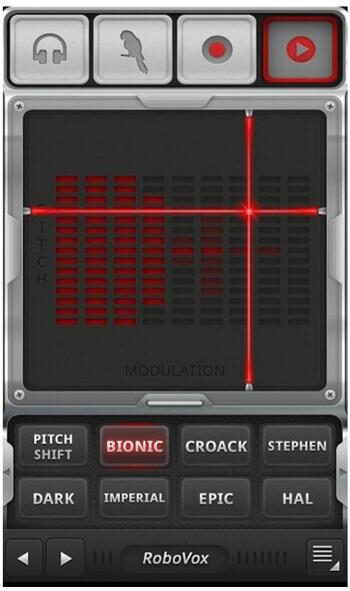
Key Features
Pros of RoboVox

Very simple interface
Supports latest Android versions
Three different modes including the real time mode
Save and directly share your final product
Cons of RoboVox

Pushes for in-app purchases
Limited free voice styles
It’s priced at $1.49 as of now.
2. Best Voice Changer
As the name indicates, it is one of the best tools to change your voice on Discord. Best Voice Changer is a great choice for Android users who want a free and lightweight app having many different voice-changing effects.
Having over a million users, this discord voice changer for Android app has a pretty intuitive interface for tech-savvy users.
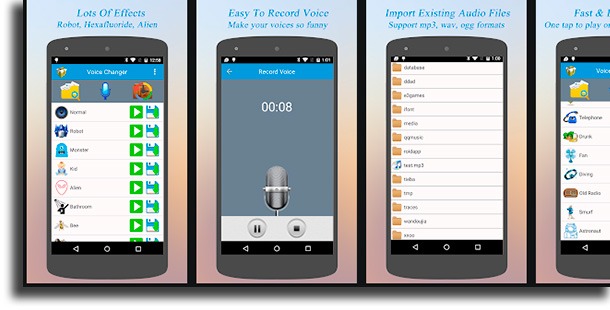
Key Features
Pros
The voice changing styles are updated regularly
It’s completely free
Easy to use
Cons
Often crashes unexpectedly
Limited features
Too many ads
As of now, this app is 100% free for all users.
3. Voice changer with effects
Having over 10 million downloads and 4.4 ratings, this app stands out as the best discord voice changer Android. It is simple, easy to install and use, and works smoothly with chat applications on your phone.
It offers over 40 unique and exciting voice effects to switch both your pre-recorded voice and live recording to Helium, robot, giant, drunk, alien, and many more effects.
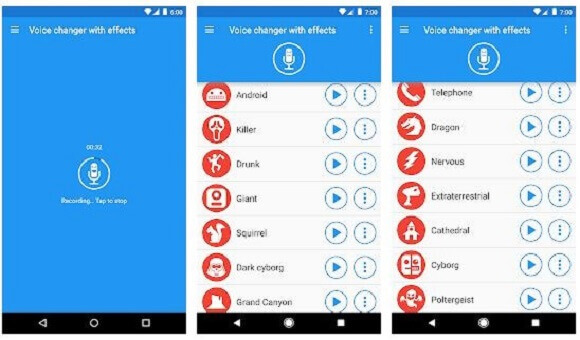
Key Features
Pros
Can disguise both an existing audio file or live recording.
Import pre-recorded audio
Remove different filters without recording the voice again
Cons
The audio quality is compromised
Can produce slight lag in the recorded audio
It’s complicated to link it with Discord
Part 2. Best Voice Changer App for Discord on iPhone
This section will list several top-ranked mobile voice changer for discord for iPhone users.
1. Voice Changer Plus
Voice Changer Plus is amongst the highest-rated and most popular voice changer discord iOS app. It makes it ridiculously easy to record your voice and apply a plethora of filters to tweak it to your satisfaction.
Users can also play the pre-recorded voice and try multiple voice effects including robot, helium, Darth Vader, and many other voice styles. It also allows you to adjust the speed of the voice and play it backward if you want.
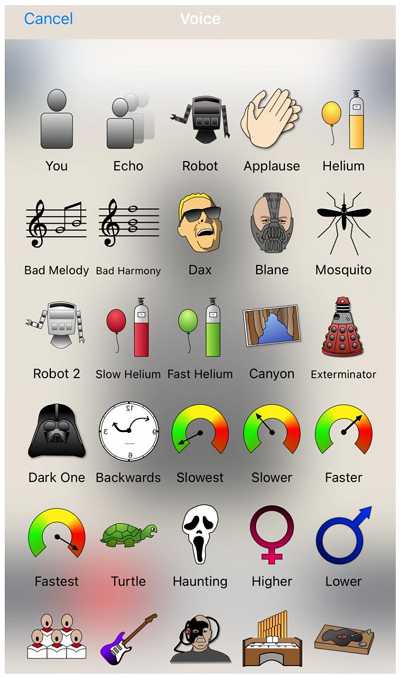
Key Features
Pros
It is free
GUI interface
Share edited videos directly to social media
Cons
No real-time recording feature
Free features are basic and limited
Price: This app is free to use but offers in-app purchases
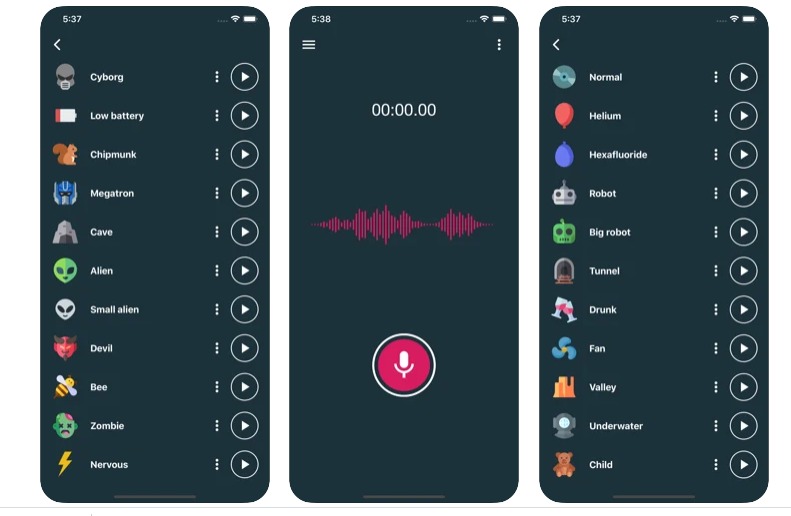
2. Voice Changer — Audio Effects
It is another iOS voice changer discord app that works phenomenally well with discord and other apps on your iPhone. With millions of satisfied users, Voice Changer — Audio Effects promises a ton of powerful voice-changing features.
With just a few taps, you can add futuristic designs and cool animations to your recorded voice and share it on any platform.
Key Features
Pros
Save recordings easily
Intuitive user-interface
Cons
Too many ads
No audio editing tools
It’s a free app but offers in-app purchases.
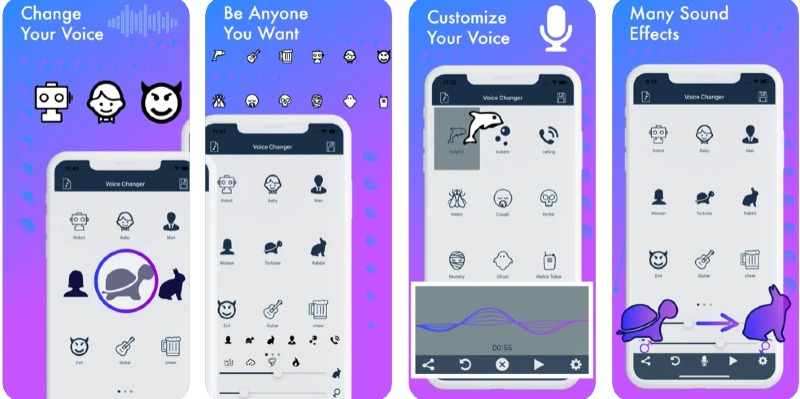
3. Voice Changer Prank Call
Changing your voice to a completely new sound using Voice Changer Prank Call is a child’s play and won’t take more than a few seconds. Apart from applying exciting and funny voice effects to the recorded sound, you can easily edit the output voice using this voice changer discord mobile.
Its free version offers limited features, so you have to make in-app purchases to enjoy all its capabilities.
Key Features
Pros
Share recorded videos to social media platforms
Applies effects in real-time
Easy and attractive interface
Cons
Limited features
Cannot import pre-recorded files
Price: It’s free to use
Part 3. Best Discord Voice Changer for PC with 300+ Voices
Now that you know about the best Discord voice changer mobile apps.
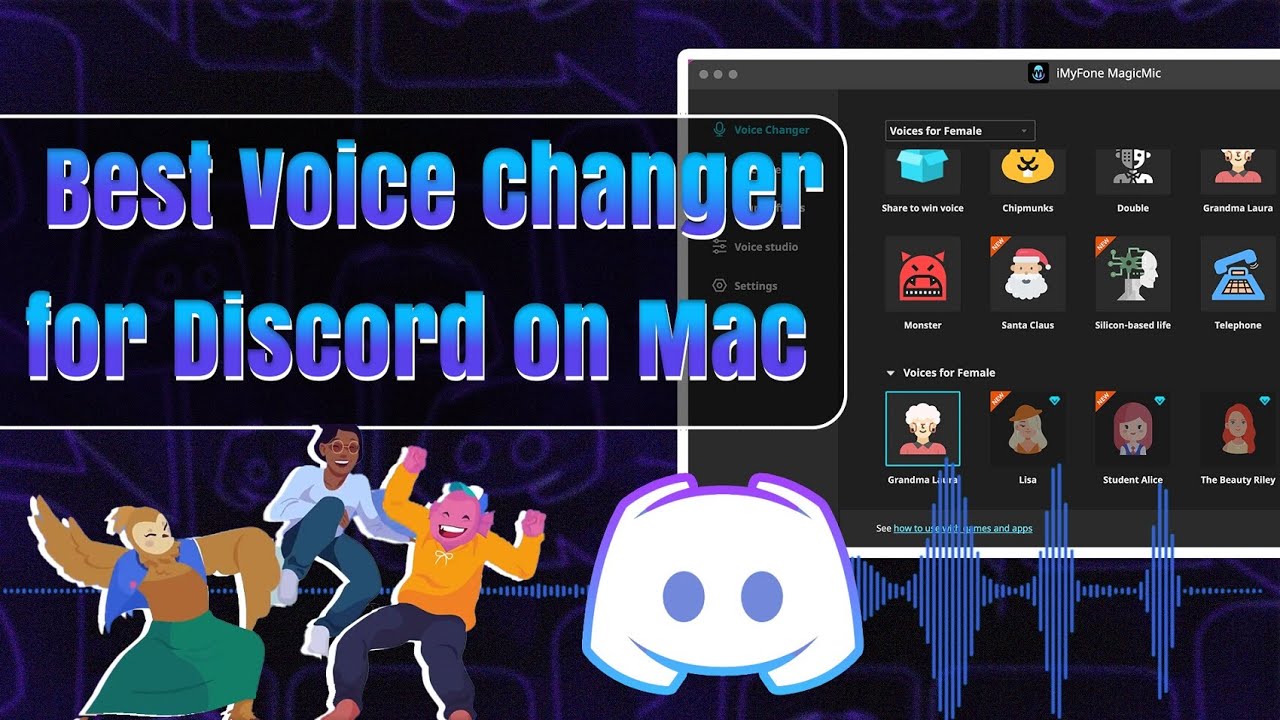
Yet, if you need a comprehensive voice changer like MagicMic voice changer for Discord. It can really change your voice instantly with variou voice filters. You can be anyone else by changing your voice!

Here are more details about the key features of this tool:
Main Feature of MagincMic:
- The voice changer can change your voice in one click. You only need to select the voice, and it will be transformed in no time.
- You can change the voice using various voice filters, like Female,Monster, Man, Devil, Robot and more.
- You can also add 800+ sound effects in MagicMic for adding timely reactions.
- It can be used on different platforms like Fortnite, PUBG, Discord, Skype, Twitch and more to change your voice in real-time.
- It has high-quality output voice for you.
Steps to Change Voice Using MagicMic Voice Changer:
Step 1: Launch the Latest Version
First, you need to download and install the iMyFone MagicMic from the official website. Make sure to download the latest version to have all the functions available.
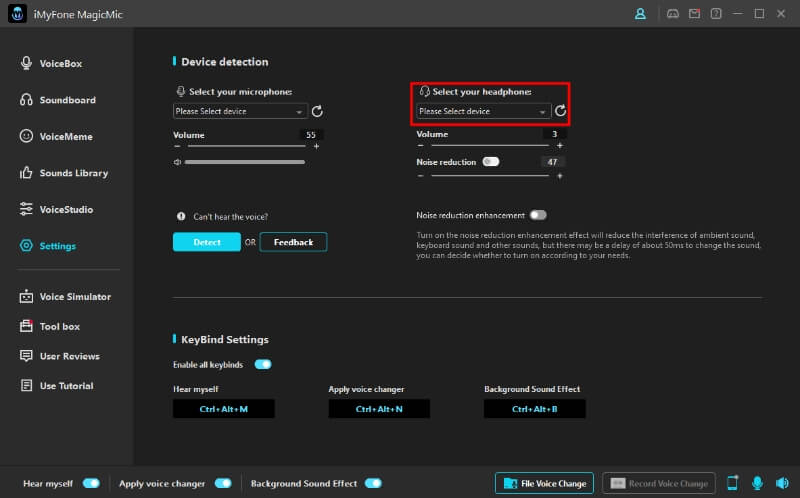
Step 2: Set the Input Device
Then select your real microphone as the input device. Select your headphones as the output device.
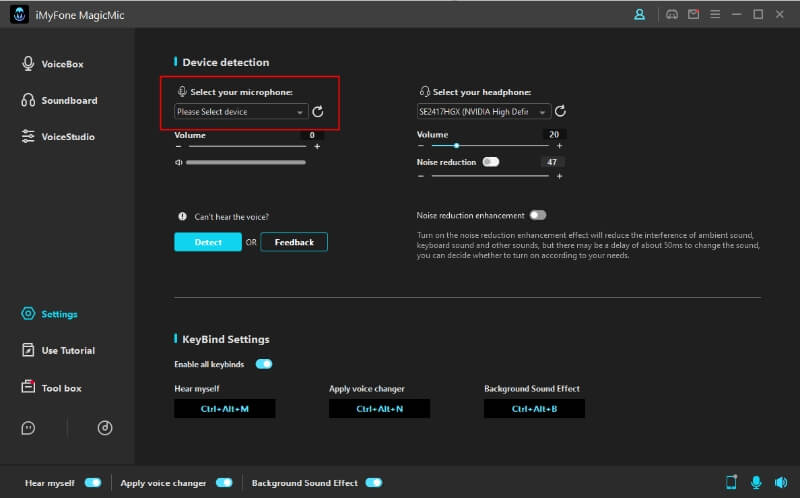
Step 3:Set theOutput Device
Then select your real microphone as the input device. Select your headphones as the output device.
Step 4: Choose Voice Effect
Now you can click any voice effect in MagicMic and speak into your microphone to check if it really change your voice.
Conclusion
Everyone loves to have fun and all the voice changer for discord apps outlined in this blog post allow you to enter a world of creativity and entertainment. Some of them help you change your voice during live recording while some allow you to apply amazing filters on pre-recorded voice files as well that you can share on Discord.
As for our recommendation, we urge the readers to install MagicMic Discord voice changer. which is hands down the best voice changing software available in 2023.
Related Articles:
- [Pros & Cons] 12 Best Discord Voice Changer on PC/Phone/Online
- 5 Real-Time Voice Modulator for Discord Voice Chat
- Funny Discord Sounds and Real-time Apply Guide 2024