У вас большие запросы!
Точнее, от вашего браузера их поступает слишком много, и сервер VK забил тревогу.
Эта страница была загружена по HTTP, вместо безопасного HTTPS, а значит телепортации обратно не будет.
Обратитесь в поддержку сервиса.
Вы отключили сохранение Cookies, а они нужны, чтобы решить проблему.
Почему-то страница не получила всех данных, а без них она не работает.
Обратитесь в поддержку сервиса.
Вы вернётесь на предыдущую страницу через 5 секунд.
Вернуться назад
How to Warn Someone on Discord

Discord has become a great community-building service that allows you to create individual servers for all your interests and invite people to them for healthy discussions. Each server has a specific set of rules necessary to maintain the group’s sanity. Like any online community, you will bump into people who don’t follow a server’s rules, violate them, or have been a reason for the inconvenience for others on the server.
If you’re part of a server whose rules have been violated by one of the members, the following post should help you warn them on Discord.
Contents show
- How to warn people on Discord
- Requirements
- Step 1: Choose and install a bot on your server
- Step 2: Use the warn command to warn a member
How to warn people on Discord
You can warn someone inside a server on Discord using warn commands in any chat or channel as long as you meet the requirements listed below.
Requirements
Here are the requirements you need to meet to warn someone on Discord.
- A compatible server role that gives you the right to warn someone
- A compatible bot that adds the ability to warn someone
You can use the steps below to install a bot on your server and warn someone accordingly. However, you need to keep in mind that you will require appropriate permissions to install bots on your server before you can warn someone or use the command yourself.
Step 1: Choose and install a bot on your server
There are tons of moderation bots available for Discord offering numerous features, including the ability to warn someone. In this instance, we will be using the Dyno bot but there are other bots that you can use if they better fit your needs. You can check out bot alternatives at the end of this guide.
Open the link below for the Dyno bot in your preferred browser and click on Add To Server.

Choose a preferred plan you like by clicking on it and subscribing to it. We will be using the free plan for this example. If you too wish to opt for the free plan, click on Add to Server.

Now sign into your Discord account if needed. Click the drop-down menu under “Add to Server” and select the server where you wish to install the bot.

Click Continue once you’ve selected your preferred server.

You will now be shown the permissions required by the Dyno bot. Scroll down and click on Authorize at the bottom. You might be asked to complete a captcha after this step. Verify that you’re a human to install the Dyno bot on your server.

You will now be asked to choose a prefix for your bot commands. We will leave it at the default “?” for now. If you wish, you can choose a different prefix as well. This prefix will help the bot recognize commands on your server and can be used to execute bot commands anywhere you like.

Click the next drop-down menu under Choose your timezone and choose your preferred timezone.

Click Next.

Now choose a preferred channel to get bot updates using the Choose your updates channel drop-down menu.

Click on Next when you’re done.

Choose if you wish to use a premium subscription and click on Done.

And that’s it! Dyno bot will now be added to your server. You can now use the next step to easily warn someone violating rules on your server.
Step 2: Use the warn command to warn a member
Now that we have added the Dyno bot to your server, we can use it to warn any member of your server. Follow the steps below to help you along with the process.
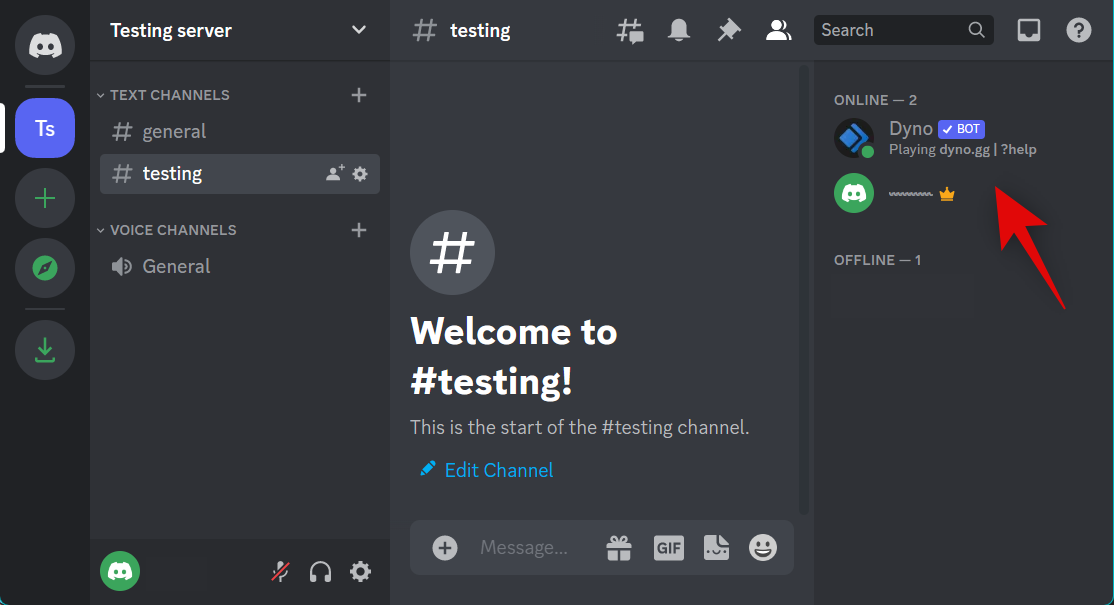
Open Discord in your browser and log into your account. Let’s first verify if the Dyno bot has been added to your server. Click on the concerned server icon from the left sidebar on the Discord screen.

Now click the people icon to access the server’s members list.

When the members list shows up on the right panel, check if you can see the Dyno bot on this list. You can now send warnings to people on your server by following the steps below.
Open a channel where you wish to issue a warning, and use the format below to warn someone. You can use the following warning code to send a warning:
[Prefix]warn @[Username] [Message]
Replace [Prefix] with the prefix you chose (in this case, it’s “?“) for the Dyno bot. Then, replace [Username] with the username of the user you wish to warn and [Message] with the message you wish to send while warning someone.

For example, if you wish to warn user “ABC” to stop violating rules, a warning can be issued using the command below.
?warn @ABC Please stop violating the rules.

And that’s how you can issue warnings using the Dyno bot on Discord.
Other bots you can use to warn someone on Discord
Besides Dyno, there are other bots with moderation capabilities that you can use to issue warnings on Discord. Here are a few of them:
Why and when should you issue a warning on Discord
You should issue warnings judiciously and ensure that you don’t warn users that haven’t violated any rules. Here are a few reasons and scenarios for when you should be issuing warnings to the respective user on your Discord server.
- Violation of server rules
- Violation of Discord rules
- Spam
- Banned content
- Harassment
- Unwanted behavior
- Bots posing as humans
and more. At the end of the day, it is up to you how you wish to moderate your server. You can be a bit lenient or decide to be strict and issue warnings as you like. However, in any case, you should avoid warning users that haven’t violated any rules or more.
If you are suspicious about whether someone is online for real or not on Discord, you can use our guide to find out if they are fake online. In another cool tip, learn how to get an invisible name on Discord here.
What Is the Warn Command in Discord?

By Rob Emerson January 6, 2023 January 6, 2023

Server admins and moderators govern how members interact in the Discord server.
When an annoying member or someone is trying to spam others, the moderator or admin can decide to ban or kick out the member.
Before kicking out the member, there is an option to issue a warning to the member, but that requires a bot like Dyno bot for you to use it. The Dyno facilitates the moderation of the Discord server.
Quick Answer
Members often violate the rules of the given server. When that happens, the admin or moderator issues warnings to that member, such that repeated actions can lead to kicking out of the member. The Dyno bot provides the warning command, and its syntax is ?warn @user-name . Once the command gets executed, the Dyno bot will issue the warning to the member alongside the added warning message.
We will cover the warn command in Discord and what it means. We will mention why you may receive a warning message, then discuss the steps for issuing the warning command provided you are the admin or moderator of the server.
Table of Contents
- What is The Warn Command in Discord?
- How To Use the warn Command in Discord
- Conclusion
What is The Warn Command in Discord?
The good thing about using Discord for communication is that you can create a server with thousands of members.
Discord servers are communities for various projects or a hub for gamers, streamers, friends, etc. Most Discord servers have admins and moderators who ensure everything works correctly on the server.
When someone is trying to spam others on the server or is abusive, the admin or moderator has the mandate of dealing with them either by banning them from the server or kicking them out.
Suppose the admin has added the Dyno bot to help moderate the server. They have an option for sending warnings to a particular member.
If the member fails to heed the warning, they risk getting banned from the server.
The warn command uses the syntax ?warn @username .
For instance, if you have an annoying member called Mike, you can warn them with the command ?warn @Mike Stop spamming others!
The specified member will receive the warning immediately, and it’s upon them to decide whether to stop their wrong actions or risk getting banned from the server.
How To Use the warn Command in Discord
The warn command is mainly used with a server moderation bot like Dyno. So, we must first add the bot to the server before using the warn command.
- Visit the Dyno website on your browser.
- Tap on the “Add to Server” button.
- Login to your Discord account, select the target server and click the “Continue” button.
- Next, review the listed permissions and click the “Authorize” button.
- Mark the captcha to confirm you are human.
- Open your Discord application.
- Access the server containing the Dyno bot.
- To warn a member, type ?warn @username and press the send button.
A notification showing that a particular member has been warned will appear.
That’s how you warn members in a server using the Dyno bot. Note that the Dyno bot is not the only bot with the warn command. Different server moderation bots offer the same feature, but we’ve used the Dyno bot for this guide.
Conclusion
The warn command is an excellent way of warning members who go against the rules of a given server.
The warn command requires you to have a server moderation bot like Dyno bot to execute the ?warn @username command for the target member to get warned.
We’ve discussed the warning command and how to use it in Discord.
Что такое ивент в дискорде
Ивенты, или мероприятия, в дискорде — это добровольная инициатива администрации для улучшения опыта игроков и создания дополнительного взаимодействия на сервере. Зачастую представляют собой различные конкурсы, турниры, розыгрыши, голосования, тематические дни и многое другое. Ивенты по своей сути делают дискорд сервер более интересным и уникальным, а также дают возможность участникам познакомиться с новыми людьми, получить награды и в целом повысить свой уровень участия в жизни сообщества.
- Как проходят ивенты на дискорд серверах
- Виды ивентов на дискорд серверах
- Советы по проведению ивентов на дискорд сервере
- Выводы
Как проходят ивенты на дискорд серверах
Организаторы ивентов обычно позволяют участникам заранее заявиться на участие в мероприятии, и тем, кто подал заявки заранее, отдают приоритет. Выставление информации о мероприятии на разных платформах — группы VKontakte, дискорд сервер, сайт проекта — даёт максимальные шансы на то, что большие группы людей узнают о проведении ивента и заинтересуются им.
Виды ивентов на дискорд серверах
Ивенты на дискорд серверах можно проводить по бесконечному количеству тематик, но основные типы мероприятий — это:
- Конкурсы на креативность (к примеру, рисование или сочинение историй по заданной теме)
- Quiz или головоломки (соревнование на знание темы, где участники должны по возможности быстрее дать правильный ответ)
- Голосования (игроки могут голосовать за различные конкурсы, анкеты или донести своё мнение)
- Различные турниры (такие как футбольные, шахматные, игры на выживание)
- Квесты (сражения за уникальные предметы, исследование мира игры)
Советы по проведению ивентов на дискорд сервере
- Заранее сообщайте об ивентах на разных платформах и выделяйте отдельный канал для обсуждения. Это поможет привлечь большее количество игроков и сделает проведение ивента максимально продуктивным.
- Обязательно уточняйте правила проведения мероприятия и доступность участия. Игроки должны ясно понимать, что от них требуется и как им принять участие.
- Не забудьте о наградах. Система наград должна быть прозрачной и способствовать здоровому соревнованию.
- Используйте множество различных типов ивентов для того, чтобы участники видели, что на сервере всегда происходит что-то новое и интересное.
Выводы
Ивенты на дискорд серверах — это не только интерактивное времяпровождение для участников, но и инструмент для создания и поддержания сообщества. Они помогают участникам общаться между собой, учиться новым вещам и осознавать лучше своё место в сообществе. Регулярное проведение ивентов улучшает ауру дискорд сервера и привлекает новых игроков, у которых есть желание присоединиться к сообществу.

Ивент — это добровольное мероприятие, которое организовывает администрация сервера в дискорде. Такие ивенты могут быть уникальными и разнообразными, как в игровом, так и внеигровом контексте. Например, это могут быть конкурсы, турниры, викторины, тематические вечеринки и многое другое. Информация о проводимых мероприятиях обычно размещается на различных платформах, таких как сайт сервера, группа ВКонтакте или на самом сервере в дискорде. Если на ивент подаются заявки, то приоритет отдают тем, кто подал их заранее. Участие в ивенте является добровольным и требует выполнения всех условий и правил, установленных администрацией. Это замечательная возможность для участников сервера пообщаться и расслабиться в игровом или неигровом контексте.
Все права защищены © 2024