How to run Control Panel tools by typing a command
To run a Control Panel tool in Windows, type the appropriate command in the Open box or at a command prompt.
NOTE: If you want to run a command from a command prompt, you must do so from the Windows folder. Also, note that your computer may not have all of the tools listed in this article, as your Windows installation may not include all of these components.
Control panel tool Command
——————————————————————
Accessibility Options control access.cpl
Add New Hardware control sysdm.cpl add new hardware
Add/Remove Programs control appwiz.cpl
Date/Time Properties control timedate.cpl
Display Properties control desk.cpl
FindFast control findfast.cpl
Fonts Folder control fonts
Internet Properties control inetcpl.cpl
Joystick Properties control joy.cpl
Keyboard Properties control main.cpl keyboard
Microsoft Exchange control mlcfg32.cpl
(or Windows Messaging)
Microsoft Mail Post Office control wgpocpl.cpl
Modem Properties control modem.cpl
Mouse Properties control main.cpl
Multimedia Properties control mmsys.cpl
Network Properties control netcpl.cpl
NOTE: In Windows NT 4.0, Network
properties is Ncpa.cpl, not Netcpl.cpl
Password Properties control password.cpl
PC Card control main.cpl pc card (PCMCIA)
Power Management (Windows 95) control main.cpl power
Power Management (Windows 98) control powercfg.cpl
Printers Folder control printers
Regional Settings control intl.cpl
Scanners and Cameras control sticpl.cpl
Sound Properties control mmsys.cpl sounds
System Properties control sysdm.cpl
NOTE: The Scanners and Cameras applet (sticpl.cpl) cannot be run in Windows Millennium. It has been replaced by the Scanners and Cameras Folder, which is similar in function to folders like Printers and Dial-up Networking.
Windows substitutes the name of the tool you want to run for %1%. For example:
«rundll32.exe shell32.dll,Control_RunDLL appwiz.cpl».
To run the Users tool in Control Panel, type control Ncpa.cpl users, and then press ENTER.
To run the Users tool for Windows 95/98/Me, type «control inetcpl.cpl users» (without the quotation marks) and then press ENTER.
How to run Control Panel tools by typing a command
To run a Control Panel tool in Windows, type the appropriate command in the Open box or at a command prompt.
NOTE: If you want to run a command from a command prompt, you must do so from the Windows folder. Also, note that your computer may not have all of the tools listed in this article, as your Windows installation may not include all of these components.
Control panel tool Command
——————————————————————
Accessibility Options control access.cpl
Add New Hardware control sysdm.cpl add new hardware
Add/Remove Programs control appwiz.cpl
Date/Time Properties control timedate.cpl
Display Properties control desk.cpl
FindFast control findfast.cpl
Fonts Folder control fonts
Internet Properties control inetcpl.cpl
Joystick Properties control joy.cpl
Keyboard Properties control main.cpl keyboard
Microsoft Exchange control mlcfg32.cpl
(or Windows Messaging)
Microsoft Mail Post Office control wgpocpl.cpl
Modem Properties control modem.cpl
Mouse Properties control main.cpl
Multimedia Properties control mmsys.cpl
Network Properties control netcpl.cpl
NOTE: In Windows NT 4.0, Network
properties is Ncpa.cpl, not Netcpl.cpl
Password Properties control password.cpl
PC Card control main.cpl pc card (PCMCIA)
Power Management (Windows 95) control main.cpl power
Power Management (Windows 98) control powercfg.cpl
Printers Folder control printers
Regional Settings control intl.cpl
Scanners and Cameras control sticpl.cpl
Sound Properties control mmsys.cpl sounds
System Properties control sysdm.cpl
NOTE: The Scanners and Cameras applet (sticpl.cpl) cannot be run in Windows Millennium. It has been replaced by the Scanners and Cameras Folder, which is similar in function to folders like Printers and Dial-up Networking.
Windows substitutes the name of the tool you want to run for %1%. For example:
«rundll32.exe shell32.dll,Control_RunDLL appwiz.cpl».
To run the Users tool in Control Panel, type control Ncpa.cpl users, and then press ENTER.
To run the Users tool for Windows 95/98/Me, type «control inetcpl.cpl users» (without the quotation marks) and then press ENTER.
How to run Control Panel tools by typing a command
To run a Control Panel tool in Windows, type the appropriate command in the Open box or at a command prompt.
NOTE: If you want to run a command from a command prompt, you must do so from the Windows folder. Also, note that your computer may not have all of the tools listed in this article, as your Windows installation may not include all of these components.
Control panel tool Command
——————————————————————
Accessibility Options control access.cpl
Add New Hardware control sysdm.cpl add new hardware
Add/Remove Programs control appwiz.cpl
Date/Time Properties control timedate.cpl
Display Properties control desk.cpl
FindFast control findfast.cpl
Fonts Folder control fonts
Internet Properties control inetcpl.cpl
Joystick Properties control joy.cpl
Keyboard Properties control main.cpl keyboard
Microsoft Exchange control mlcfg32.cpl
(or Windows Messaging)
Microsoft Mail Post Office control wgpocpl.cpl
Modem Properties control modem.cpl
Mouse Properties control main.cpl
Multimedia Properties control mmsys.cpl
Network Properties control netcpl.cpl
NOTE: In Windows NT 4.0, Network
properties is Ncpa.cpl, not Netcpl.cpl
Password Properties control password.cpl
PC Card control main.cpl pc card (PCMCIA)
Power Management (Windows 95) control main.cpl power
Power Management (Windows 98) control powercfg.cpl
Printers Folder control printers
Regional Settings control intl.cpl
Scanners and Cameras control sticpl.cpl
Sound Properties control mmsys.cpl sounds
System Properties control sysdm.cpl
NOTE: The Scanners and Cameras applet (sticpl.cpl) cannot be run in Windows Millennium. It has been replaced by the Scanners and Cameras Folder, which is similar in function to folders like Printers and Dial-up Networking.
Windows substitutes the name of the tool you want to run for %1%. For example:
«rundll32.exe shell32.dll,Control_RunDLL appwiz.cpl».
To run the Users tool in Control Panel, type control Ncpa.cpl users, and then press ENTER.
To run the Users tool for Windows 95/98/Me, type «control inetcpl.cpl users» (without the quotation marks) and then press ENTER.
How to Open Control Panel From CMD
In Windows 10, to open the Control Panel from CMD, type control (or control.exe ) and press enter.
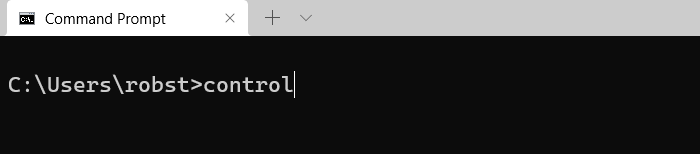
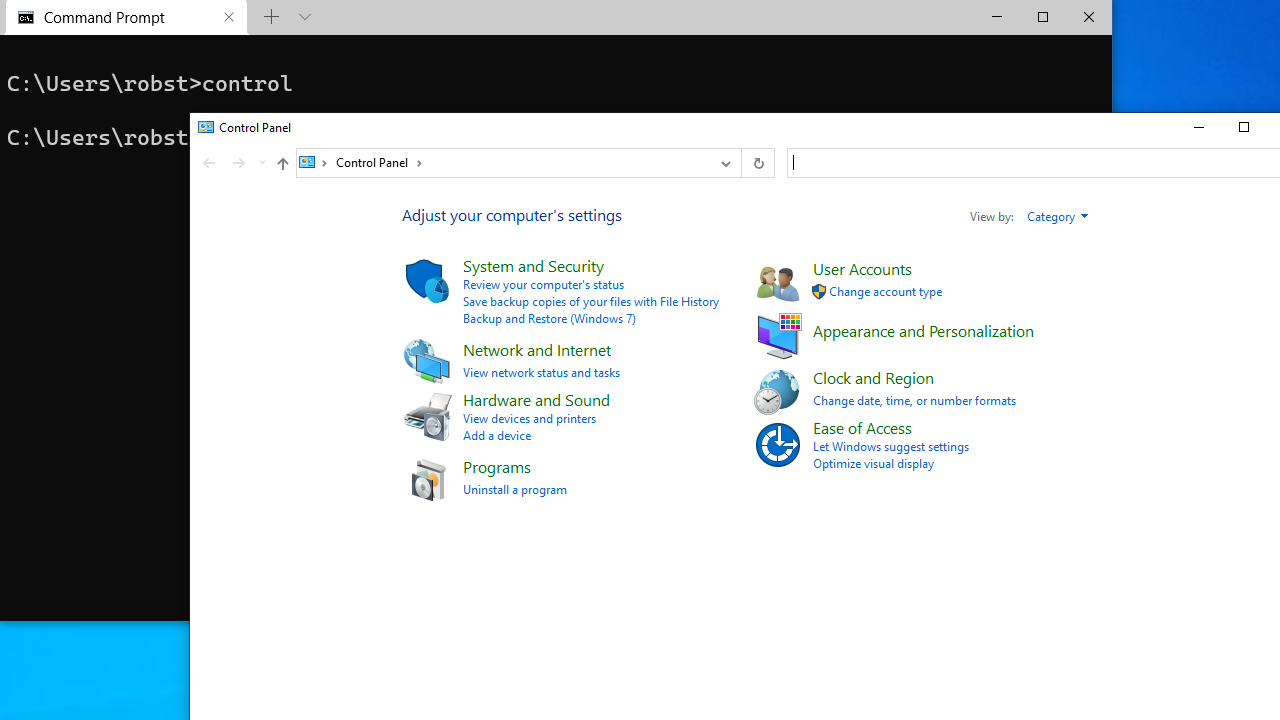
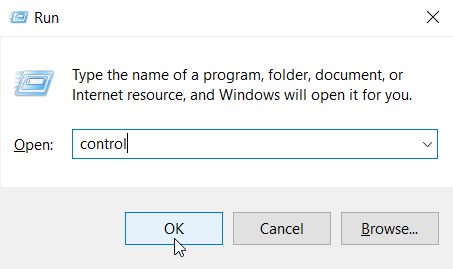
You can also use the control command to launch the Control Panel using the Run dialog box.
The Windows control command includes options for launching individual Control Panel applets. For example, to open mouse properties, run the control mouse command.
The following table shows the list of control command options:
| Command | Control Panel Applet |
|---|---|
| control wscui.cpl | Security and Maintenance |
| control timedate.cpl | Date and Time |
| control admintools | Administrative Tools |
| control folders | Folder Options |
| control desk.cpl | Display Setting |
| control access.cpl | Ease of Access Center |
| control fonts | Fonts |
| control inetcpl.cpl | Internet Properties |
| control ncpa.cpl | Network Connections |
| control printers | Devices and Printers |
| control keyboard | Keyboard Properties |
| control mouse | Mouse Properties |
| control tabletpc.cpl | Tablet and Pen Settings |
| control powercfg.cpl | Power Options |
| control appwiz.cpl | Programs and Features |
| control scannercamera | Scanners and Cameras |
| control mmsys.cpl | Sound |
| control sysdm.cpl | System Properties |
| control nusrmgr.cpl | User Accounts |
| control firewall.cpl | Windows Defender Firewall |
The location of the control panel ( control.exe ) in Windows 10 is C:\Windows\System32 . Shortcut to open the control panel is available in the Start menu, under the Windows System.
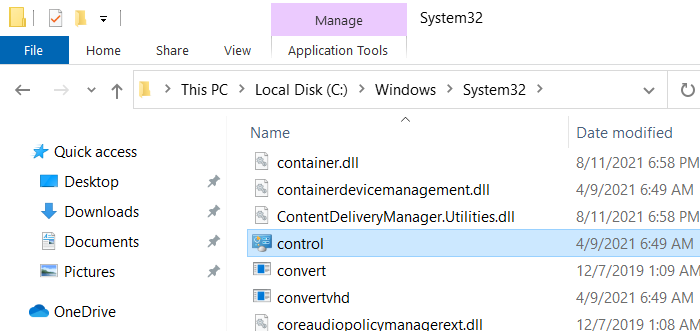
In Windows 11, The Start menu shortcut is available under the All apps | Windows Tools.