Справочник Пользователя для Cisco Nexus 2148T Fabric Extender N2K-C2148T-1GE
simplify data center architecture and operations by meeting the business and application needs of a data center.
Working in conjunction with Cisco Nexus switches, the Cisco Nexus 2000 Series Fabric Extenders deliver a cost-
effective and efficient way to support today’s Gigabit Ethernet environments while allowing seamless migration to 10
Gigabit Ethernet, virtual machine–aware Unified Fabric technologies.
Cisco Nexus 2148T Fabric Extender
The first product in the Cisco Nexus 2000 Series is the Cisco Nexus 2148T Fabric Extender (Figure 4). A Cisco
Nexus 2148T connected to a Nexus 5000 Series system acts as a single managed entity, with the Cisco Nexus 5000
Series system providing the supervisory functions of the control plane and the Cisco Nexus 2148T inheriting the
Скачать и распечатать инструкцию
- Прочитать и распечатать без рекламы
- Загрузить, чтобы сохранить себе
- Править, переслать или читать оффлайн
Справочник Пользователя для Cisco Nexus 2148T Fabric Extender N2K-C2148T-1GE
while allowing seamless migration to 10 Gigabit Ethernet, virtual machine-aware Unified Fabric technologies.
Cisco Nexus 5000 Series Hardware Features
The Cisco Nexus 5000 Series cut-through switching architecture supports line-rate 10 Gigabit Ethernet with
low-latency and predictable performance on all ports. These switches also support 10/1 Gigabit Ethernet
mode on a subset of the fixed ports to provide connectivity for Gigabit Ethernet attached servers and network
The Cisco Nexus 5000 Series supports Fibre Channel over Ethernet that enables consolidation of LAN, SAN
and cluster traffic onto a single, Unified Fabric, which greatly simplifies network infrastructure, increases
flexibility and reduces costs. By connecting to existing Fibre Channel storage arrays, FCoE protects existing
storage investments while simplifying in-rack cabling and reducing power and cooling overhead.
Cisco Nexus 5000 Series supports standards-based IEEE Data Center Bridging (DCB) capabilities that allows
the switches to support multiple traffic classes — LAN, SAN, and cluster — over the same link, while retaining
individual traffic treatment.
In addition to standard 10 Gigabit network interface cards (NICs), the Cisco Nexus 5000 Series supports
standards-based Fibre Channel over Ethernet consolidated network adapters (CNAs) that combine Ethernet
NICs and Fibre Channel host bus adapters (HBAs). These CNAs make the transition to a Unified Fabric
transparent and consistent with existing practices, management software, and operating system drivers.
The Cisco Nexus 5000 Series is compatible with third-party integrated transceivers and Twinax cabling
solution that delivers very low latency at a low cost, making the product line an excellent match for cluster
environments.
Скачать и распечатать инструкцию
- Прочитать и распечатать без рекламы
- Загрузить, чтобы сохранить себе
- Править, переслать или читать оффлайн
Troubleshoot FEX Performance Issues on Nexus 5000/6000 Series
The documentation set for this product strives to use bias-free language. For the purposes of this documentation set, bias-free is defined as language that does not imply discrimination based on age, disability, gender, racial identity, ethnic identity, sexual orientation, socioeconomic status, and intersectionality. Exceptions may be present in the documentation due to language that is hardcoded in the user interfaces of the product software, language used based on RFP documentation, or language that is used by a referenced third-party product. Learn more about how Cisco is using Inclusive Language.
Contents
Introduction
This document describes how to troubleshoot performance on the Fabric Extenders (FEX) that can attach to Nexus 5000 or 6000 Series Switches.
Note: None of the commands introduced in this document are disruptive. You must have a Nexus 2000 switch connected to a 5000 or 6000 series switch.
Background Information
Navigate the CLI
Attach to the FEX
Attach to the FEX to run show commands on the FEX command line:
Nexus# attach fex fex
fex>
Enter Debug Exec Mode
Enter the debug mode on the FEX in order to run advanced commands and specify the FEX asic name. Refer to Table 1. for the FEX asic names.
fex# dbgexec [prt/woo/red/pri]
Exit Debug Exec Mode
In order to exit the Debug Exec Mode use CTRL+C keyboard sequence:
fex> [CTRL+C]
Exit the FEX
In order to exit the fex, use the command exit:
fex# exit
Terminology
Host Interface (HI)
Hi’s are the ports that face the servers on the FEX.These are commonly known as front ports.Every front port on a FEX has a HI number. This number is usually different than the port number, but it is used to troubleshoot commands to refer to a port. Each asic tabulates front ports differently.
Network Interface (NI)
NI’s are the FEX Control Ports on the FEX that connect back to the parent switch. These are also refered to as Network Uplinks. These also have a unique NI number dependent on the model.
FEX Fabric Port
These ports are the parent switch side of the unique link to the FEX. These ports are configured with switchport mode fex-fabric and a fex association commands.
FEX ASIC Names
Each FEX is designed with a different ASIC. The abbreviation of the ASIC name is used in the debugging mode to run commands.
Most models of the FEX have one ASIC, however the 2148 has 6, each with 8 front ports. These are referred to as rmon in troubleshoot commands.
The ASIC names and associated abreviations are listed for reference:
Table 1.
Front Port Mapping
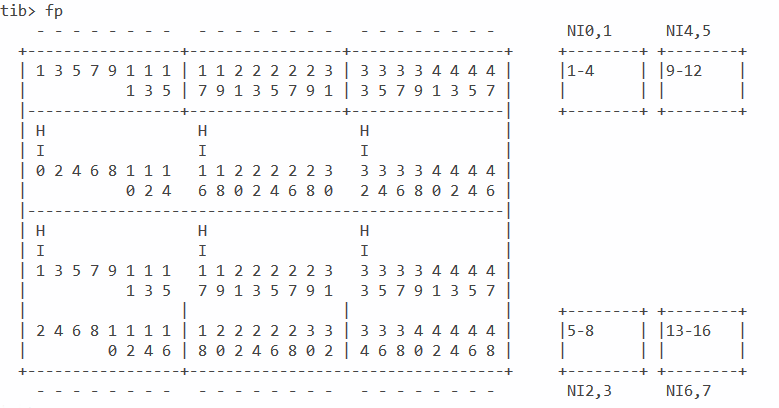
To interpet interface counter output it can be necessary to convert the front port number to a HI number. The conversion is dependent on the FEX chassis model.
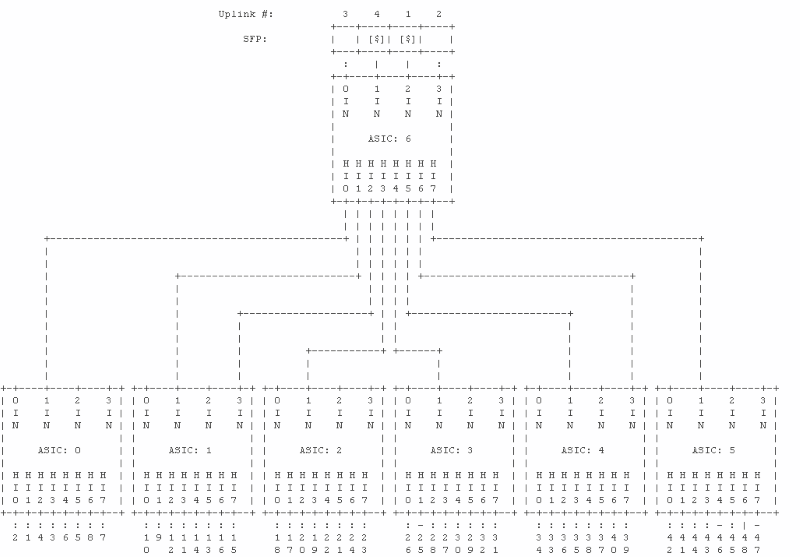
N2K-C2148T-1GE
In this example, front port 26 (chassis-id/1/26) has been assigned rmon 3 HI 0:
switch# attach fex chassis_id
fex-[chassis_id]# show platform software redwood sts
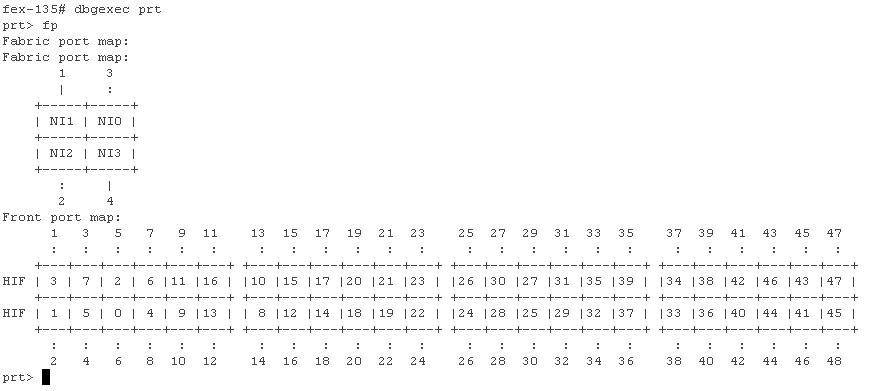
N2K-C2224TP-1GE / N2K-C2248TP-1GE
In this example, front port 10 (135/1/10) has been assigned HI 9:
switch# attach fex chassis_id
fex-[chassis_id]# dbgexec portola
prt> fp
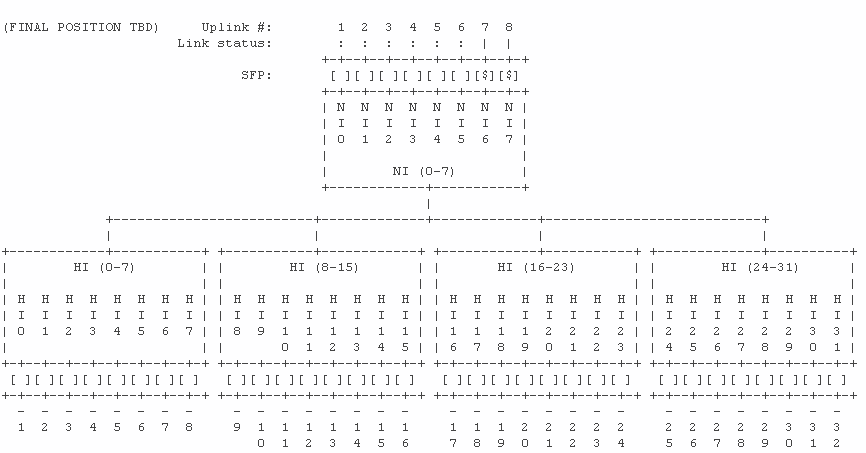
N2K-C2232PP-10GE / N2K-C2232TM-10GE
In this example, front port 20 (135/1/20) has been assigned HI 19:
switch# attach fex chassis_id
fex-[chassis_id]# show platform software woodside sts
N2K-C2248TP-E-1G
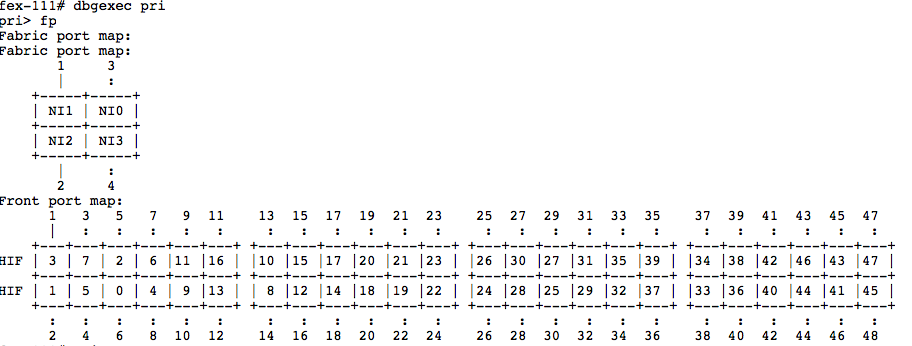
N2K-C2248PQ-10GE & N2K-C2348UPQ-10GE
In this example, HI28 maps to Front Port 29:
Verify SFP
This command shows the Small Form-Factor Pluggable (SFP) information for the port.
fex# show platform software woodside sfp rmon 0 HI5
In this example, you see that the SFP in HI5 is a 10G-Base-SR (LC) made by CISCO-AVAGO:
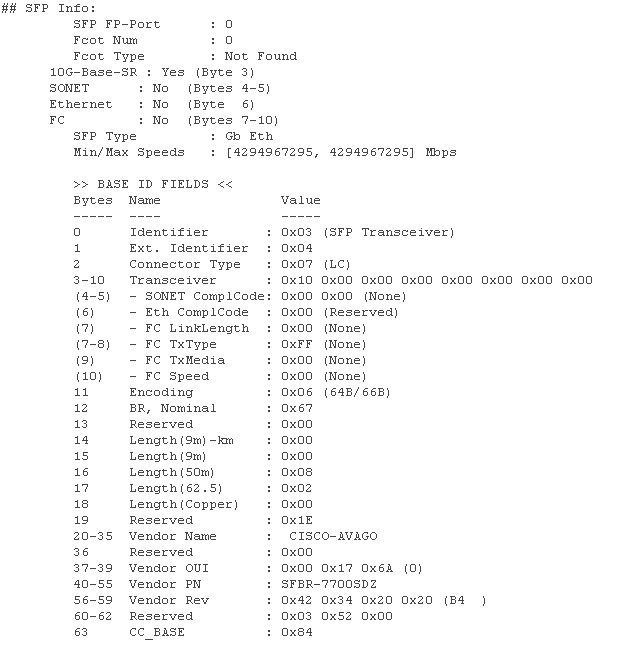
Note: If you run this command on a FEX that uses copper ports, then you will notice the command errors. This is expected as there is no SFP to query. The prompt will return to no SFP found when that port is fiber, but does not currently contain an SFP.
Find Loss
Show commands can be run at the FEX prompt for the HI and NI ports in order to view interface counters on the FEX side of the FEX Fabric port links.
View HI Port Counters
This command shows port counter verification, similar to a show int:
fex-128# show platform software woodside rmon 0 HI0 +----------------------+----------------------+-----------------+--------------------------+----------------------+-----------------+ | TX | Current | Diff | RX | Current | Diff | +----------------------+----------------------+-----------------+--------------------------+----------------------+-----------------+ | TX_PKT_LT64 | 0| 0| RX_PKT_LT64 | 0| 0| | TX_PKT_64 | 0| 0| RX_PKT_64 | 0| 0| | TX_PKT_65 | 0| 0| RX_PKT_65 | 0| 0| | TX_PKT_128 | 0| 0| RX_PKT_128 | 0| 0| | TX_PKT_256 | 0| 0| RX_PKT_256 | 0| 0|
Note: rmon 0 is used only when the FEX has one host asic. The 2224, 2248 and 2232 models have only one asic. The 2148 model has six asics, so rmon 0 through 5 will be used. See the Front Port Mapping section for further details.
View NI Port Counters
This command will show you the port counters for the network uplinks similar to a show int. This command shows you the FEX side of the link. This command does not show you the parent switch side of the link.
fex-128# show platform software woodside rmon 0 NI0 +----------------------+----------------------+-----------------+--------------------------+----------------------+-----------------+ | TX | Current | Diff | RX | Current | Diff | +----------------------+----------------------+-----------------+--------------------------+----------------------+-----------------+ | TX_PKT_LT64 | 0| 0| RX_PKT_LT64 | 0| 0| | TX_PKT_64 | 0| 0| RX_PKT_64 | 0| 0| | TX_PKT_65 | 0| 0| RX_PKT_65 | 0| 0| | TX_PKT_128 | 0| 0| RX_PKT_128 | 0| 0| | TX_PKT_256 | 0| 0| RX_PKT_256 | 0| 0|
View Historical Drops
Historical Drops can be viewed with the drops command. This shows you all drops on the FEX since it was turned on.
This command also shows you drops to the FEX CPU that will not represent data traffic drops with DROP8 counters. These can be safely ignored.
Note: tail drop [8] and TAIL_DROP8 represents tail drops to the FEX CPU and is not relevant to troubleshoot performance as this happens under normal conditions.
prt> drops
PRT_SS_CNT_TAIL_DROP1 : 3 SS0
PRT_SS_CNT_TAIL_DROP1 : 6 SS1
PRT_SS_CNT_TAIL_DROP1 : 1 SS2
PRT_SS_CNT_TAIL_DROP1 : 25 SS3
PRT_SS_CNT_TAIL_DROP1 : 2 SS5
PRT_SS_CNT_TAIL_DROP8 : 142 SS0
PRT_SS_CNT_TAIL_DROP8 : 73 SS1
PRT_SS_CNT_TAIL_DROP8 : 11 SS2
PRT_SS_CNT_TAIL_DROP8 : 62048 SS3
PRT_SS_CNT_TAIL_DROP8 : 4613 SS4
PRT_SS_CNT_TAIL_DROP8 : 552 SS5
View Recent Drops and Interrupts
Interrupts sent to the CPU include tail-drops, which are drops due to congestion and lack of buffer space. These can be viewed with the show new_ints command:
Note: 6.0 and later code uses show new_ints all
This example shows that frames tail drop in the SS1 buffer:
prt> show new_ints
|-----------------------------------------------|
| SS1 : ssx_int_norm_td
|--+---------+----------------------------------+
| 1 | 00001c98 | tail drop[1] | frames are being tail dropped.
| 2 | 00005cac | tail drop[2] | frames are being tail dropped.
| 8 | 0000012e | tail drop[8] | frames are being tail dropped.
This example shows that NI 3 receives symbol errors:
| NI3 : nix_xe_INT_xg
|--+---------+----------------------------------+
|2 |00000005 | rx_local_fault | Link is in local fault state
|3 |00000007 | rx_remote_fault | Link is in remote fault state
|4 |00000004 | rx_code_violation | MAC received unexpected XGMII control characters.
|5 |00000004 | rx_err_symbol | MAC received an XGMII error character.
|16|00000001 | rx_local_fault_edge | Local fault state has changed.
|17|00000001 | rx_remote_fault_edge | Remote fault state has changed.
|-----------------------------------------------|
This example shows that the FEX tail drops frames that ingress NI3:
| SS4 : ssx_int_err
|--+---------+----------------------------------+
|0 |00031aa9 | wo_cr[0] | frames rcvd without credit for pausable classes. Pause is missing.
|1 |00014e21 | wo_cr[1] | frames rcvd without credit for pausable classes. Pause is missing.
|2 |00018a9f | wo_cr[2] | frames rcvd without credit for pausable classes. Pause is missing.
|3 |00025efb | wo_cr[3] | frames rcvd without credit for pausable classes. Pause is missing.
|-----------------------------------------------|
View the Port Traffic Rate in Real Time
The rate command outputs real time traffic rate statistics for a port. Unlike show int, its not an average, its the raw current data rate that second. In this example, NI 3 currently receives 2.96kbps in the Network to Host direction. A show int on the corresponding parent Nexus switch shows 2.96Kbps in the TX direction on the FEX Fabric uplink connected to NI 3.

Mitigate Loss
Tail drops are caused by buffer exhaustion. Typically the buffer becomes exhausted when multiple servers burst to the HIFs at once, or the host egress buffers cannot empty their outbound traffic fast enough to replenish the credits on the NIFs.
There are several options available to mitigate that loss.
Reposition Servers
Move any servers with bursty traffic flows such as storage arrays and video endpoints off of the FEX and connect them directly to the base ports of the parent switch. This will prevent the bursty servers from exhausting the buffer and starving out traffic from less chatty hosts.
Nexus 5000 and 6000 Series Switches have larger buffers than FEX models, to connect bursty servers to the base ports mitigates the loss because the base port buffers are able to handle a much greater burst.
Add Additional Uplinks
Some models of FEX can unlock additional buffer space when more uplinks from the FEX to the parent switch are added. This can potentially cease drops on the Network Uplinks.
Table 2.
| Model | Buffer Increase When Adding Uplinks |
| 2148 | none |
| 2224 | buffer increase up to 2 uplinks |
| 2248TP | buffer increase up to 4 uplinks |
| 2232 | buffer increase up to 4 uplinks |
| 2248TP-E | none |
| 2248PQ | none |
Share HI Buffers
Most models of FEX can benefit from sharing the HI buffer across all host ports. If drops are seen on the HI, sharing the buffer might mitigate those drops.
Modify the FEX queue limit globally:
5k(config)# no fex queue-limit (globally applies to all fexes on that 5k)
Modify the FEX queue limit on individual FEX:
5k(config)# fex 100
5k(config-fex)# no hardware [model] queue-limit
Nexus 6000 FEX Load Balance Enhancement
The Nexus 6000 has an additional option to change the load balancing algorithm from HIF to NIF. By default, even if packets arrive on different HIF ports, they might still be queued to the same NIF. With uplink-load-balance-mode enabled, they are distributed across multiple NIFs, and allow for more even usage of NIF egress buffers.
6k(config)# hardware N2248PQ uplink-load-balance-mode
Cisco Nexus 2000 Series NX-OS Fabric Extender Software Configuration Guide for Cisco Nexus 5000 Series Switches, Release 4.0
The documentation set for this product strives to use bias-free language. For the purposes of this documentation set, bias-free is defined as language that does not imply discrimination based on age, disability, gender, racial identity, ethnic identity, sexual orientation, socioeconomic status, and intersectionality. Exceptions may be present in the documentation due to language that is hardcoded in the user interfaces of the product software, language used based on RFP documentation, or language that is used by a referenced third-party product. Learn more about how Cisco is using Inclusive Language.
Book Contents
Book Contents
- Preface
- Fabric Extender Architectural Overview
- Configuring the Fabric Extender
- Fabric Extender Features
Find Matches in This Book
Log in to Save Content
Available Languages
Download Options
Book Title
Cisco Nexus 2000 Series NX-OS Fabric Extender Software Configuration Guide for Cisco Nexus 5000 Series Switches, Release 4.0
Configuring the Fabric Extender
- PDF — Complete Book (815.0 KB)PDF — This Chapter (131.0 KB) View with Adobe Reader on a variety of devices
- ePub — Complete Book (146.0 KB) View in various apps on iPhone, iPad, Android, Sony Reader, or Windows Phone
Results
Updated: May 22, 2014
Chapter: Configuring the Fabric Extender
Chapter Contents
- Associating a Fabric Extender to a Fabric Interface
- Associating a Fabric Extender to an Ethernet Interface
- Associating a Fabric Extender to an EtherChannel
- Disassociating a Fabric Extender from an Interface
- Changing the Number of Links
- Maintaining the Pinning Order
- Displaying Configuration Information
- Displaying Chassis Management Information
Configuring the Fabric Extender
This chapter describes how to configure a Cisco Nexus 2000 Series Fabric Extender with a Cisco Nexus 5000 Series switch and includes the following sections:
- Associating a Fabric Extender to a Fabric Interface
- Configuring the Fabric Extender
- Redistributing the Links
- Upgrading the Fabric Extender
- Displaying Fabric Extender Information
Associating a Fabric Extender to a Fabric Interface
A Fabric Extender is connected to the switch through physical Ethernet interfaces or an EtherChannel. By default, the switch does not allow the attached Fabric Extender to connect until it has been assigned a chassis ID and is associated with the connected interface.
Note The Fabric Extender may connect to the switch through a number of separate physical Ethernet interfaces or at most one EtherChannel interface.
Caution In Release 4.0(1a)N2(1), you cannot connect the Ethernet interfaces of the Expansion Modules in the Cisco Nexus 5000 Series switch to a Fabric Extender. Only the Ethernet interfaces on the switch chassis (slot 1) can be used as fabric interfaces.
This section includes the following topics:
- Associating a Fabric Extender to an Ethernet Interface
- Associating a Fabric Extender to an EtherChannel
- Disassociating a Fabric Extender from an Interface
Associating a Fabric Extender to an Ethernet Interface
To associate the Fabric Extender to an Ethernet interface, perform this task:
switch# configure terminal
Enters configuration mode.
switch(config)# interface ethernet slot / port
Specifies an Ethernet interface to configure.
switch(config-if)# switchport mode fex-fabric
Sets the interface to support an external Fabric Extender.
switch(config-if)# fex associate chassis
Associates the chassis ID to the Fabric Extender unit attached to the interface. The range of the chassis ID is from 100 to 199.
switch# show interface ethernet port / slot fex-intf
(Optional) Displays the association of a Fabric Extender to an Ethernet interface.
This example shows how to associate the Fabric Extender to an Ethernet interface on the switch:
switch# configure terminal
switch(config)# interface ethernet 1/40
switch(config-if)# switchport mode fex-fabric
switch(config-if)# fex associate 100This example shows how to display the association of the Fabric Extender and the switch:
switch# show interface ethernet 1/40 fex-intf
Fabric FEX
Interface Interfaces
—————————————————
Eth1/40 Eth100/1/48 Eth100/1/47 Eth100/1/46 Eth100/1/45
Eth100/1/44 Eth100/1/43 Eth100/1/42 Eth100/1/41
Eth100/1/40 Eth100/1/39 Eth100/1/38 Eth100/1/37
Eth100/1/36 Eth100/1/35 Eth100/1/34 Eth100/1/33
Eth100/1/32 Eth100/1/31 Eth100/1/30 Eth100/1/29
Eth100/1/28 Eth100/1/27 Eth100/1/26 Eth100/1/25
Eth100/1/24 Eth100/1/23 Eth100/1/22 Eth100/1/21
Eth100/1/20 Eth100/1/19 Eth100/1/18 Eth100/1/17
Eth100/1/16 Eth100/1/15 Eth100/1/14 Eth100/1/13
Eth100/1/12 Eth100/1/11 Eth100/1/10 Eth100/1/9
Eth100/1/8 Eth100/1/7 Eth100/1/6 Eth100/1/5
Eth100/1/4 Eth100/1/3 Eth100/1/2 Eth100/1/1Associating a Fabric Extender to an EtherChannel
To associate the Fabric Extender to an EtherChannel, perform this task:
switch# configure terminal
Enters configuration mode.
switch(config)# interface port-channnel channel
Specifies an EtherChannel to configure.
switch(config-if)# switchport mode fex-fabric
Sets the EtherChannel to support an external Fabric Extender.
switch(config-if)# fex associate chassis
Associates the chassis ID to the Fabric Extender unit attached to the interface. The range of the chassis ID is from 100 to 199.
switch# show interface port-channel channel fex-intf
(Optional) Displays the association of a Fabric Extender to an EtherChannel interface.
This example shows how to associate the Fabric Extender to an EtherChannel interface on the switch:
switch# configure terminal
switch(config)# interface port-channel 4
switch(config-if)# switchport mode fex-fabric
switch(config-if)# fex associate 100
switch(config-if)# exit
switch(config)# interface ethernet 1/37
switch(config-if)# switchport mode fex-fabric
switch(config-if)# fex associate 100
switch(config-if)# channel-group 4
switch(config-if)# exit
switch(config)# interface ethernet 1/38
switch(config-if)# switchport mode fex-fabric
switch(config-if)# fex associate 100
switch(config-if)# channel-group 4
switch(config-if)# exit
switch(config)# interface ethernet 1/39
switch(config-if)# switchport mode fex-fabric
switch(config-if)# fex associate 100
switch(config-if)# channel-group 4
switch(config-if)# exit
switch(config)# interface ethernet 1/40
switch(config-if)# switchport mode fex-fabric
switch(config-if)# fex associate 100
switch(config-if)# channel-group 4Note You have to associate each Ethernet interface that is a members of the EtherChannel as a fabric interface as shown in the above example.
This example shows how to display the association of the Fabric Extender and the switch:
switch# show interface port-channel 4 fex-intf
Fabric FEX
Interface Interfaces
—————————————————
Po4 Eth100/1/48 Eth100/1/47 Eth100/1/46 Eth100/1/45
Eth100/1/44 Eth100/1/43 Eth100/1/42 Eth100/1/41
Eth100/1/40 Eth100/1/39 Eth100/1/38 Eth100/1/37
Eth100/1/36 Eth100/1/35 Eth100/1/34 Eth100/1/33
Eth100/1/32 Eth100/1/31 Eth100/1/30 Eth100/1/29
Eth100/1/28 Eth100/1/27 Eth100/1/26 Eth100/1/25
Eth100/1/24 Eth100/1/23 Eth100/1/22 Eth100/1/21
Eth100/1/20 Eth100/1/19 Eth100/1/18 Eth100/1/17
Eth100/1/16 Eth100/1/15 Eth100/1/14 Eth100/1/13
Eth100/1/12 Eth100/1/11 Eth100/1/10 Eth100/1/9
Eth100/1/8 Eth100/1/7 Eth100/1/6 Eth100/1/5
Eth100/1/4 Eth100/1/3 Eth100/1/2 Eth100/1/1Disassociating a Fabric Extender from an Interface
To disassociate the Fabric Extender from an interface, perform this task:
switch(config-if)# no fex associate
Disassociates the Fabric Extender unit attached to the interface.
Configuring the Fabric Extender
To configure global features for a Fabric Extender, perform this tasks:
switch# configure terminal
Enters configuration mode.
switch(config)# fex chassis
Enters configuration mode for the specified Fabric Extender chassis ID. The range of the chassis ID is from 100 to 199.
switch(config-fex)# description desc
Specifies the description. The default is the string FEX xxxx where xxxx is the chassis ID. If the chassis ID is 123, the description is FEX0123.
switch(config-fex)# no description
Deletes the description.
switch(config-fex)# pinning max-links uplinks
Defines the number of uplinks. The default is 1. The range is from 1 to 4.
This command is only applicable if the Fabric Extender is connected to its parent switch using one or more statically pinned fabric interfaces. There can only be one EtherChannel connection.
switch(config-fex)# no pinning max-links
Resets the number of uplinks to the default.
switch(config-fex)# serial serial
Defines a serial number string. If this command is configured, then a switch will only allow the corresponding chassis ID to associate (using the fex associate command) if the Fabric Extender reports a matching serial number string.
Configuring a serial number other than that of the given Fabric Extender will force the Fabric Extender offline.
switch(config-fex)# no serial
Deletes the serial number string.
Turns on the beacon LED. This LED allows you to locate a specific Fabric Extender in a rack.
switch(config-fex)# no beacon
Turns off the beacon LED.
Caution Changing the number of uplinks with the pinning max-links command or the no pinning max-links command disrupts all the host interface ports of the Fabric Extender.
Redistributing the Links
When you provision the Fabric Extender with statically pinned interfaces (see the “Static Pinning Fabric Interface Connection” section), the downlink host interfaces on the Fabric Extender are pinned to the fabric interfaces in the order they were initially configured. If you want to maintain a specific relationship of host interfaces to fabric interface across reboots, you should re-pin the links.
You may want to perform this function in these two situations:
- A change in the max-links configuration.
- If you need to maintain the pinning order of host interfaces to fabric interfaces.
Changing the Number of Links
If you initially configured port 33 on the parent switch as your only fabric interface, all 48 host interfaces are pinned to this port. If you provision another port, for example 35, then you must enter the pinning max-links 2 command to redistribute the host interfaces. All host interfaces are brought down and host interfaces 1 to 24 are pinned to fabric interface 33 and host interfaces 25 to 48 are pinned to fabric interface 35.
Maintaining the Pinning Order
The pinning order of the host interfaces is initially determined by the order in which the fabric interfaces were configured. In this example, four fabric interfaces were configured in the following order:
switch# show interface ethernet 1/35 fex-intf
Fabric FEX
Interface Interfaces
—————————————————
Eth1/35 Eth100/1/12 Eth100/1/11 Eth100/1/10 Eth100/1/9
Eth100/1/8 Eth100/1/7 Eth100/1/6 Eth100/1/5
Eth100/1/4 Eth100/1/3 Eth100/1/2 Eth100/1/1switch# show interface ethernet 1/33 fex-intf
Fabric FEX
Interface Interfaces
—————————————————
Eth1/33 Eth100/1/24 Eth100/1/23 Eth100/1/22 Eth100/1/21
Eth100/1/20 Eth100/1/19 Eth100/1/18 Eth100/1/17
Eth100/1/16 Eth100/1/15 Eth100/1/14 Eth100/1/13switch# show interface ethernet 1/38 fex-intf
Fabric FEX
Interface Interfaces
—————————————————
Eth1/38 Eth100/1/36 Eth100/1/35 Eth100/1/34 Eth100/1/33
Eth100/1/32 Eth100/1/31 Eth100/1/30 Eth100/1/29
Eth100/1/28 Eth100/1/27 Eth100/1/26 Eth100/1/25switch# show interface ethernet 1/40 fex-intf
Fabric FEX
Interface Interfaces
—————————————————
Eth1/40 Eth100/1/48 Eth100/1/47 Eth100/1/46 Eth100/1/45
Eth100/1/44 Eth100/1/43 Eth100/1/42 Eth100/1/41
Eth100/1/40 Eth100/1/39 Eth100/1/38 Eth100/1/37The next time that you reboot the Fabric Extender, the configured fabric interfaces are pinned to the host interfaces in an ascending order by port number of the fabric interface. If you want to configure the same fixed distribution of host interfaces without restarting the Fabric Extender, enter the fex pinning redistribute command (see the “Static Pinning Fabric Interface Connection” section).
To redistribute the host interfaces on the Fabric Extender, perform this task:
switch# fex pinning redistribute chassis
Redistributes the host connections. The range of the chassis ID is from 100 to 199.
This example shows how to redistribute the host interfaces on a Fabric Extender:
switch# fex pinning redistribute 100
Caution The fex pinning redistribute command disrupts all the host interface ports of the Fabric Extender.
Upgrading the Fabric Extender
To upgrade a Cisco Nexus 2000 Series Fabric Extender, perform these steps:
Step 1 Download the new kickstart and system images to the parent switch.
Step 2 Enter the install all command.
While the installation is in progress, the Fabric Extender remains online.
The new image is pushed to the Fabric Extender by the parent switch. Once the software image has successfully been installed, the parent switch reboots. The Fabric Extender is also rebooted automatically to maintain the software version compatibility between the parent switch and the Fabric Extender. When the parent switch comes up, it rediscovers the Fabric Extender and brings it online.
This process is the least disruptive process for the hosts and servers connected to the Fabric Extender.
Displaying Fabric Extender Information
This section describes the show commands that are available to display the configuration and status of the Fabric Extender and includes the following topics:
- Displaying Configuration Information
- Displaying Chassis Management Information
Displaying Configuration Information
To display configuration information about the defined interfaces, perform one of these tasks:
switch# show fex [ chassis [ detail ]
Displays information about a specific Fabric Extender or all attached units.
switch# show interface type number fex-intf
Displays the Fabric Extender ports pinned to a specific switch interface.
switch# show interface fex-fabric
Displays the switch interfaces that have detected a Fabric Extender uplink.
This example shows how to display all the attached Fabric Extender units:
switch# show fex
FEX FEX FEX FEX
Number Description State Model Serial
————————————————————————
100 FEX0100 Online N5K-C5110T-BF-1GE FOX1242GJSQThis example shows how to display the detailed status of a specific Fabric Extender:
switch# show fex 100 detail
FEX: 100 Description: FEX0100 state: Online
FEX version: 4.0(1a)N2(0.101) [Switch version: 4.0(1a)N2(0.101)]
Extender Model: N5K-C5110T-BF-1GE, Extender Serial: JAF1241BLFN
Part No: 73-12009-02
Card Id: 70, Mac Addr: 00:0d:ec:b1:28:42, Num Macs: 64
Module Sw Gen: 17 [Switch Sw Gen: 17]
pinning-mode: static Max-links: 1
Fabric port for control traffic: Eth1/40
Fabric interface state:
Eth1/40 — Interface Up. State: Active
Fex Port State Fabric Port Primary Fabric
Eth100/1/1 Up Eth1/40 Eth1/40
Eth100/1/2 Down Eth1/40 Eth1/40
Eth100/1/3 Down Eth1/40 Eth1/40
Eth100/1/4 Down Eth1/40 Eth1/40
Eth100/1/5 Down Eth1/40 Eth1/40
Eth100/1/6 Down Eth1/40 Eth1/40
Eth100/1/7 Down Eth1/40 Eth1/40
Eth100/1/8 Down Eth1/40 Eth1/40
Eth100/1/9 Down Eth1/40 Eth1/40
Eth100/1/10 Down Eth1/40 Eth1/40
Eth100/1/11 Down Eth1/40 Eth1/40
Eth100/1/12 Down Eth1/40 Eth1/40
Eth100/1/13 Down Eth1/40 Eth1/40
Eth100/1/14 Down Eth1/40 Eth1/40
Eth100/1/15 Up Eth1/40 Eth1/40
Eth100/1/16 Down Eth1/40 Eth1/40
Eth100/1/17 Down Eth1/40 Eth1/40
Eth100/1/18 Down Eth1/40 Eth1/40
Eth100/1/19 Down Eth1/40 Eth1/40
Eth100/1/20 Down Eth1/40 Eth1/40
Eth100/1/22 Down Eth1/40 Eth1/40
Eth100/1/24 Down Eth1/40 Eth1/40
Eth100/1/25 Down Eth1/40 Eth1/40
Eth100/1/26 Down Eth1/40 Eth1/40
Eth100/1/27 Down Eth1/40 Eth1/40
Eth100/1/28 Down Eth1/40 Eth1/40
Eth100/1/29 Down Eth1/40 Eth1/40
Eth100/1/30 Down Eth1/40 Eth1/40
Eth100/1/31 Up Eth1/40 Eth1/40
Eth100/1/32 Down Eth1/40 Eth1/40
Eth100/1/33 Down Eth1/40 Eth1/40
Eth100/1/34 Down Eth1/40 Eth1/40
Eth100/1/35 Down Eth1/40 Eth1/40
Eth100/1/36 Down Eth1/40 Eth1/40
Eth100/1/37 Down Eth1/40 Eth1/40
Eth100/1/38 Down Eth1/40 Eth1/40
Eth100/1/39 Down Eth1/40 Eth1/40
Eth100/1/40 Down Eth1/40 Eth1/40
Eth100/1/41 Down Eth1/40 Eth1/40
Eth100/1/42 Down Eth1/40 Eth1/40
Eth100/1/43 Down Eth1/40 Eth1/40
Eth100/1/44 Down Eth1/40 Eth1/40
Eth100/1/45 Down Eth1/40 Eth1/40
Eth100/1/46 Down Eth1/40 Eth1/40
Eth100/1/47 Up Eth1/40 Eth1/40
Eth100/1/48 Down Eth1/40 Eth1/40
Logs:
[12/10/2008 00:11:40.698999] Module timed out
[12/10/2008 00:11:44.501221] Module register received
[12/10/2008 00:11:44.502240] Registration response sent
[12/10/2008 00:11:44.587581] Module Online Sequence
[12/10/2008 00:11:49.140170] Module Online
[12/10/2008 00:18:46.662135] Module disconnected
[12/10/2008 00:18:46.663222] Offlining Module
[12/10/2008 00:18:46.663856] Module Offline Sequence
[12/10/2008 00:18:49.317584] Module Offline
[12/10/2008 00:19:30.427864] Module register received
[12/10/2008 00:19:30.428875] Registration response sent
[12/10/2008 00:19:30.456882] Module Online Sequence
[12/10/2008 00:19:32.62827] Module Online
[12/10/2008 00:20:37.196648] Module disconnected
[12/10/2008 00:20:37.197782] Offlining Module
[12/10/2008 00:20:37.199299] Module Offline Sequence
[12/10/2008 00:20:39.859971] Module Offline
[12/10/2008 00:21:13.945372] Module register received
[12/10/2008 00:21:13.946435] Registration response sent
[12/10/2008 00:21:13.974962] Module Online Sequence
[12/10/2008 00:21:15.737667] Module OnlineThis example shows how to display the Fabric Extender interfaces pinned to a specific switch interface:
switch# show interface ethernet 1/40 fex-intf
Fabric FEX
Interface Interfaces
—————————————————
Eth1/40 Eth100/1/48 Eth100/1/47 Eth100/1/46 Eth100/1/45
Eth100/1/44 Eth100/1/43 Eth100/1/42 Eth100/1/41
Eth100/1/40 Eth100/1/39 Eth100/1/38 Eth100/1/37
Eth100/1/36 Eth100/1/35 Eth100/1/34 Eth100/1/33
Eth100/1/32 Eth100/1/31 Eth100/1/30 Eth100/1/29
Eth100/1/28 Eth100/1/27 Eth100/1/26 Eth100/1/25
Eth100/1/24 Eth100/1/22 Eth100/1/20 Eth100/1/19
Eth100/1/18 Eth100/1/17 Eth100/1/16 Eth100/1/15
Eth100/1/14 Eth100/1/13 Eth100/1/12 Eth100/1/11
Eth100/1/10 Eth100/1/9 Eth100/1/8 Eth100/1/7
Eth100/1/6 Eth100/1/5 Eth100/1/4 Eth100/1/3
Eth100/1/2 Eth100/1/1This example shows how to display the switch interfaces that are connected to a Fabric Extender uplink:
switch# show interface fex-fabric
Fabric Fabric Fex FEX
Fex Port Port State Uplink Model Serial
—————————————————————
— Eth1/1 Discovered 1 N5K-C5110T-BF-1GE FOX1242GJSQ
— Eth1/2 Discovered 4 N5K-C5110T-BF-1GE FOX1242GJSQ
— Eth1/3 Discovered 2 N5K-C5110T-BF-1GE FOX1242GJSQ
100 Eth1/40 Active 3 N5K-C5110T-BF-1GE FOX1242GJSQNote The above example shows a Fabric Extender with four uplink connections, only one of which is currently active.
This example shows how to display the SFP+ transceiver and diagnostic optical monitoring (DOM) information for Fabric Extender uplinks:
switch# show interface ethernet 1/40 transceiver
Ethernet1/40
sfp is present
name is CISCO-EXCELIGHT
part number is SPP5101SR-C1
revision is A
serial number is ECL120901AV
nominal bitrate is 10300 MBits/sec
Link length supported for 50/125mm fiber is 82 m(s)
Link length supported for 62.5/125mm fiber is 26 m(s)
cisco id is —
cisco extended id number is 4switch# show interface ethernet 1/40 transceiver fex-fabric
Ethernet1/40
sfp is present
name is CISCO-EXCELIGHT
part number is SPP5101SR-C1
revision is A
serial number is ECL120601U0
nominal bitrate is 10300 MBits/sec
Link length supported for 50/125mm fiber is 82 m(s)
Link length supported for 62.5/125mm fiber is 26 m(s)
cisco id is —
cisco extended id number is 4Note The first show command above shows the SFP+ transceiver that is plugged into the parent switch interface. The second show command displays the SFP+ transceiver that is plugged into the uplink port on the Fabric Extender.
Displaying Chassis Management Information
To display configuration information used on the switch supervisor to manage the Fabric Extender, perform one of these tasks:
switch# show diagnostic result fex chassis
Displays results from the diagnostic test for a Fabric Extender chassis.
switch# show inventory fex chassis
Displays inventory information for a Fabric Extender chassis.
switch# show module fex chassis
Displays module information about a Fabric Extender chassis.
This example shows how to display the module information about all connected Fabric Extender units:
switch# show module fex
FEX Mod Ports Card Type Model Status.
— — —— ———————————- —————— ————
100 1 48 Fabric Extender 48x1GE Module N2K-C2148T-1GE okFEX Mod MAC-Address(es) Serial-Num
— — ————————————— ———-
100 1 000d.ecb1.3f00 to 000d.ecb1.3f2fff JAF1244ATERThis example shows how to display the module information about a specific Fabric Extender unit:
switch# show module fex 100
FEX Mod Ports Card Type Model Status.
— — —— ———————————- —————— ————
100 1 48 Fabric Extender 48x1GE Module N2K-C2148T-1GE okFEX Mod MAC-Address(es) Serial-Num
— — ————————————— ———-
100 1 000d.ecb1.3f00 to 000d.ecb1.3f2fff JAF1244ATERThis example shows how to display the inventory information about a specific Fabric Extender unit:
switch# show inventory fex 100
NAME: «FEX 100 CHASSIS», DESCR: «N2K-C2148T-1GE CHASSIS»
PID: N2K-C2148T-1GE , VID: V00 , SN: JAF1244ATERNAME: «FEX 100 Module 1», DESCR: «Fabric Extender Module: 48x1GE, 4X10GE Supervisor»
PID: N2K-C2148T-1GE , VID: V00 , SN: FOX1242GJT4NAME: «FEX 100 Fan 1», DESCR: «Fabric Extender Fan module»
PID: N2K-C2148-FAN , VID: N/A , SN: N/ANAME: «FEX 100 Power Supply 1», DESCR: «Fabric Extender AC power supply»
PID: N5K-PAC-200W , VID: 00V0, SN: PAC12473L2JThis example shows how to display diagnostic test results for a specific Fabric Extender unit:
switch# show diagnostic result fex 100
FEX-100: 48x1GE/Supervisor SerialNo : JAF1241BLFN
Overall Diagnostic Result for FEX-100 : OKThis example shows how to display the environment status for a specific Fabric Extender unit:
switch# show environment fex 100
Mod Model Power Power Power Power Status
Requested Requested Allocated Allocated
(Watts) (Amp) (Watts) (Amp)
— ——————- ——- ———- ——— ———- ———-
1 N5K-C5110T-BF-1GE 96.00 8.00 96.00 8.00 powered-upPower Usage Summary:
———————
Power Supply redundancy mode: redundantTotal Power Capacity 200.04 W
Power reserved for Supervisor(s) 96.00 W
Power currently used by Modules 0.00 WThis example shows how to display the SPROM for a specific Fabric Extender unit:
switch# show sprom fex 100 all
DISPLAY FEX 100 SUP sprom contents
Common block:
Block Signature : 0xabab
Block Version : 3
Block Length : 160
Block Checksum : 0x1774
EEPROM Size : 4096
Block Count : 3
FRU Major Type : 0x6002
FRU Minor Type : 0x0
OEM String : Cisco Systems, Inc.
Product Number : N2K-C2148T-1GE
Serial Number : JAF1244ATER
Part Number : 73-12009-02
Part Revision : 07
Mfg Deviation : 0
H/W Version : 0.2
Mfg Bits : 0
Engineer Use : 0
snmpOID : 9.12.3.1.9.72.8.0
Power Consump : -800
RMA Code : 0-0-0-0
CLEI Code : COMEB00ARA
VID : V00
Supervisor Module specific block:
Block Signature : 0x6002
Block Version : 2
Block Length : 103
Block Checksum : 0x592
Feature Bits : 0x0
HW Changes Bits : 0x2
Card Index : 11011
MAC Addresses : 00-00-00-00-00-00
Number of MACs : 0
Number of EPLD : 0
Port Type-Num : 1-48;2-4
Sensor #1 : 60,50
Sensor #2 : 60,50
Sensor #3 : 60,50
Sensor #4 : 60,50
Sensor #5 : 50,40
Sensor #6 : 50,40
Sensor #7 : 50,40
Sensor #8 : 50,40
Max Connector Power: 1000
Cooling Requirement: 300
Ambient Temperature: 40DISPLAY FEX 100 backplane sprom contents:
Common block:
Block Signature : 0xabab
Block Version : 3
Block Length : 160
Block Checksum : 0x173f
EEPROM Size : 65535
Block Count : 5
FRU Major Type : 0x6001
FRU Minor Type : 0x0
OEM String : Cisco Systems, Inc.
Product Number : N2K-C2148T-1GE
Serial Number : FOX1242GJT4
Part Number : 68-3342-02
Part Revision : 05
Mfg Deviation : 0
H/W Version : 0.0
Mfg Bits : 0
Engineer Use : 0
snmpOID : 9.12.3.1.3.820.0.0
Power Consump : 0
RMA Code : 0-0-0-0
CLEI Code : COMEB00ARA
VID : V00
Chassis specific block:
Block Signature : 0x6001
Block Version : 3
Block Length : 39
Block Checksum : 0x2b6
Feature Bits : 0x0
HW Changes Bits : 0x2
Stackmib OID : 0
MAC Addresses : 00-0d-ec-b1-3f-00
Number of MACs : 64
OEM Enterprise : 0
OEM MIB Offset : 0
MAX Connector Power: 0
WWN software-module specific block:
Block Signature : 0x6005
Block Version : 1
Block Length : 0
Block Checksum : 0x66
wwn usage bits:
00 00 00 00 00 00 00 00
00 00 00 00 00 00 00 00
00 00 00 00 00 00 00 00
00 00 00 00 00 00 00 00
00 00 00 00 00 00 00 00
00 00 00 00 00 00 00 00
00 00 00 00 00 00 00 00
00 00 00 00 00 00 00 00
00 00 00 00 00 00 00 00
00 00 00 00 00 00 00 00
00 00 00 00 00 00 00 00
00 00 00 00 00 00 00 00
00 00 00 00 00 00 00 00
00 00 00 00 00 00 00 00
00 00 00 00 00 00 00 00
00 00 00 00 00 00 00 00
00 00 00 00 00 00 00 00
00 00 00 00 00 00 00 00
00 00 00 00 00 00 00 00
00 00 00 00 00 00 00 00
00 00 00 00 00 00 00 00
00 00 00 00 00 00 00 00
00 00 00 00 00 00 00 00
00 00 00 00 00 00 00 00
00 00 00 00 00 00 00 00
00 00 00 00 00 00 00 00
00 00 00 00 00 00 00 00
00 00 00 00 00 00 00 00
00 00 00 00 00 00 00 00
00 00 00 00 00 00 00 00
00 00 00 00 00 00 00 00
00 00
License software-module specific block:
Block Signature : 0x6006
Block Version : 1
Block Length : 16
Block Checksum : 0x77
lic usage bits:
00 00 00 00 00 00 00 00DISPLAY FEX 100 power-supply 1 sprom contents:
Common block:
Block Signature : 0xabab
Block Version : 3
Block Length : 124
Block Checksum : 0x1610
EEPROM Size : 124
Block Count : 1
FRU Major Type : 0xab01
FRU Minor Type : 0x1
OEM String : Cisco Systems, Inc.
Product Number : N5K-PAC-200W
Serial Number : PAC12473L2J
Part Number : 341-0335-01
Part Revision : 01
CLEI Code : COUPADSBAA
VID : 00V0
snmpOID : 0.0.0.0.0.0.0.0
H/W Version : 0.1
Current : 1667
RMA Code : 0-0-0-0DISPLAY FEX 100 power-supply 2 sprom contents:
Common block:
Block Signature : 0x0
Block Version : 0
Block Length : 0
Block Checksum : 0x0
EEPROM Size : 0
Block Count : 0
FRU Major Type : 0x0
FRU Minor Type : 0x0
OEM String :
Product Number :
Serial Number :
Part Number :
Part Revision :
CLEI Code :
VID : V00
snmpOID : 0.0.0.0.0.0.0.0
H/W Version : 0.0
Current : 0
RMA Code : 0-0-0-0