How to Delete Soft Links in Linux
Learn a thing or two about deleting soft links and hard links in the Linux command line.
How to Delete Soft Links in Linux
The symbolic link, also known as soft link or symlink, in Linux is a special type of file that works as a shortcut to another file.
You can create a soft link using the ln command. But what about deleting them?
There is no special command for removing symbolic links in Linux. You can use the rm command which is also used for deleting files and directories.
rm symbolic_link_nameYou may also the unlink command here. Don’t go by its name. It’s not only for deleting links; it can also delete files.
unlink symbolic_link_nameLet’s see it in detail.
Delete symbolic links using rm command
All you have to do is to give the name of the path of the link to the command:
rm name_or_path_of_linkLet’s see it with an example. Can you identify the soft link in the long list output of ls command?
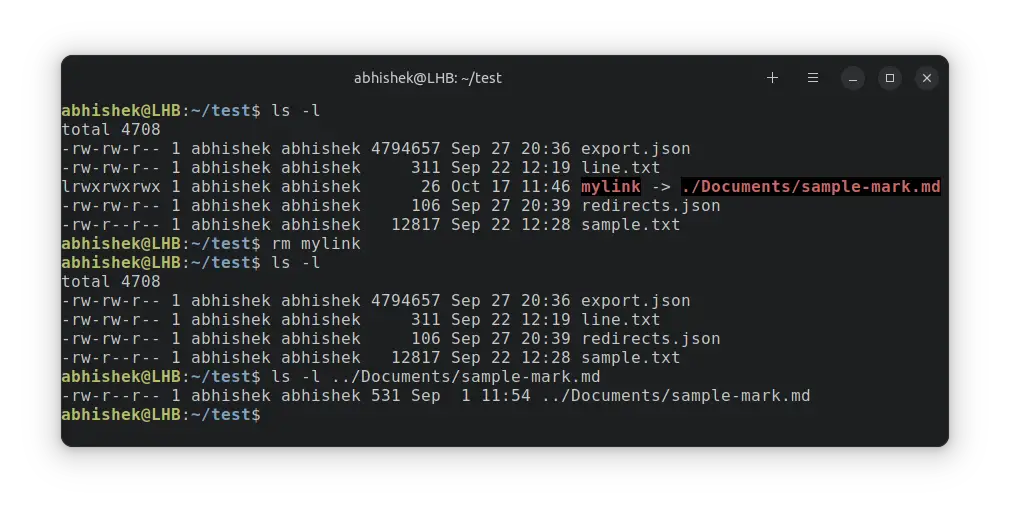
abhishek@LHB:~/test$ ls -l total 4708 -rw-rw-r-- 1 abhishek abhishek 4794657 Sep 27 20:36 export.json -rw-rw-r-- 1 abhishek abhishek 311 Sep 22 12:19 line.txt lrwxrwxrwx 1 abhishek abhishek 26 Oct 17 11:24 mylink -> ./Documents/sample-mark.md -rw-rw-r-- 1 abhishek abhishek 106 Sep 27 20:39 redirects.json -rw-r--r-- 1 abhishek abhishek 12817 Sep 22 12:28 sample.txtThe link is called mylink. You can identify it in the long listing as it starts with the character l (for link) and the name shows the file it points to.
Let me delete the link and verify it:
abhishek@LHB:~/test$ rm mylink abhishek@LHB:~/test$ ls -l total 4708 -rw-rw-r-- 1 abhishek abhishek 4794657 Sep 27 20:36 export.json -rw-rw-r-- 1 abhishek abhishek 311 Sep 22 12:19 line.txt -rw-rw-r-- 1 abhishek abhishek 106 Sep 27 20:39 redirects.json Deleting a soft link does not delete the original file it links to.
You can verify that the original file still exists.
Deleting multiple links
You can remove multiple symlinks at once with the rm command:
rm symlink1 symlink2 symlink3
Remove soft links using unlink command
Another way to delete soft links is by using the unlink command. It may sound like this command is only for removing links, it can delete files as well.
To remove a link with unlink, use it like this.
unlink name_or_path_of_linkI’ll use the same example I used earlier.
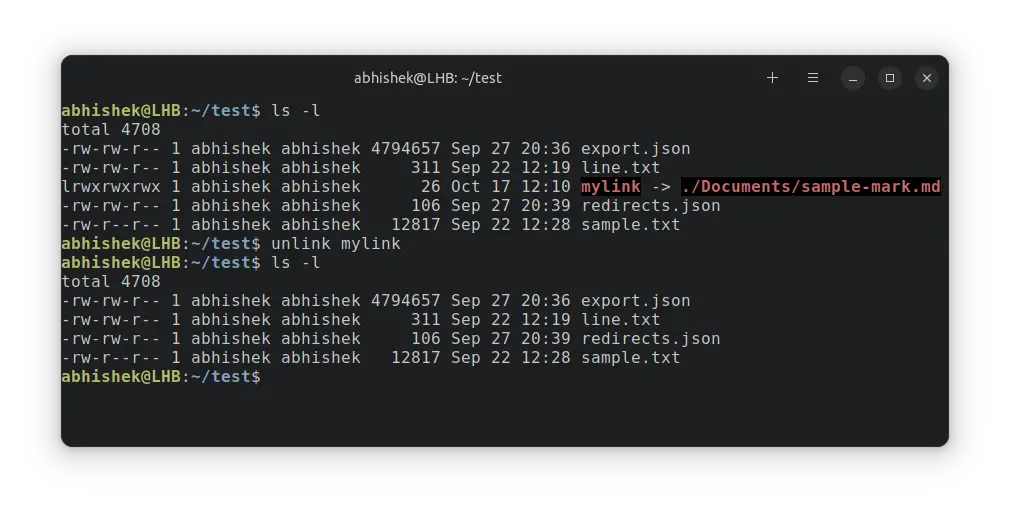
The unlink command is pretty limited. You can not delete multiple links at once with it.
Delete soft link to a directory
You can create soft links to both files and directories. While you have to remove a directory with -r option, the link to a directory doesn’t need that.
Use it the same way you used to delete link to a file:
rm name_or_path_to_link_to_dirDon’t use trailing slashes with the link else it will complain.
abhishek@LHB:~/test$ rm link_to_dir/ rm: cannot remove 'link_to_dir/': Is a directoryHere’s an example of deleting a soft link to directory.
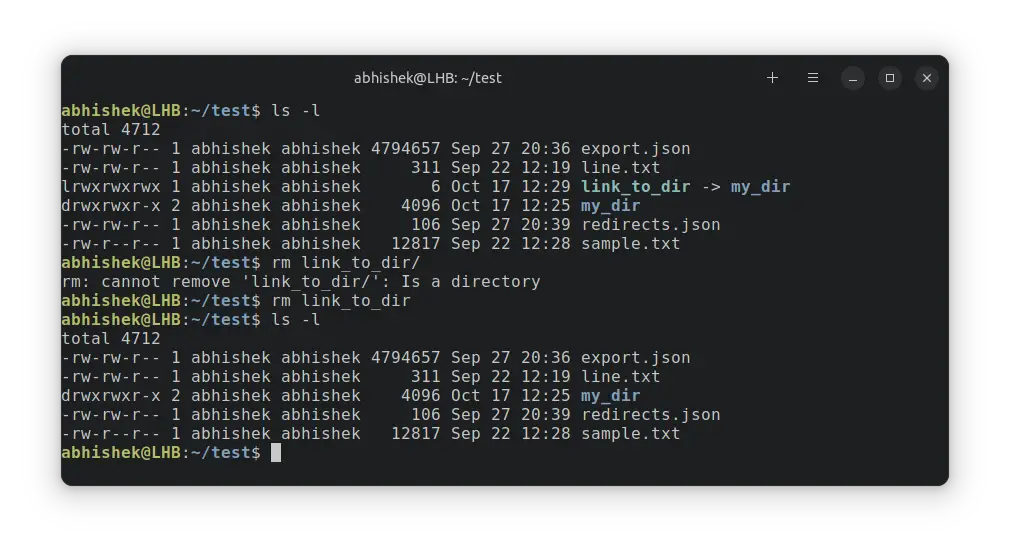
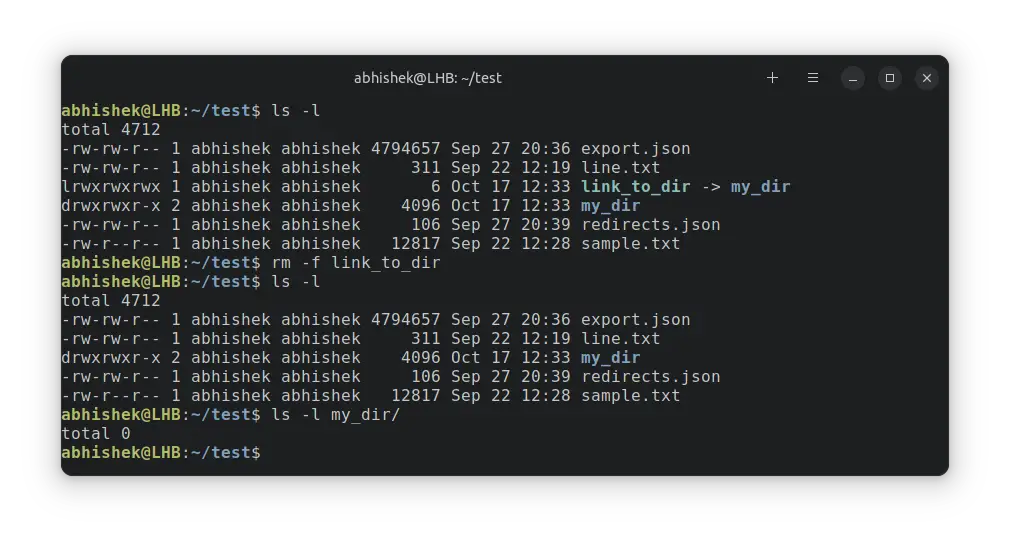
Never force remove a link to a directory with rm -f because it will delete the contents of the directory.
Deleting hard links
Unlike soft links, a hard link is almost indistinguishable from the original file. You can only notice it with the inode number.
Can you identify the hard link and the file in the output? Pay attention to the inode numbers.
abhishek@LHB:~/test$ ls -li total 4716 544057 -rw-rw-r-- 1 abhishek abhishek 4794657 Sep 27 20:36 export.json 544884 -rw-rw-r-- 2 abhishek abhishek 311 Sep 22 12:19 hard_link 544884 -rw-rw-r-- 2 abhishek abhishek 311 Sep 22 12:19 line.txt 1181365 drwxrwxr-x 2 abhishek abhishek 4096 Oct 17 12:33 my_dir 546419 -rw-rw-r-- 1 abhishek abhishek 106 Sep 27 20:39 redirects.json And deleting a hard link is the same as deleting a file.
rm path_or_name_of_hard_linkWhat about deleting the linked file?
I can’t think of a scenario where you would want to delete the original file while removing the soft link automatically.
Well, you can follow a symbolic link to get to the original file and use it to remove the file.
rm "$(readlink '/path/to/link')" /path/to/link If you delete a file, keeping the soft link intact, the link becomes a broken or dangling link.
Conclusion
While the unlink command exists, I recommend using the rm command for deleting symbolic links. You are already familiar with it and use this command for removing files. Use it for links as well. It’s one less command to remember.
Как создавать и удалять симлинки

Обновлено: 12.03.2023 Опубликовано: 25.01.2017
 Windows
Работы с символьными ссылками в Windows ведутся из командной строки.
Синтаксис
Симлинк на файл
mklink C:\Users\dmosk\Desktop\cmd.exe C:\Windows\system32\cmd.exe
* в данном примере на рабочем столе пользователя dmosk будет создан симлинк на файл cmd.exe.
Симлинк на директорию
mklink /D «C:\Users\dmosk\Desktop\Сетевая папка» \\dmosk.local\share
* в примере создается симлинк на сетевую папку \\dmosk.local\share
** так как в названии папки есть пробел, путь заключен в кавычки.
Для создания ссылки на папку доступен также ключ /J. Созданная таким образом ссылка будет по некоторым особенностям напоминать жесткую ссылку.
Удалить симлинк
В Windows его можно удалить в проводнике, как обычный файл или папку.
Или использовать командную строку.
Для папки:
rmdir «C:\Users\dmosk\Desktop\Сетевая папка»
Для файла:
Разрешить симлинки в Windows
Если при попытке перейти по символьной ссылке мы получим ошибку «Символическая ссылка не может быть загружена, так как ее тип отключен», открываем командную строку от администратора и вводим команду:
fsutil behavior set SymlinkEvaluation L2L:1 R2R:1 L2R:1 R2L:1
Если это не помогло, пробуем создать симлинк с ключом /J.
 Linux и FreeBSD
Создание
В системах на базе Linux (например, Ubuntu или CentOS) и FreeBSD симлинк для каталога и файла создаются одинаково:
ln -s /usr/share/nginx/html/index.php /home/dmosk/
ln -s /usr/share/nginx/html /home/dmosk/
* в первом примере создана символьная ссылка в домашней директории пользователя dmosk на файл index.php; во втором — на каталог /usr/share/nginx/html.
Удаление
Также используется одна команда:
Решение возможных проблем
При работе с симлинками мы можем сталкиваться с различными проблемами. Я рассмотрю те, с которыми приходилось сталкиваться мне.
ln: failed to create symbolic link . Function not implemented
При попытке создать симлинк мы можем получить ошибку Function not implemented, например:
ln: failed to create symbolic link ‘/etc/pve/nodes/pve/fullchain.pem’: Function not implemented
Причина: файловая система, на которой мы хотим создать файл не поддерживает симлинки. Посмотреть файловую систему подмонтированных разделов можно командой:
Решение: как правило, решения зависит от используемой файловой системы и ее драйвера. Но, обычно, решения у проблемы нет и нужно искать методы работы без использования символьных ссылок.
Команда Ln в Linux (создание символических ссылок)
Символическая ссылка, также известная как символическая ссылка или программная ссылка, представляет собой файл особого типа, который указывает на другой файл или каталог.
В этом руководстве мы расскажем, как использовать команду ln для создания символических ссылок.
Типы ссылок
В системах Linux / UNIX есть два типа ссылок:
- Жесткие ссылки . Вы можете рассматривать жесткую ссылку как дополнительное имя для существующего файла. Жесткие ссылки связывают два или более имен файлов с одним и тем же индексом . Вы можете создать одну или несколько жестких ссылок для одного файла. Невозможно создать жесткие ссылки для каталогов и файлов в другой файловой системе или разделе.
- Мягкие ссылки . Программная ссылка — это что-то вроде ярлыка в Windows. Это косвенный указатель на файл или каталог. В отличие от жесткой ссылки, символическая ссылка может указывать на файл или каталог в другой файловой системе или разделе.
Как использовать команду ln
ln — это утилита командной строки для создания ссылок между файлами. По умолчанию команда ln создает жесткие ссылки. Чтобы создать символическую ссылку, используйте параметр -s ( —symbolic ).
Синтаксис команды ln для создания символических ссылок следующий:
ln -s [OPTIONS] FILE LINK - Если заданы и FILE и LINK , ln создаст ссылку из файла, указанного в качестве первого аргумента ( FILE ), на файл, указанный в качестве второго аргумента ( LINK ).
- Если в качестве аргумента указан только один файл или вторым аргументом является точка ( . ), ln создаст ссылку на этот файл в текущем рабочем каталоге . Имя символической ссылки будет таким же, как имя файла, на который она указывает.
По умолчанию в случае успеха ln не производит никакого вывода и возвращает ноль.
Создание символической ссылки к файлу
Чтобы создать символическую ссылку на данный файл, откройте терминал и введите:
ln -s source_file symbolic_link Замените source_file именем существующего файла, для которого вы хотите создать символическую ссылку, а symbolic_link — именем символической ссылки.
Параметр symbolic_link необязательный. Если вы не укажете символическую ссылку, команда ln создаст новую ссылку в вашем текущем каталоге:
В следующем примере мы создаем символическую ссылку my_link.txt на файл my_file.txt :
ln -s my_file.txt my_link.txtЧтобы убедиться, что символическая ссылка была успешно создана, используйте команду ls :
ls -l my_link.txtРезультат будет выглядеть примерно так:
lrwxrwxrwx 1 linuxize users 4 Nov 2 23:03 my_link.txt -> my_file.txt Символ l — это флаг типа файла, представляющий символическую ссылку. Символ -> показывает файл, на который указывает символическая ссылка.
Создание символических ссылок на каталог
Команда для создания символической ссылки на каталог такая же, как и при создании символической ссылки на файл. Укажите имя каталога в качестве первого параметра и символическую ссылку в качестве второго параметра.
Например, если вы хотите создать символическую ссылку из /mnt/my_drive/movies каталог ~/my_movies вы должны запустить:
ln -s /mnt/my_drive/movies ~/my_movies Замена символических ссылок
Если вы попытаетесь создать уже существующую символическую ссылку , команда ln выведет сообщение об ошибке.
ln -s my_file.txt my_link.txtln: failed to create symbolic link 'my_link.txt': File exists Чтобы перезаписать путь назначения символической ссылки, используйте параметр -f ( —force ).
ln -sf my_file.txt my_link.txtУдаление символических ссылок
Чтобы удалить / удалить символические ссылки, используйте команду unlink или rm .
Синтаксис unlink очень прост:
unlink symlink_to_remove Удаление символической ссылки с помощью команды rm такое же, как и при удалении файла:
rm symlink_to_remove Независимо от того , какой команды вы используете, при удалении символической ссылки не добавляет / слэша в конце его названия.
Если вы удалите или переместите исходный файл в другое место, символический файл останется висящим (сломанным), и его следует удалить.
Выводы
Чтобы создать символическую ссылку в Linux, используйте команду ln с параметром -s .
Для получения дополнительной информации о команде ln посетите страницу руководства ln или введите man ln в терминале.
Если у вас есть какие-либо вопросы или отзывы, не стесняйтесь оставлять комментарии.
How to remove symbolic link
permission denied: You do know you need sudo if you want to use it in a situation you do not own the file? That goes for ‘rm’ too.
Jan 3, 2014 at 6:32
i did it rm /usr/bin/python and removed my python from ubuntu :S
– user433546
Jul 23, 2016 at 19:17
@RaheelKhan no you did -not- You removed a SYMLINK. Python relies on this symlink though. If you recreate that symlink python will be back.
Jul 23, 2016 at 19:29
I try this command but it seems that my file has been removed, I don’t want to remove my file
Dec 11, 2017 at 15:52
You can try the unlink command as well.
unlink is a similar command to rm . Therefore rm will work same as unlink
70.1k 56 56 gold badges 218 218 silver badges 328 328 bronze badges
answered Nov 6, 2014 at 13:18
645 6 6 silver badges 6 6 bronze badges
unlink has nothing to do with symlinks in particular. See serverfault.com/a/38817/64085
Apr 15, 2015 at 16:24
While you are correct that unlink will remove the symlink, it is not an alias of rm . They are different, if ever so slightly. For one you cannot pass multiple arguments to unlink
Feb 17, 2020 at 19:49
Suppose you were trying to do:
sudo ln -s /usr/share/phpmyadmin /var/www/phpmyadmin/ but accidentally did:
sudo ln -s /usr/share/somethingelse /var/www/phpmyadmin/ To correct it simply navigate to the folder where the link is and unlink
cd /var/www/phpmyadmin/ ~:# unlink somethingelse 9,359 17 17 gold badges 57 57 silver badges 80 80 bronze badges
answered Nov 2, 2015 at 2:01
Metals Marata Metals Marata
197 1 1 silver badge 5 5 bronze badges
You can use the following to remove the symbolic link
sudo rm /usr/share/php,yad,in Explanation
- rm is the terminal command to remove a file. See rm —help for more options that it can take.
- sudo is used because the symbolic link was created with sudo . The file therefore belongs to root and your normal user will not have permission to edit/remove it (you would be able to force this if you had write permission on the directory, which would not be the case here).
Extra
Also see this post and my comment to the first answer to access phpmyadmin when getting a not found error after install.
70.1k 56 56 gold badges 218 218 silver badges 328 328 bronze badges
answered Jan 3, 2014 at 9:32
1,699 14 14 silver badges 25 25 bronze badges
A small caveat I found was that I was trying to run rm and unlink on a symlink and I was getting an error that it was a directory.
$ rm folder_name/ rm: cannot remove ‘folder_name/’: Is a directory $ unlink folder_name/ unlink: cannot unlink ‘folder_name/’: Not a directory To remove the symlink, I used unlink folder_name . It was failing as there was a trailing / which causes the file to appear to be a directory.