CPUID CPU-Z что это за программа и нужна ли она?

Всем приветандр Поговорим о такой программе как CPU-Z, насколько она хороша и для чего она нужна. Значит у всех нас есть компьютеры, на которых стоит винда. Это все хорошо, но проблема в том, что сама винда особой инфы о железе выдать не может, правда почему, я не особо понимаю. Разве сложно было уже в новой Windows 10 придумать инструмент для вытягивания полной инфы о железе?
Ну так вот, прога CPU-Z как раз такая, она вытягивает подробную инфу, но только из процессора. Есть другие проги, например Aida64 (платная), которые могут показать инфу вообще о всех устройствах, которые у вас стоят на компе.
Мне кажется, что CPU-Z это лучшая программа, чтобы быстро узнать инфу о процессоре, при этом всю самую главную инфу. В чем ее плюсы, почему мне кажется что она лучшая? Ну, смотрите сами, она не глючит, не имеет никаких косяков, работает стабильно, быстро и при этом она бесплатная. То есть просто невероятно полезная и нужная прога.
Ну что вы теперь думаете? Правда крутая эта маленькая, да удаленькая прога CPU-Z! Итак, смотрите, вот у меня стоит процессор Pentium G3220 (кстати неплохой), вот какую инфу показывает о нем прога CPU-Z:

Ну и что тут она показывает, подумаете вы? Я сейчас постараюсь все рассказать. Значит смотрите, в самом вверху написано что это за модель у меня, это поле Name. Потом идет Code Name, это на какой микроархитектуре сделан процессор. Потом идет Max TDP, это сколько процессор потребляет энергии, ну или сколько выделяет тепла. Package, это какой сокет у процессора. Ну в принципе и так все понятно, внизу также находится важная инфа: Core Speed, это частота проца, а Cores и Threads, это ядра и потоки (в самом низу).
То есть как видите, все самое главное и нужное тут есть. Вы всегда можете быстро запустить эту прогу и узнать инфу о своем проце
Есть еще кое что интересное и я это обязан вам показать, хотя не знаю, будет вам это интересно или нет. В общем в этой проге CPU-Z можно также узнать когда была выпущена планка памяти, представляете? Да, да, это правда и есть такая инфа, она специально так бы сказать закладывается в саму планку еще на этапе производства.
На планке памяти есть такая область, которая называется SPD, вот именно в этой области и хранится всякая интересная инфа. Вот эта вкладка:

Только самое главное это выбрать планку памяти, о которой вы хотите узнать. У меня стоит одна 8-гигова DDR3 планка, и стоит она именно в Slot #4, поэтому я его и выбрал (в левом верхнем углу). Ну и там на картинке есть такое как Week/Year, вот тут и указана неделя/год, как видите моя планка сделана в 30-тую неделю 2014-го года.
Еще есть интересная инфа в Manufacturer, там указан производитель памяти. У меня вот память Hynix, там написано что производитель Hyundai Electronics, ну а это и есть Hynix.
Как удалить программу CPU-Z с компьютера полностью?
Ну не знаю почему вы хотите удалить CPU-Z, но наверно на то есть серьезная причина. Лично мне прога нравится, я ее не стал бы удалять, комп ну никак она не может грузить. Но на всякий случай я все таки покажу как удалить CPU-Z. У меня стоит Windows 10, но способ подходит и для Windows 7! Значит зажимаете кнопки Win + R и пишите туда такую команду как:

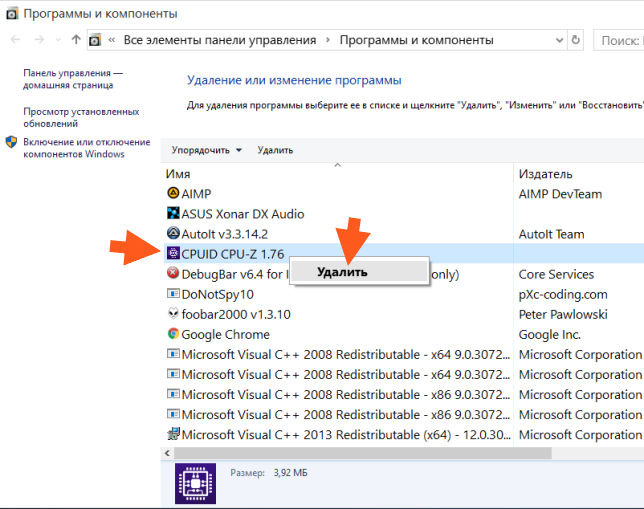
Откроется окно с установленным софтом, находите тут CPUID CPU-Z (у меня вот версия 1.76), нажимаете правой кнопкой и выбираете Удалить:
Потом будет такое окошко, тут нажимаете Да:

И через секунды две CPU-Z будет полностью удалена с вашего компа, о чем будет сказано вот в таком сообщении:

Ну вот ребята на этом и все, надеюсь что все вам тут было понятно и данная инфа вам таки пригодилась. Удачи вам в жизни и чтобы все у вас было хорошо
CPUID — System & hardware benchmark, monitoring, reporting
Hi! For some reason we can’t display an ad here, probably because of an ad blocker.
We have full respect if you want to run an ad blocker, but keeping this website and related softwares free depend on ads.
We would appreciate if you add us to your white list or consider donating via Paypal.
Thank you!
CPU-Z
System information software
- Processor name and number, codename, process, package, cache levels.
- Mainboard and chipset.
- Memory type, size, timings, and module specifications (SPD).
- Real time measurement of each core’s internal frequency, memory frequency.
- CPU-Z is fully supported on Windows® 11.
The CPU-Z‘s detection engine is now available for customized use through the CPUID System Information Development Kit, a professional SDK built for the Microsoft Windows & Android.
MY ACCOUNT
Hi! For some reason we can’t display an ad here, probably because of an ad blocker.
We have full respect if you want to run an ad blocker, but keeping this website and related softwares free depend on ads.
We would appreciate if you add us to your white list or consider donating via Paypal if ads really bother you.
Thank you!
CLASSIC VERSIONS
Version 2.09 for windows® x86/x64
- Improved support of Intel Meteor Lake and preliminary support of Arrow Lake.
- AMD Hawk Point and Hawk Point 2 (Zen 4/Zen 4c).
- NVIDIA RTX 4070 SUPER (AD104-350).
- The benchmark can now be ran on a single coreset/cluster.
VINTAGE VERSION
Version 1.04 for windows® 95/98
- VIA Apollo MVP4 (VT8501) chipset.
- VIA Apollo VPX (VT82C580) chipset.
CUSTOM VERSIONS
Customized version for windows®
- Version 2.08
COOLER MASTER
32 and 64-bit versions
ASUS ROG
32 and 64-bit versions
MSI Gaming
32 and 64-bit versions
Gigabyte AORUS
32 and 64-bit versions
Gigabyte
32 and 64-bit versions
Asrock Phantom
32 and 64-bit versions
Asrock Taichi
32 and 64-bit versions
Asrock Formula
32 and 64-bit versions
LATEST VALIDATION
informatic@myreto.net January 24th, 2024
Reached 4850 MHz with a AMD Ryzen 7 7800X3D MB: MSI MAG X670E TOMAHAWK WIFI (MS-7E12) — RAM: 65536MB Corsair
Anonymous January 24th, 2024
Reached 3598 MHz with a AMD Ryzen 3 1300X MB: MSI B450M-A PRO MAX (MS-7C52) — RAM: 16384MB Patriot Memory
Anonymous January 24th, 2024
Reached 5342 MHz with a AMD Ryzen 5 7600 MB: Gigabyte B650M GAMING X AX — RAM: 32768MB Corsair
GIBBERSTATION January 24th, 2024
Reached 3775 MHz with a AMD Ryzen 7 5800X MB: Asus ROG STRIX B550-F GAMING (WI-FI) — RAM: 32768MB Corsair
Hi! For some reason we can’t display an ad here, probably because of an ad blocker.
We have full respect if you want to run an ad blocker, but keeping this website and related softwares free depend on ads.
We would appreciate if you add us to your white list or consider donating via Paypal if ads really bother you.
Thank you!
Install and Remove
- The installation creates program entries in the start menu and on the desktop.
- It installs the right binary (x32 or x64) depending on your system.
Installation
Run the setup executable file, and let it guide you for the installation process.
Removal
You can remove the program either from the Add or Remove Programs window (from Settings, Control Panel), or choose Uninstall CPU-Z from Start menu, Programs, CPUID, CPU-Z.
Configuration file
CPU-Z uses a configuration file, cpuz.ini, that allows to set several parameters for the program. The cpuz.ini file must be in the same directory as cpuz.exe. Note that the use of this file is optional. If no .ini file is found, default values will be used. It looks like this : [CPU-Z]
TextFontName=Verdana
TextFontSize=13
TextFontColor=000060
LabelFontName=Verdana
LabelFontSize=13
PCI=1
MaxPCIBus=256
DMI=1
Sensor=1
SMBus=1
Display=1
UseDisplayAPI=1
BusClock=1
Chipset=1
SPD=1
CheckUpdates=1
| TextFontName | Font used for the information boxes. |
| TextFontSize | Size of the font used for the information boxes. |
| TextFontColor | Color of the font used for the information boxes. Value is expressed in hexadecimal, and consists in a classic Red/Green/Blue color code : RRGGBB |
| LabelFontName | Font used for the label boxes. |
| LabelFontSize | Size of the font used for the label boxes. |
| Sensor | Set to OFF (or 0) disables sensor chip detection and voltages measurement. |
| DMI | Set to OFF disables the DMI (Desktop Management Interface) information. This concerns BIOS vendor and version, motherboard vendor and revision. |
| PCI | Set to OFF disables the PCI information. This disables chipset, SPD and, depending on the hardware, sensoring information. |
| MaxPCIBus | Sets the maximum PCI bus to scan. Default value is 256. |
| SMBus | Set to OFF (or 0) disables SMBus information : SPD, and, depending on the hardware, sensoring information. |
| Display | Set to OFF (or 0) disables the video card information reported in the validator. |
| ShowDutyCycles | Set to 1, switches the alternate clock computation method based on duty cycles. 0 to disable. |
| UseDisplayAPI | Set to 1, uses the display driver to read the display adapters information. 0 to disable. |
Application parameters
| -txt=report | Launch CPU-Z in ghost mode : no interface appears, the register dump (report.txt) is automatically created.Example:cpuz.exe -txt=c:\mydirectory\mysystem: runs CPU-Z in ghost mode. Report file mysystem.txt is automatically generated in directory c:\mydirectory. |
| -html=report | Same as «-txt» but generates the html report file. |
| -core=id | Displays clock speed of core #id (id can be set from 0 to «Number of cores minus one»). It is then possible to check the speed of each core by running as many instances of CPU-Z as necessary, using batch files for example: cpuz0.bat: cpuz.exe -core=0 cpuz1.bat: cpuz.exe -core=1 Note that the current core can be dynamically selected by right-clicking in the CPU page, and select the target core. This feature is available from version 1.42. |
| -console | Generates output in a command prompt (Windows XP only). |
Special Keys
The F5 key allows to save a screenshot as a bmp file in the application directory. These are named cpu.bmp, cache.bmp, mainboard.bmp and memory.bmp.
The F6 key copies the current page in the clipboard.
The F7 key saves the validation cvf file in the current directory.
The F9 key switches between CPU clock computation methods.
Cache Latency Computation
The cache latency computation tool allows to gather information about the cache hierarchy of the system. For each cache level, it provides its size and its latency. Please note that code caches are not reported.The latency tool can be downloaded here.
CPU-Z reports my CPU running below its clock specification or the clock speed is varying.
This is the effect of the CPU power reduction mechanism : C1E (Enhanced Halt State) and/or EIST (Enhanced Intel SpeedStep Technology) for Intel CPUs, Cool’n’Quiet and or PowerNow! for AMD CPUs. Load your system and you will see the frequency increase to its nominal value.
CPU-Z reports a wrong CPU vcore.
Please download HWMonitor then save monitoring data (menu file -> save monitoring data) and send back the file to us via the bug report form.
CPU-Z causes a general protection fault, or freezes my system, or causes a blue screen.
edit cpuz.ini, and replace: DMI=1
Sensor=1
SMBus=1
Display=1
UseDisplayAPI=1 with:
DMI=0
Sensor=0
SMBus=0
Display=0
UseDisplayAPI=0 Then run cpu-z again. If it works, restore the «1» one by one, until the problem occurs again. Then send an email and mentioning which «1» is responsible.
Why does CPU-Z misreport my memory module specification ? For example, my DDR2-800 is reported as DDR2-667.
The memory theorical bandwidth is computed using the module access time information for the maximal CAS# latency value, included in the SPD area. If the computed bandwidth is lower than the one specified on the memory module, that means that the SPD information on the module is not correctly programmed, or most likely that the bandwidth is not given at the default memory voltage, but at a voltage defined in an extended profile (EPP or XMP).
CPUID — System & hardware benchmark, monitoring, reporting
Hi! For some reason we can’t display an ad here, probably because of an ad blocker.
We have full respect if you want to run an ad blocker, but keeping this website and related softwares free depend on ads.
We would appreciate if you add us to your white list or consider donating via Paypal.
Thank you!
CPU-Z
System information software
- Processor name and number, codename, process, package, cache levels.
- Mainboard and chipset.
- Memory type, size, timings, and module specifications (SPD).
- Real time measurement of each core’s internal frequency, memory frequency.
- CPU-Z is fully supported on Windows® 11.
The CPU-Z‘s detection engine is now available for customized use through the CPUID System Information Development Kit, a professional SDK built for the Microsoft Windows & Android.
MY ACCOUNT
Hi! For some reason we can’t display an ad here, probably because of an ad blocker.
We have full respect if you want to run an ad blocker, but keeping this website and related softwares free depend on ads.
We would appreciate if you add us to your white list or consider donating via Paypal if ads really bother you.
Thank you!
CLASSIC VERSIONS
Version 2.09 for windows® x86/x64
- Improved support of Intel Meteor Lake and preliminary support of Arrow Lake.
- AMD Hawk Point and Hawk Point 2 (Zen 4/Zen 4c).
- NVIDIA RTX 4070 SUPER (AD104-350).
- The benchmark can now be ran on a single coreset/cluster.
VINTAGE VERSION
Version 1.04 for windows® 95/98
- VIA Apollo MVP4 (VT8501) chipset.
- VIA Apollo VPX (VT82C580) chipset.
CUSTOM VERSIONS
Customized version for windows®
- Version 2.08
COOLER MASTER
32 and 64-bit versions
ASUS ROG
32 and 64-bit versions
MSI Gaming
32 and 64-bit versions
Gigabyte AORUS
32 and 64-bit versions
Gigabyte
32 and 64-bit versions
Asrock Phantom
32 and 64-bit versions
Asrock Taichi
32 and 64-bit versions
Asrock Formula
32 and 64-bit versions
LATEST VALIDATION
informatic@myreto.net January 24th, 2024
Reached 4850 MHz with a AMD Ryzen 7 7800X3D MB: MSI MAG X670E TOMAHAWK WIFI (MS-7E12) — RAM: 65536MB Corsair
Anonymous January 24th, 2024
Reached 3598 MHz with a AMD Ryzen 3 1300X MB: MSI B450M-A PRO MAX (MS-7C52) — RAM: 16384MB Patriot Memory
Anonymous January 24th, 2024
Reached 5342 MHz with a AMD Ryzen 5 7600 MB: Gigabyte B650M GAMING X AX — RAM: 32768MB Corsair
GIBBERSTATION January 24th, 2024
Reached 3775 MHz with a AMD Ryzen 7 5800X MB: Asus ROG STRIX B550-F GAMING (WI-FI) — RAM: 32768MB Corsair
Hi! For some reason we can’t display an ad here, probably because of an ad blocker.
We have full respect if you want to run an ad blocker, but keeping this website and related softwares free depend on ads.
We would appreciate if you add us to your white list or consider donating via Paypal if ads really bother you.
Thank you!
Install and Remove
- The installation creates program entries in the start menu and on the desktop.
- It installs the right binary (x32 or x64) depending on your system.
Installation
Run the setup executable file, and let it guide you for the installation process.
Removal
You can remove the program either from the Add or Remove Programs window (from Settings, Control Panel), or choose Uninstall CPU-Z from Start menu, Programs, CPUID, CPU-Z.
Configuration file
CPU-Z uses a configuration file, cpuz.ini, that allows to set several parameters for the program. The cpuz.ini file must be in the same directory as cpuz.exe. Note that the use of this file is optional. If no .ini file is found, default values will be used. It looks like this : [CPU-Z]
TextFontName=Verdana
TextFontSize=13
TextFontColor=000060
LabelFontName=Verdana
LabelFontSize=13
PCI=1
MaxPCIBus=256
DMI=1
Sensor=1
SMBus=1
Display=1
UseDisplayAPI=1
BusClock=1
Chipset=1
SPD=1
CheckUpdates=1
| TextFontName | Font used for the information boxes. |
| TextFontSize | Size of the font used for the information boxes. |
| TextFontColor | Color of the font used for the information boxes. Value is expressed in hexadecimal, and consists in a classic Red/Green/Blue color code : RRGGBB |
| LabelFontName | Font used for the label boxes. |
| LabelFontSize | Size of the font used for the label boxes. |
| Sensor | Set to OFF (or 0) disables sensor chip detection and voltages measurement. |
| DMI | Set to OFF disables the DMI (Desktop Management Interface) information. This concerns BIOS vendor and version, motherboard vendor and revision. |
| PCI | Set to OFF disables the PCI information. This disables chipset, SPD and, depending on the hardware, sensoring information. |
| MaxPCIBus | Sets the maximum PCI bus to scan. Default value is 256. |
| SMBus | Set to OFF (or 0) disables SMBus information : SPD, and, depending on the hardware, sensoring information. |
| Display | Set to OFF (or 0) disables the video card information reported in the validator. |
| ShowDutyCycles | Set to 1, switches the alternate clock computation method based on duty cycles. 0 to disable. |
| UseDisplayAPI | Set to 1, uses the display driver to read the display adapters information. 0 to disable. |
Application parameters
| -txt=report | Launch CPU-Z in ghost mode : no interface appears, the register dump (report.txt) is automatically created.Example:cpuz.exe -txt=c:\mydirectory\mysystem: runs CPU-Z in ghost mode. Report file mysystem.txt is automatically generated in directory c:\mydirectory. |
| -html=report | Same as «-txt» but generates the html report file. |
| -core=id | Displays clock speed of core #id (id can be set from 0 to «Number of cores minus one»). It is then possible to check the speed of each core by running as many instances of CPU-Z as necessary, using batch files for example: cpuz0.bat: cpuz.exe -core=0 cpuz1.bat: cpuz.exe -core=1 Note that the current core can be dynamically selected by right-clicking in the CPU page, and select the target core. This feature is available from version 1.42. |
| -console | Generates output in a command prompt (Windows XP only). |
Special Keys
The F5 key allows to save a screenshot as a bmp file in the application directory. These are named cpu.bmp, cache.bmp, mainboard.bmp and memory.bmp.
The F6 key copies the current page in the clipboard.
The F7 key saves the validation cvf file in the current directory.
The F9 key switches between CPU clock computation methods.
Cache Latency Computation
The cache latency computation tool allows to gather information about the cache hierarchy of the system. For each cache level, it provides its size and its latency. Please note that code caches are not reported.The latency tool can be downloaded here.
CPU-Z reports my CPU running below its clock specification or the clock speed is varying.
This is the effect of the CPU power reduction mechanism : C1E (Enhanced Halt State) and/or EIST (Enhanced Intel SpeedStep Technology) for Intel CPUs, Cool’n’Quiet and or PowerNow! for AMD CPUs. Load your system and you will see the frequency increase to its nominal value.
CPU-Z reports a wrong CPU vcore.
Please download HWMonitor then save monitoring data (menu file -> save monitoring data) and send back the file to us via the bug report form.
CPU-Z causes a general protection fault, or freezes my system, or causes a blue screen.
edit cpuz.ini, and replace: DMI=1
Sensor=1
SMBus=1
Display=1
UseDisplayAPI=1 with:
DMI=0
Sensor=0
SMBus=0
Display=0
UseDisplayAPI=0 Then run cpu-z again. If it works, restore the «1» one by one, until the problem occurs again. Then send an email and mentioning which «1» is responsible.
Why does CPU-Z misreport my memory module specification ? For example, my DDR2-800 is reported as DDR2-667.
The memory theorical bandwidth is computed using the module access time information for the maximal CAS# latency value, included in the SPD area. If the computed bandwidth is lower than the one specified on the memory module, that means that the SPD information on the module is not correctly programmed, or most likely that the bandwidth is not given at the default memory voltage, but at a voltage defined in an extended profile (EPP or XMP).
CPUID — System & hardware benchmark, monitoring, reporting
Hi! For some reason we can’t display an ad here, probably because of an ad blocker.
We have full respect if you want to run an ad blocker, but keeping this website and related softwares free depend on ads.
We would appreciate if you add us to your white list or consider donating via Paypal.
Thank you!
CPU-Z
System information software
- Processor name and number, codename, process, package, cache levels.
- Mainboard and chipset.
- Memory type, size, timings, and module specifications (SPD).
- Real time measurement of each core’s internal frequency, memory frequency.
- CPU-Z is fully supported on Windows® 11.
The CPU-Z‘s detection engine is now available for customized use through the CPUID System Information Development Kit, a professional SDK built for the Microsoft Windows & Android.
MY ACCOUNT
Hi! For some reason we can’t display an ad here, probably because of an ad blocker.
We have full respect if you want to run an ad blocker, but keeping this website and related softwares free depend on ads.
We would appreciate if you add us to your white list or consider donating via Paypal if ads really bother you.
Thank you!
CLASSIC VERSIONS
Version 2.09 for windows® x86/x64
- Improved support of Intel Meteor Lake and preliminary support of Arrow Lake.
- AMD Hawk Point and Hawk Point 2 (Zen 4/Zen 4c).
- NVIDIA RTX 4070 SUPER (AD104-350).
- The benchmark can now be ran on a single coreset/cluster.
VINTAGE VERSION
Version 1.04 for windows® 95/98
- VIA Apollo MVP4 (VT8501) chipset.
- VIA Apollo VPX (VT82C580) chipset.
CUSTOM VERSIONS
Customized version for windows®
- Version 2.08
COOLER MASTER
32 and 64-bit versions
ASUS ROG
32 and 64-bit versions
MSI Gaming
32 and 64-bit versions
Gigabyte AORUS
32 and 64-bit versions
Gigabyte
32 and 64-bit versions
Asrock Phantom
32 and 64-bit versions
Asrock Taichi
32 and 64-bit versions
Asrock Formula
32 and 64-bit versions
LATEST VALIDATION
informatic@myreto.net January 24th, 2024
Reached 4850 MHz with a AMD Ryzen 7 7800X3D MB: MSI MAG X670E TOMAHAWK WIFI (MS-7E12) — RAM: 65536MB Corsair
Anonymous January 24th, 2024
Reached 3598 MHz with a AMD Ryzen 3 1300X MB: MSI B450M-A PRO MAX (MS-7C52) — RAM: 16384MB Patriot Memory
Anonymous January 24th, 2024
Reached 5342 MHz with a AMD Ryzen 5 7600 MB: Gigabyte B650M GAMING X AX — RAM: 32768MB Corsair
GIBBERSTATION January 24th, 2024
Reached 3775 MHz with a AMD Ryzen 7 5800X MB: Asus ROG STRIX B550-F GAMING (WI-FI) — RAM: 32768MB Corsair
Hi! For some reason we can’t display an ad here, probably because of an ad blocker.
We have full respect if you want to run an ad blocker, but keeping this website and related softwares free depend on ads.
We would appreciate if you add us to your white list or consider donating via Paypal if ads really bother you.
Thank you!
Install and Remove
- The installation creates program entries in the start menu and on the desktop.
- It installs the right binary (x32 or x64) depending on your system.
Installation
Run the setup executable file, and let it guide you for the installation process.
Removal
You can remove the program either from the Add or Remove Programs window (from Settings, Control Panel), or choose Uninstall CPU-Z from Start menu, Programs, CPUID, CPU-Z.
Configuration file
CPU-Z uses a configuration file, cpuz.ini, that allows to set several parameters for the program. The cpuz.ini file must be in the same directory as cpuz.exe. Note that the use of this file is optional. If no .ini file is found, default values will be used. It looks like this : [CPU-Z]
TextFontName=Verdana
TextFontSize=13
TextFontColor=000060
LabelFontName=Verdana
LabelFontSize=13
PCI=1
MaxPCIBus=256
DMI=1
Sensor=1
SMBus=1
Display=1
UseDisplayAPI=1
BusClock=1
Chipset=1
SPD=1
CheckUpdates=1
| TextFontName | Font used for the information boxes. |
| TextFontSize | Size of the font used for the information boxes. |
| TextFontColor | Color of the font used for the information boxes. Value is expressed in hexadecimal, and consists in a classic Red/Green/Blue color code : RRGGBB |
| LabelFontName | Font used for the label boxes. |
| LabelFontSize | Size of the font used for the label boxes. |
| Sensor | Set to OFF (or 0) disables sensor chip detection and voltages measurement. |
| DMI | Set to OFF disables the DMI (Desktop Management Interface) information. This concerns BIOS vendor and version, motherboard vendor and revision. |
| PCI | Set to OFF disables the PCI information. This disables chipset, SPD and, depending on the hardware, sensoring information. |
| MaxPCIBus | Sets the maximum PCI bus to scan. Default value is 256. |
| SMBus | Set to OFF (or 0) disables SMBus information : SPD, and, depending on the hardware, sensoring information. |
| Display | Set to OFF (or 0) disables the video card information reported in the validator. |
| ShowDutyCycles | Set to 1, switches the alternate clock computation method based on duty cycles. 0 to disable. |
| UseDisplayAPI | Set to 1, uses the display driver to read the display adapters information. 0 to disable. |
Application parameters
| -txt=report | Launch CPU-Z in ghost mode : no interface appears, the register dump (report.txt) is automatically created.Example:cpuz.exe -txt=c:\mydirectory\mysystem: runs CPU-Z in ghost mode. Report file mysystem.txt is automatically generated in directory c:\mydirectory. |
| -html=report | Same as «-txt» but generates the html report file. |
| -core=id | Displays clock speed of core #id (id can be set from 0 to «Number of cores minus one»). It is then possible to check the speed of each core by running as many instances of CPU-Z as necessary, using batch files for example: cpuz0.bat: cpuz.exe -core=0 cpuz1.bat: cpuz.exe -core=1 Note that the current core can be dynamically selected by right-clicking in the CPU page, and select the target core. This feature is available from version 1.42. |
| -console | Generates output in a command prompt (Windows XP only). |
Special Keys
The F5 key allows to save a screenshot as a bmp file in the application directory. These are named cpu.bmp, cache.bmp, mainboard.bmp and memory.bmp.
The F6 key copies the current page in the clipboard.
The F7 key saves the validation cvf file in the current directory.
The F9 key switches between CPU clock computation methods.
Cache Latency Computation
The cache latency computation tool allows to gather information about the cache hierarchy of the system. For each cache level, it provides its size and its latency. Please note that code caches are not reported.The latency tool can be downloaded here.
CPU-Z reports my CPU running below its clock specification or the clock speed is varying.
This is the effect of the CPU power reduction mechanism : C1E (Enhanced Halt State) and/or EIST (Enhanced Intel SpeedStep Technology) for Intel CPUs, Cool’n’Quiet and or PowerNow! for AMD CPUs. Load your system and you will see the frequency increase to its nominal value.
CPU-Z reports a wrong CPU vcore.
Please download HWMonitor then save monitoring data (menu file -> save monitoring data) and send back the file to us via the bug report form.
CPU-Z causes a general protection fault, or freezes my system, or causes a blue screen.
edit cpuz.ini, and replace: DMI=1
Sensor=1
SMBus=1
Display=1
UseDisplayAPI=1 with:
DMI=0
Sensor=0
SMBus=0
Display=0
UseDisplayAPI=0 Then run cpu-z again. If it works, restore the «1» one by one, until the problem occurs again. Then send an email and mentioning which «1» is responsible.
Why does CPU-Z misreport my memory module specification ? For example, my DDR2-800 is reported as DDR2-667.
The memory theorical bandwidth is computed using the module access time information for the maximal CAS# latency value, included in the SPD area. If the computed bandwidth is lower than the one specified on the memory module, that means that the SPD information on the module is not correctly programmed, or most likely that the bandwidth is not given at the default memory voltage, but at a voltage defined in an extended profile (EPP or XMP).