“PC-Doctor Module” High CPU, Memory, Disk Usage and Slowdown
Occasionally, your system may slow down to a crawl due to the PC-Doctor Module process that runs in the background. When this happens, it can take several seconds to open the Task Manager or any program.
The Task Manager may show that a process named PC-Doctor Module is occupying 100% of CPU and a very high amount of RAM. You may be wondering if PC-Doctor Module is a virus, Malware, or a PUA.
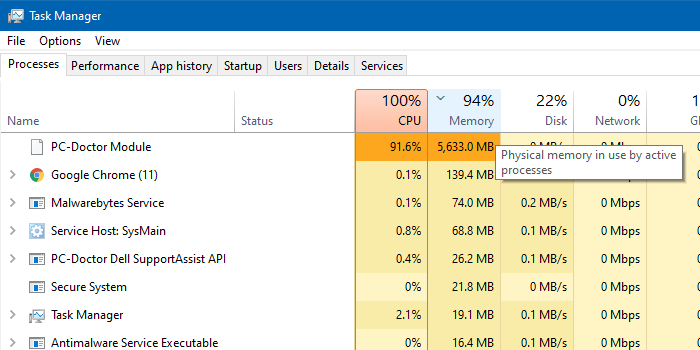
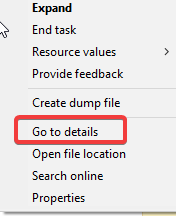
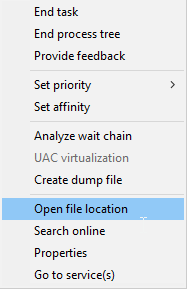
When you right-click on PC-Doctor Module and click Go to details to find the executable file name of the application, you’ll find that the executable file path looks like the following, and runs under NT AUTHORITY\SYSTEM (LocalSystem) account:
C:\Program Files\Dell\SupportAssistAgent\PCDr\SupportAssist\6.0.7193.611\pcdrmemory2.p5x" run -e -lang en -cust dell -var dsc -bd "C:\ProgramData\PCDr\7193" -engineClientPid
This happens in Dell computers that ship with the Dell SupportAssist diagnostics (a.k.a. Dell SupportAssist remediation services) utility.
Dell SupportAssist – Scheduled hardware scan and optimization tasks
PC-Doctor Module is a component of Dell SupportAssist. Dell SupportAssist keeps your PC up to date and running at its best with recommended software and driver updates. It also helps resolve issues quickly by detecting common problems and sending issue details to Dell Technical Support agents on your behalf.
The Dell SupportAssist tool periodically runs a hardware scan and optimization tasks. When it runs the hardware scan, the following components are analyzed:
- Memory, CPU, Hard Drive, DVD-RW Drive, HD Audio Controller, PCI Bridge, PCI Bus, Hub, Network Card, USB Composite, Mouse, USB.
- During this process, the CPU, Memory, and Disk usage would spike up to 100% for a few minutes.
RELATED: Track Disk I/O Activity in Windows Using Task Manager and Resmon
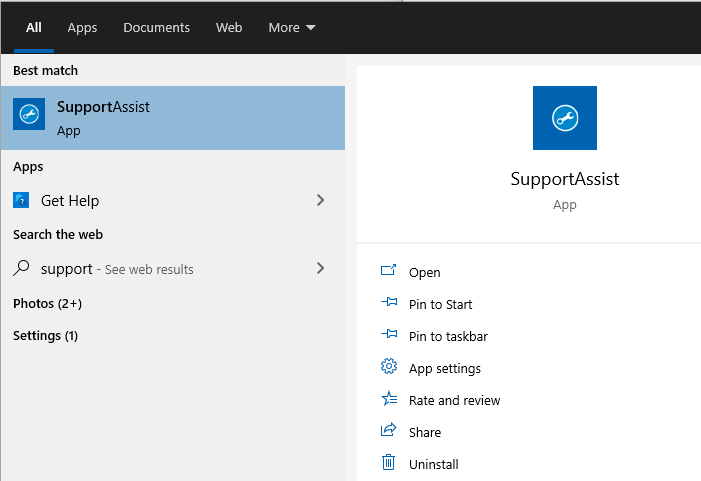
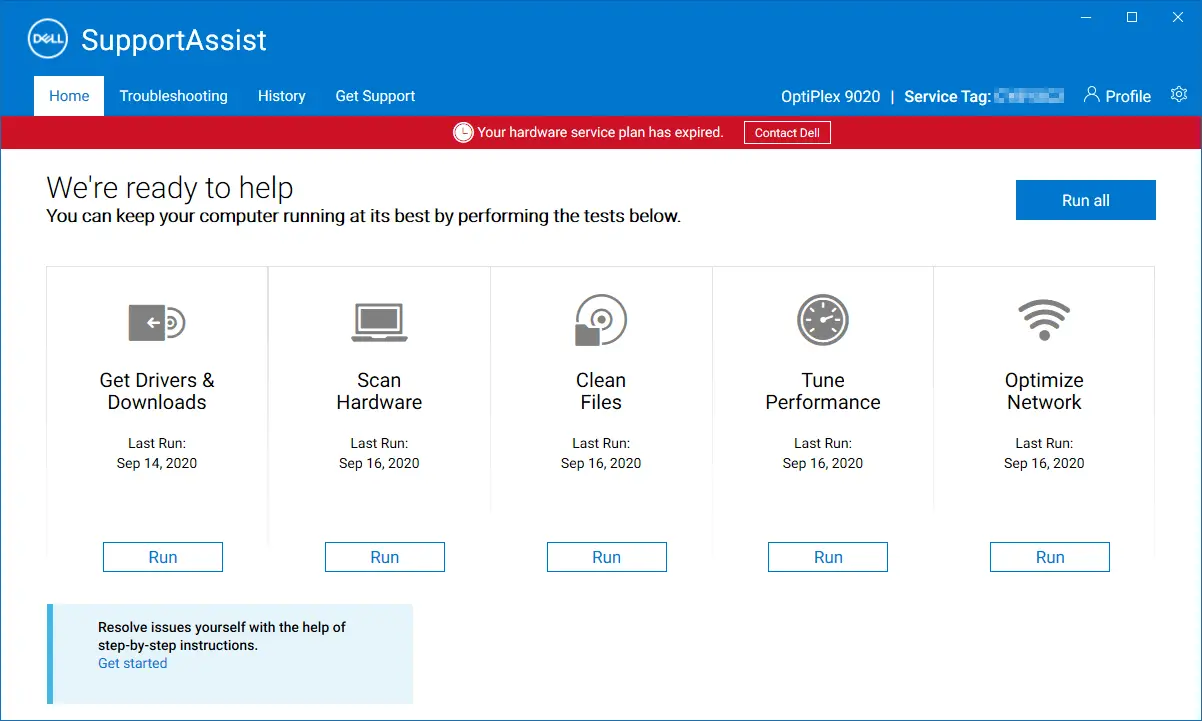
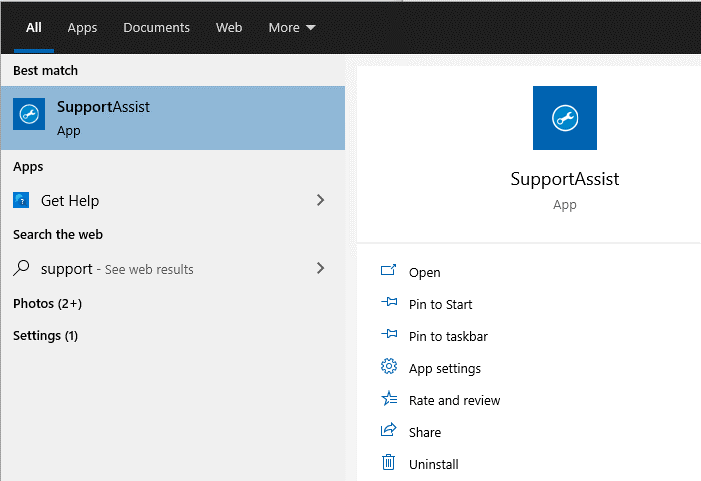
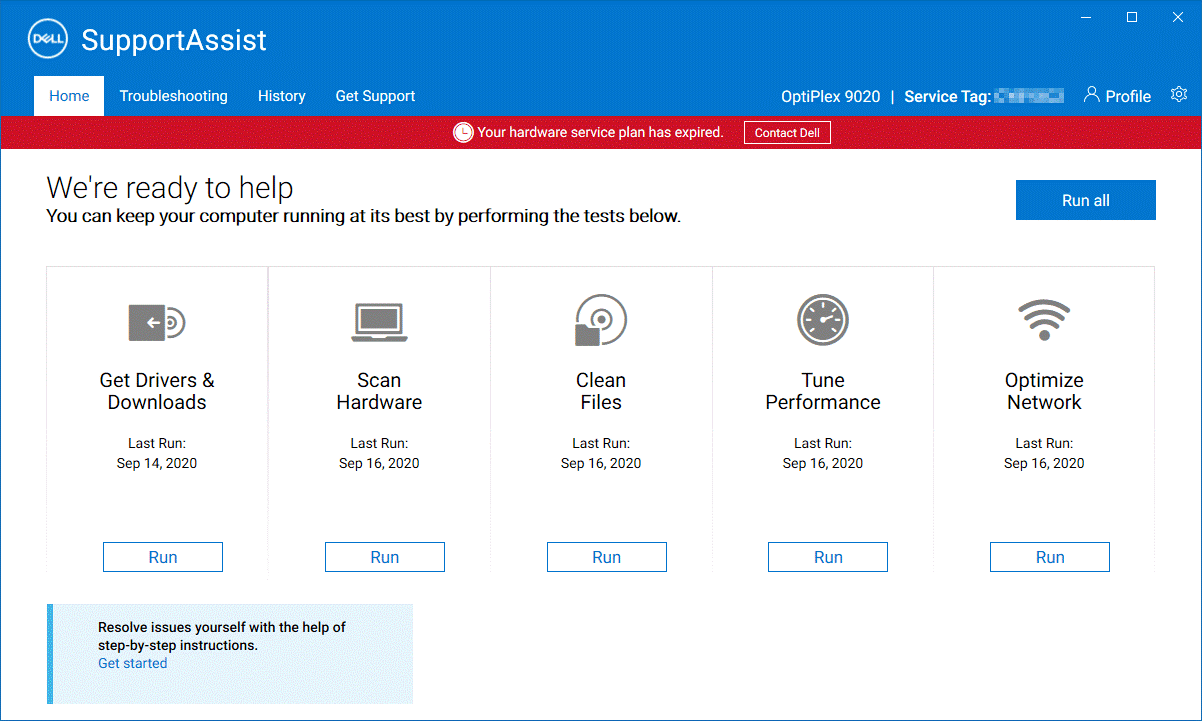
You can open the SupportAssist tool from the Start menu.
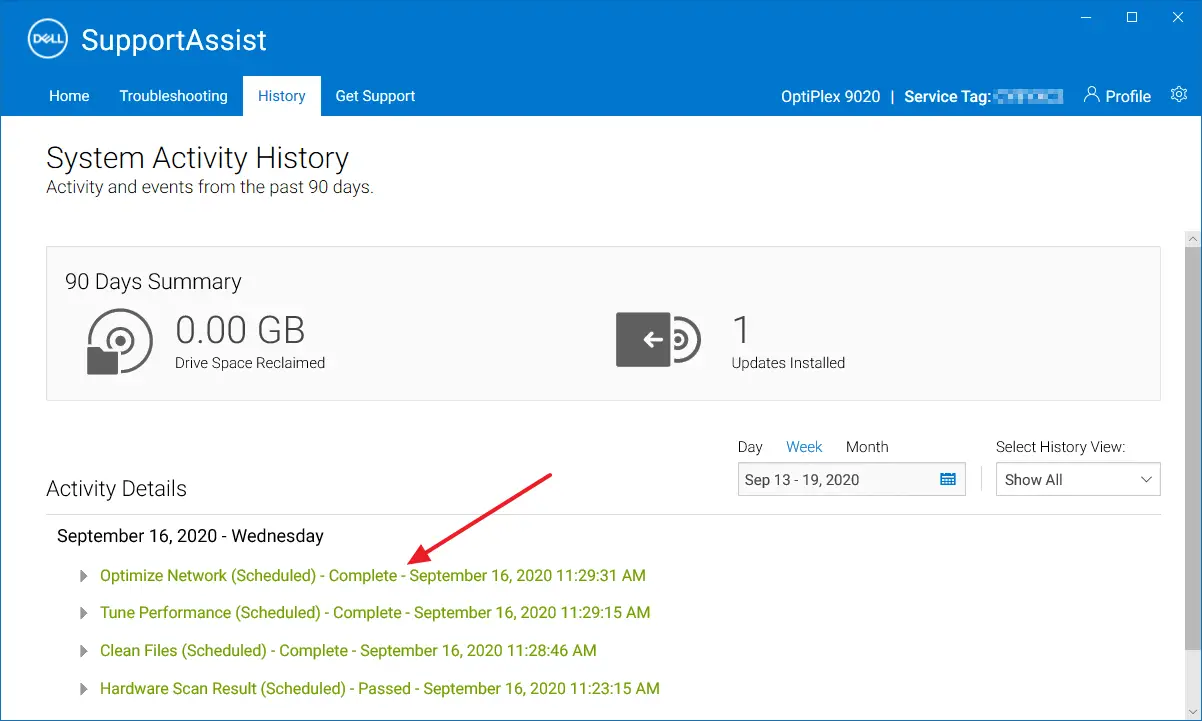
SupportAssist — Scheduled Scans
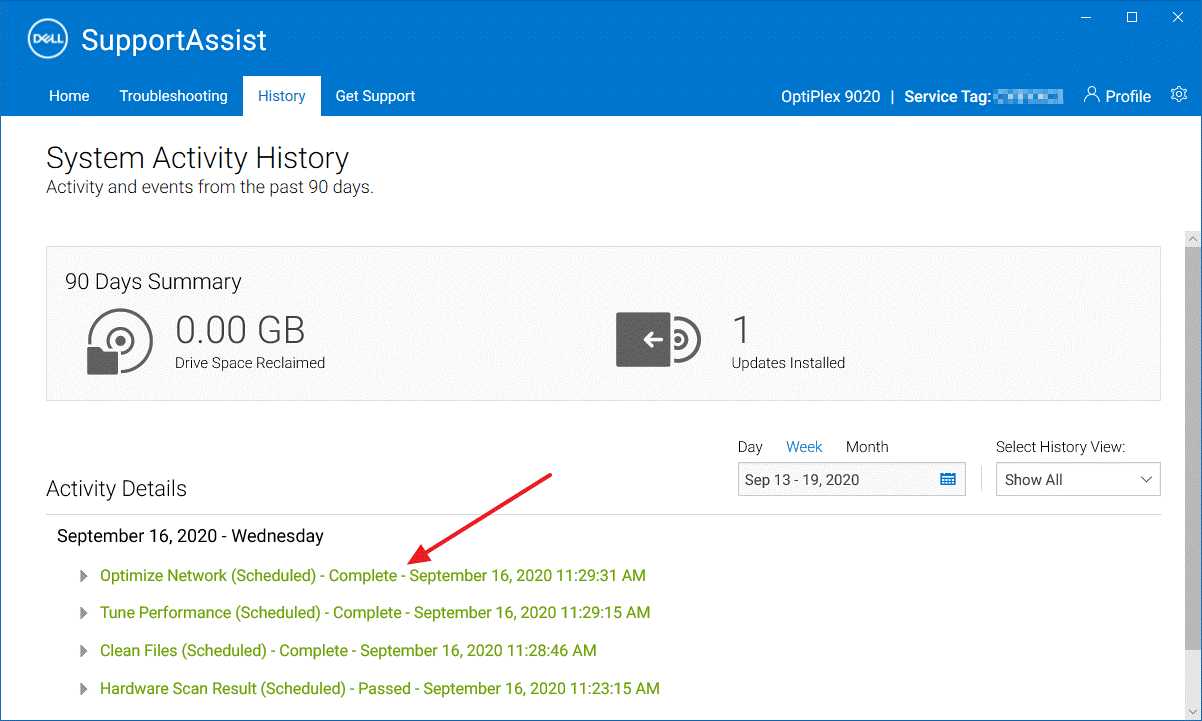
The results of the previous hardware scans and optimization tasks would be available under the History tab of the Dell SupportAssist utility.
Click on the gear icon at the top right corner of the window, and click Settings.
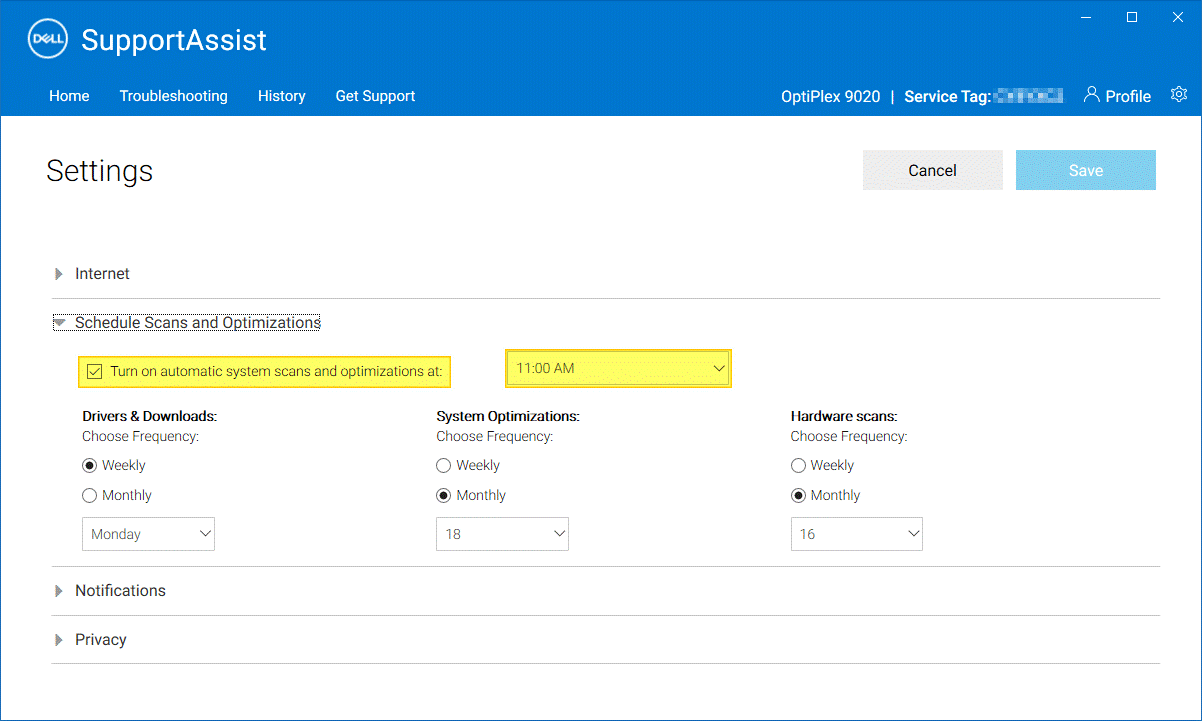
By default, the Hardware scans are scheduled to run monthly once.
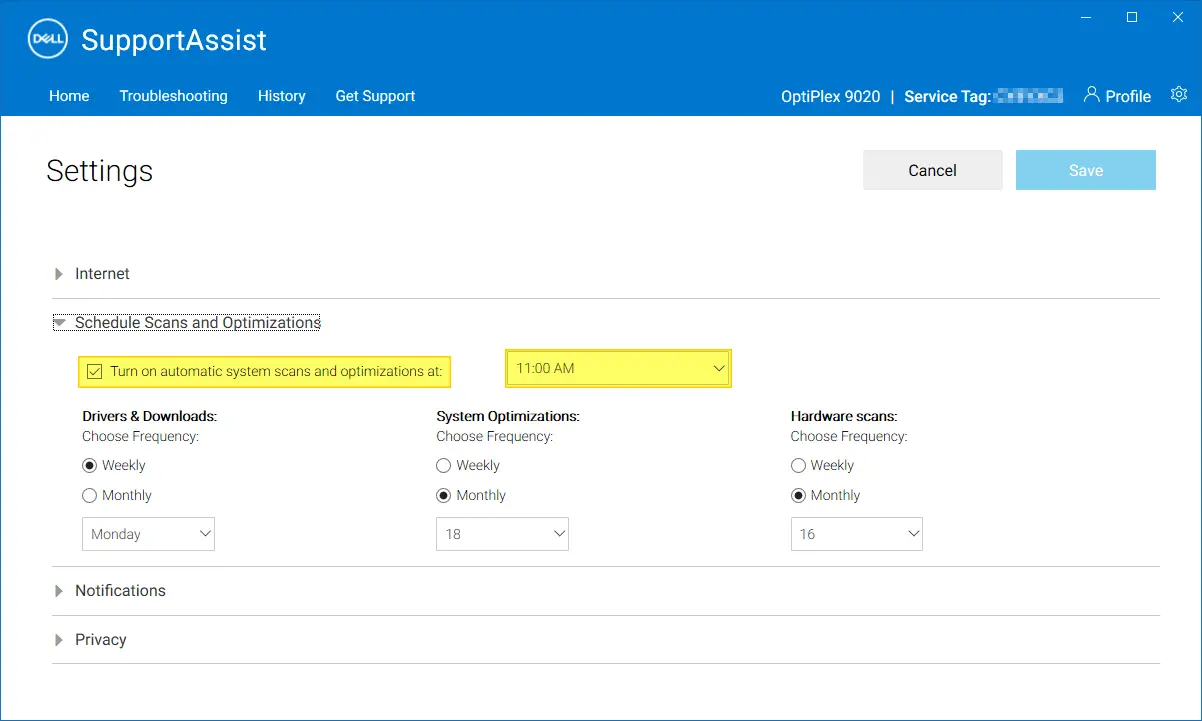
In the Settings page, you can disable the scheduled scans and optimizations by unchecking Turn on automatic scans and optimizations at: checkbox.
Alternatively, you can schedule a different time for the tasks to run. You may want to run the tasks after office hours so that you don’t face any performance bottlenecks when you’re working.
If you choose to disable the automatic scans, then you can manually run the scans at your preferred time or intervals via the Home tab.
Hardware scans can be extremely beneficial. You can make informed decisions from these scan results — e.g., it informs you in advance if a hardware component (i.e., the hard disk drive) is about to fail so that you can replace the necessary hardware proactively.
RELATED: Fix: Device Harddisk DR0 has a “bad block” Error in Event Viewer
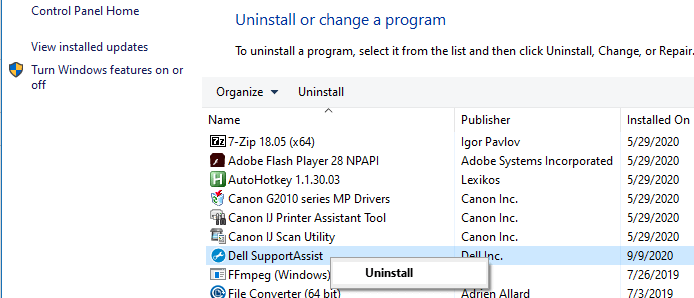
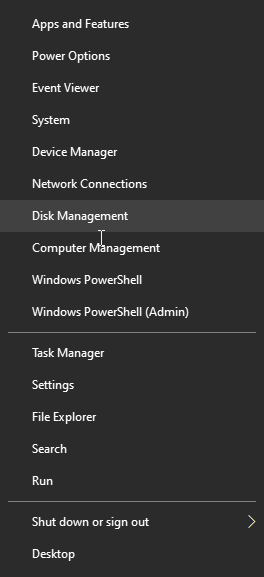
However, if you don’t plan to use this software, you can uninstall it via the Add or Remove Programs in the Control Panel or via Apps & Features in Windows 10.
To learn more about Dell SupportAssist, check out this Dell webpage: https://www.dell.com/en-us/shop/supportassistforpcs/cp/supportassistforpcs
Dell SupportAssist Service
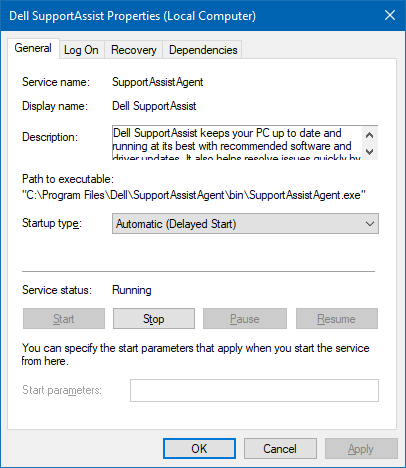
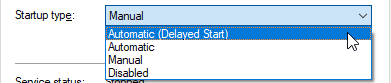
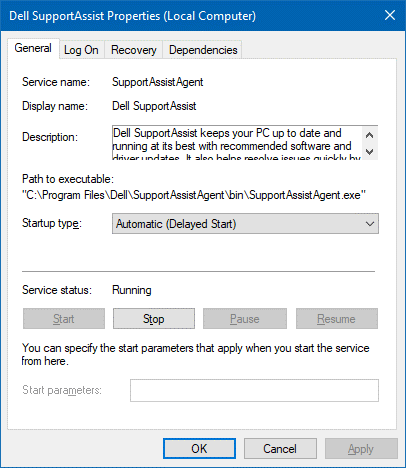
This program runs as a service having the display name Dell SupportAssist (short name: SupportAssistAgent ) and is set to Automatic (delayed started) by default. The service’s executable path is «C:\Program Files\Dell\SupportAssistAgent\bin\SupportAssistAgent.exe»
Disabling this service should disable the scheduled hardware scans as well.
The Driver and BIOS updates notification is one main reason why I retained Dell SupportAssist on my two Dell systems.
Dell SupportAssist Causing High CPU Usage by MsMpEng.exe
Recently, it’s been observed that Dell SupportAssist not only consumes high CPU usage during the hardware scan, but it is also attributed to high CPU usage by Microsoft Defender ( MsMpEng.exe ).
Security expert “@SwiftOnSecurity” noted that the high Defender usage was caused by Dell SupportAssist reading all executable files on the drive, and that triggered the Microsoft Defender on-demand scanner. The tweet said:
- New-MpPerformanceRecording -recordto c:\1.etl
- Get-MpPerformanceReport c:\1.etl -topprocesses 100
Mystery: CPU fan at max, high Defender usage, but no current scan.
Launch
New-MpPerformanceRecording -recordto c:1.etl
, run for bit,
Get-MpPerformanceReport c:1.etl -topprocesses 100Result: Dell SupportAssist was poking all EXE files on drive, triggering on-access scans.
— SwiftOnSecurity (@SwiftOnSecurity) September 29, 2022
See also
One small request: If you liked this post, please share this?
- Pin it!
- Share it to your favorite blog + Facebook, Reddit
- Tweet it!
Question: How To Navigate My Pc Doctor Windows 10 Computer
What is the PC Doctor module? PC-Doctor Module is an essential part of Dell SupportAssist. It helps keep the PC running seamlessly and recommends software and driver updates. By detecting common problems and sharing them with the Dell support team, it helps troubleshoot problems.
What is PC-Doctor for Windows and do I need it?
PC-Doctor for Windows delivers lower support costs by reducing the frequency of No Trouble Found (NTF) product returns and speeding resolution of customer-reported problems. PC-Doctor for Windows deflects service calls by giving end users the tools they need to diagnose hardware problems.
What does PC-Doctor USB solution do?
The PC Doctor USB solution performs the following THREE actions: DOS test: Runs the diagnostics in DOS mode to identify hardware failure. Windows test (interactive): Runs the diagnostics in Windows mode to identify hardware failure and is interactive. Individual diagnostics: Runs the diagnostics on a specific part.
Should I delete PC-Doctor?
We recommend you do not uninstall PC-Doctor Toolbox for Windows. It can of significant help when your computer is not working properly. If PC-Doctor was pre-installed on your computer, removing the software can cause unnecessary delays if you need technical support from the manufacturer.
Should I uninstall support assist?
Yes, it is safe to uninstall it.
What is my Dell PC Doctor?
In Dell machines, the software is called SupportAssist. It’s made by PC-Doctor, a maker of hardware-diagnostics software that licenses its software to other electronic-device makers.
What is a medical PC?
p.c.: Abbreviation meaning after meals (from the Latin “post cibum”, after meals).
What is SRE process?
The Software Risk Evaluation (SRE) is a process for identifying, analyzing, and developing mitigation strategies for risks in a software-intensive system while it is in development.
How do I get rid of Dell Support Assist?
To uninstall Dell SupportAssist, follow the instructions below. Search for Control Panel -> Press Enter -> Click Programs -> Programs and Features. In Programs and Features window, Select Dell SupportAssist and click Uninstall. In SupportAssist Uninstall prompt, Click Yes to uninstall.
How do I preserve BIOS before recovery?
Press and hold the CTRL + ESC key on the keyboard until the BIOS Recovery page appears. On the BIOS Recovery screen, select Reset NVRAM (if available) and press the Enter key. Select Disabled and press the Enter key to save the current BIOS settings.
What is PC Doctor Dell SupportAssist API?
PC-Doctor Module is a component of Dell SupportAssist. Dell SupportAssist keeps your PC up to date and running at its best with recommended software and driver updates. It also helps resolve issues quickly by detecting common problems and sending issue details to Dell Technical Support agents on your behalf.
When encountered with a no post situation what must technicians do prior to replacing the suspected faulty part?
Choose all that apply: When encountered with a no POST situation, what must technicians do prior to replacing the suspected failed part? Reseat parts and cables. Re-run diagnostic sequences with removal of individual parts to isolate issue.
How do I remove PC Doctor USB Antivirus?
Remove “Ads by PC Doctor” virus from Google Chrome Click on the “Chrome menu button” ( ) on the browser toolbar, select “Tools“, and then click on “Extensions“. In the “Extensions” tab, remove the PC Doctor any other unknown extensions by clicking the trash can. icon.
Is Dell SupportAssist a virus?
The SupportAssist flaw is not malware, but it allows malware to spread in a new way.
What is Dell Data Vault collector?
Dell Data Vault is a software component of Dell Support Center by Dell. It is used to collect information on system health, performance and environment concerning applications designed by Dell. It is located in a subfolder of C: \Program Files, mostly C: \Program Files\Dell\DellDataVault\.
What is SupportAssist?
What is SupportAssist? Dell’s SupportAssist is an automated support solution for Dell personal computers, tablets, storage devices, servers, and networking devices. In fact it’s the first automated solution that offers proactive and predictive support for a device.
How old is my Dell PC?
To quickly estimate your computer’s age, simply find it in the table. For models not shown here and/or to determine your computer’s exact original purchase date, go to dell.com/support and search for its warranty status by entering its service tag. Commonly purchased Dell computer models released by calendar years.
Are Dell updates necessary?
Dell develops drivers so that the operating system on your Dell PC can work with your Dell devices and applications. This ensures that your device optimized and up-to-date. Dell releases updated drivers frequently to ensure that your PC the latest security patches, fixes, and functionality available.
What is the My Dell app?
My Dell improves your experience by centralizing key Dell applications and features into one application which contains important system information and helps to keep you informed about warranty, help articles, software and accessories.
Where is SmartByte installed?
Go to the Search menu and look for Task Manager. From the Task Manager window, scroll down and locate SmartByte Drivers and Services entry. Right-click on it and Open file location. Open the file and return to the Task Manager window again.
How do I disable Dell Support assist in BIOS?
Steps Turn on or restart your computer. Press F2 to enter System Setup. In the left pane, expand SupportAssist System Resolution, and then select SupportAssist OS Recovery. In the right pane, select or clear the SupportAssist OS Recovery check box to enable or disable the automatic start of SupportAssist OS Recovery.
What does the MD stand for after a doctors name?
Consumer health A doctor of medicine (M.D.) has attended and graduated from a conventional medical school. The major difference between osteopathic and allopathic doctors is that some osteopathic doctors provide manual medicine therapies, such as spinal manipulation or massage therapy, as part of their treatment.
What does PC mean after name?
The letters “PC” after a business’s name stand for professional corporation. Professional corporations enjoy some, but not all, of the same liability protections as general corporations.
What does PC and AC mean?
PC breakfast/lunch. After breakfast and lunch. AC HS. Before meals and at bedtime.
Related Posts
- Question: How Do I Get Pc Doctor Off My Computer
- Quick Answer: Why Is Pc Doctor Communications Manager Running On My Computer
- Question: How To Navigate Windows Computers
- Question: How To Navigate Windows 10
- Question: How To Navigate A Windows 8 Computer
- Question: How To Navigate Windows 10 Laptop
- Can A Computer Replace A Doctor
- Can Your Doctor Monitor Your Computer
- Quick Answer: How To Navigate To Computer Configuration In Windows 10
- How To Navigate To Computer Configuration In Windows 7
- Quick Answer: Can A Computer Engineer Become A Doctor
- What Is A Doctor Of Computer Science
«Модуль PC-Doctor» Высокая загрузка ЦП, памяти, диска и замедление
Низкая производительность ПК, частые сбои, нехватка места на диске – вот некоторые проблемы, с которыми мы знакомы. Но почему они возникают? Что вызывает падение производительности системы? Для этого могут быть разные причины, например, такой процесс, как модуль PC Doctor, работающий в фоновом режиме и потребляющий системные ресурсы, заражение вредоносными программами, нежелательные файлы и многое другое. Следовательно, чтобы решить эту проблему, важно определить причину.
Обычно, чтобы понять, почему компьютер тормозит, мы открываем диспетчер задач и проверяем использование диска, верно? Если вы обнаружите, что виновником является процесс с именем PC Doctor, вы попали в нужное место. В сегодняшнем посте мы обсудим, как исправить модуль PC Doctor, высокую загрузку процессора как вручную, так и автоматически.
Проверка фактов. Обычно на компьютерах Dell, поставляемых с диагностической системой Dell SupportAssist, в системе работает модуль PC Doctor.
Не хватает времени?
Если у вас мало времени и вы не можете прочитать сообщение до конца, попробуйте Advanced System Optimizer – лучший инструмент для очистки ПК и увеличения памяти. Используя этот инструмент для настройки системы одним щелчком мыши, вы можете в кратчайшие сроки очистить ненужные файлы, удалить заражение вредоносным ПО, оптимизировать диск, очистить повторяющиеся файлы, оптимизировать реестр, очистить недействительные записи реестра и многое другое. Так чего же ты ждешь?
Нажмите кнопку «Загрузить» и получите инструмент.

Чтобы узнать больше об инструменте, вы можете пройти обзор Advanced System Optimizer.
Теперь, когда мы знаем самый простой способ, давайте узнаем о других способах исправить модуль Dell PC Doctor.
Модуль PC Doctor – это вирус или вредоносное ПО?
Заметив, что модуль PC Doctor загружает 100% ЦП, вы думаете, вирус ли это, вредоносное ПО или PUA. Вот что вам нужно сделать.
1. Нажмите Ctrl + Shift + Esc и откройте диспетчер задач.
2. Щелкните вкладку Процессы.
3. Выберите процесс модуля PC-Doctor> щелкните правой кнопкой мыши> Перейти к деталям.
4. Это поможет найти имя исполняемого файла приложения. Щелкните правой кнопкой мыши> Открыть расположение файла.
5. Если вы перенаправлены на:
C: Program Files Dell SupportAssistAgent PCDr SupportAssist 6.0.7193.611 pcdrmemory2.p5x “запустить -e -lang en -cust dell -var dsc -bd” C: ProgramData PCDr 7193 “-engineClientPid.
6. Файл не представляет угрозы.
Примечание. Исполняемый файл запускается под учетной записью NT AUTHORITY SYSTEM (LocalSystem).
Что такое Dell SupportAssist?
Предлагаемый Dell SupportAssist помогает оптимизировать ПК, давая рекомендации по обновлению программного обеспечения и драйверов. Модуль PC-Doctor является его компонентом и работает в фоновом режиме для обнаружения проблем и поиска решения, сообщая о проблеме агентам службы технической поддержки Dell. Помимо рекомендаций драйверов, Dell SupportAssist выполняет сканирование оборудования для анализа следующих компонентов:
- Память, композитный USB-процессор, жесткий диск, сетевая карта, привод DVD-RW, мост PCI, шина PCI, концентратор, аудиоконтроллер HD, мышь, USB.
Кроме того, он выполняет короткое самотестирование SMART, тест целевого чтения, тест линейного чтения, стресс-тест процессора и другие тесты. Из-за этого во многих случаях использование диска резко возрастает до 100%, и вы видите, что модуль PC Doctor съедает большую часть системных ресурсов. Чтобы справиться с этой проблемой, мы можем настроить параметры оптимизации и уменьшить нагрузку на ЦП.
Как исправить ошибку модуля PC Doctor 100 CPU
Метод 1. Настройте параметры оптимизации с помощью Support Assist.
1. Запустите инструмент SupportAssist.
2. Перейдите в раздел «Запланированные сканирования SupportAssist».
Вы можете получить более раннее сканирование оборудования и задачи по оптимизации на вкладке «История».
3. Откройте настройки, щелкнув значок шестеренки в правом верхнем углу окна SupportAssist.
Примечание. Сканирование оборудования по умолчанию выполняется один раз в месяц.
4. Чтобы отключить автоматическое сканирование, снимите флажок Включить автоматическое сканирование и оптимизацию по адресу:
Однако, если вы не хотите отключать его, вы можете изменить расписание и запускать задачи в разное время. Это поможет избежать проблем с производительностью во время работы.
Примечание. Отключение автоматического сканирования не означает, что вы застряли. Вы можете запустить сканирование вручную в любое время на вкладке «Главная».
Или нажмите Windows + R> введите services.msc> ОК.
Это откроет окно служб Windows.
Найдите Dell SupportAssist (короткое имя: SupportAssistAgent)> дважды щелкните его и по умолчанию установите для него значение «Автоматический (отложенный запуск)».
Путь к исполняемому файлу службы: «C: ProgramFiles Dell SupportAssistAgent bin SupportAssistAgent.exe».
Отключение службы также отключит плановое сканирование оборудования.
Метод 2 – удалить SupportAssist
Если вы считаете, что SupportAssist – это не то, что вам нужно, вы можете удалить его. Для этого выполните следующие действия:
1. Нажмите Windows + X> Приложения и функции.
2. Найдите Dell SupportAssist.
3. Выберите его> Удалить.
Перейдя по следующей ссылке, вы можете узнать больше о Dell SupportAssist:
Автоматический способ оптимизации ПК и удаления вредоносных программ
Используя описанные выше шаги, вы можете исправить высокую загрузку ЦП модуля PC Doctor, но как насчет оптимизации ПК? Что, если есть что-то еще, что вызывает высокую загрузку диска?
Не нужно беспокоиться об этом, у нас есть решение для этой попытки Advanced System Optimizer. Этот мощный инструмент очистки ПК мгновенно определяет ненужные файлы, вредоносные программы, недействительные реестры и многое другое, что является основной причиной распространенных проблем Windows.
Примечание. Advanced System Optimizer создает точку автоматического восстановления системы при первом запуске.
Чтобы использовать его, выполните следующие действия:
1. Загрузите и установите Advanced System Optimizer.
2. Запустите лучший инструмент для очистки ПК.
3. Нажмите «Начать Smart PC Care» и дождитесь завершения сканирования.
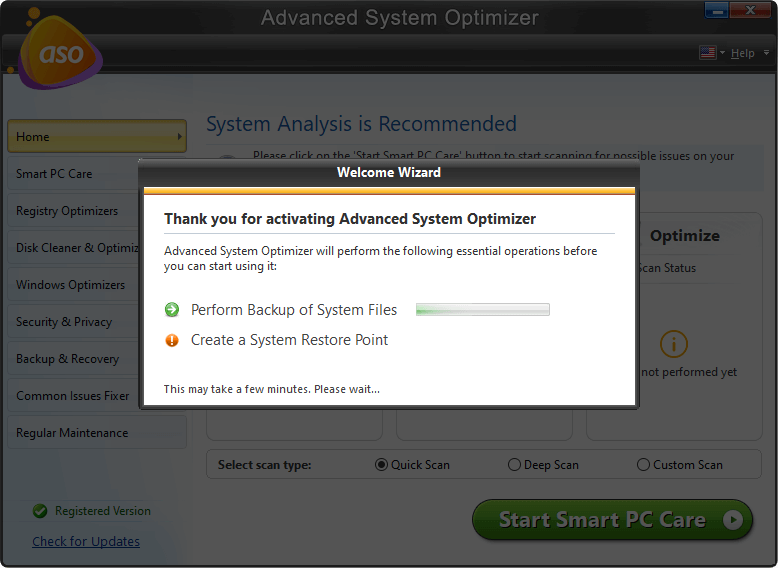
4. После этого для устранения ошибок нажмите «Оптимизировать».
5. Перезагрузите систему, чтобы сохранить изменения.
Теперь вы ощутите улучшенную производительность ПК без задержек и зависаний экрана. Кроме того, будет восстановлен значительный объем дискового пространства, которое было занято ненужными, устаревшими и ненужными файлами. Итак, чего вы ждете от использования Advanced System Optimizer и исправления 100% загрузки ЦП? Более того, отключив автоматическое сканирование SupportAssist и отложив его обслуживание, вы можете исправить ошибку PC Doctor Module в Dell.
Мы надеемся, что эта информация окажется для вас полезной и вы смогли решить проблему с высокой загрузкой диска PC Doctor Module. Пожалуйста, поделитесь своим мнением в разделе комментариев.
Часто задаваемый вопрос
Q1. Модуль PC Doctor – это вирус?
Нет, PC Doctor – это не вирус. Модуль PC-Doctor – это компонент Dell SupportAssist. Если вы подозреваете, что файл заражен, вы можете попробовать запустить лучший антивирус или использовать модуль System Protector, добавленный в Advanced System Optimizer.
Q2. Что такое модуль PC Doctor?
Модуль PC-Doctor является неотъемлемой частью Dell SupportAssist. Он помогает поддерживать бесперебойную работу ПК и рекомендует обновления программного обеспечения и драйверов. Обнаруживая распространенные проблемы и сообщая о них службе поддержки Dell, он помогает устранять неполадки.
Q3. Как мне избавиться от PC Doctor?
Самый простой способ избавиться от PC Doctor – удалить Dell SupportAssist. Как только это будет сделано, вы больше не столкнетесь с 100% загрузкой ЦП PC Doctor Module.
Q4. Как отключить Dell PC Doctor?
Чтобы отключить Dell PC Doctor, вы можете либо удалить его, либо отключить автоматическое сканирование, сняв флажок «Включить автоматическое сканирование и оптимизацию».
Чтобы удалить Dell PC Doctor, выполните следующие действия:
1. Нажмите Windows + X> Приложения и функции> найдите PC Doctor> Удалить.
Как исправить высокую загрузку ЦП в процессе обслуживания узла DISM
Как легко исправить BSOD Apc_Index_Mismatch
How to Fix PC Doctor Module High CPU/Disk Usage

Emmanuel | Jun 06,2022 7 min read
At times, you may have found your computer slowing down to a snail’s pace due to a PC Doctor Module process running in the background. In such a situation, if you try to open the Task Manager on your device or any other program, you will see that the process takes longer than usual. You will also be prompted to message that a function named PC Doctor Module takes up almost cent percent of your CPU and a large chunk of the RAM. However, this state of affairs can be easily remedied with the help of three simple methods that you can explore in this article. First, it is essential to know if the PC Doctor Module is a virus or malware.
What is PC Doctor Module? Is it a virus or malware?
PC Doctor Module is essentially a component of DellSupportAssist that is a feature you will find in most Dell computers. It is an app that helps you with the process of downloading drivers as well as with minute troubleshooting. The issue then gets picked up by the PC Doctor Module and then sends a report to the Dell Technical Team for resolving.
PC Doctor Module is not a virus but a regular process that checks the system from time to time and is a part of the DellSupportAssist. However, a virus can mask PC Doctor and infringe on many resources. You can check if there is a problem doing a right-click on the PC Doctor Module and then clicking on Open File Location. If the location is not what is mentioned below, it entails a concern.
C:\Program Files\Dell\SupportAssistAgent\PCDr\SupportAssist\
3 Ways to Fix PC Doctor Module High CPU / Disk Usage
Solution 1: Modify Optimization Settings
You can use SupportAssist to modify optimization settings to help fix the PC Doctor Module’s high CPU usage. You can do this either through the SupportAssist window or the services window.
1. Through the SupportAssist window
Step 1: Go to the Start menu and run SupportAssist.
You can do this by either typing supportassist in the search box or clicking on supportassist, which you will find under the Best match section.
Step 2: Go over to SupportAssist Scheduled Scans
Step 3: On the upper right corner of the SupportAssist, you will find a gear icon. Click on it to open Settings. Your hardware scans are set to run once every month by default.
Step 4: If you wish to deactivate the automatic scan option, uncheck the option that says Turn on automatic scans and optimizations. You can instead run a manual scan according to your demand from the Home tab
2. Through the Services Window
Step 1: Open the Run window by pressing together the Windows and R keys
Step 2: Next type of services. msc and press enter to open the Services window
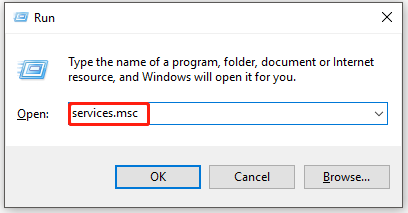
Step 3: Go to the Services window and look for SupportAssistAgent. Double click on it and set it to Automatic by default
Step 4: Save the changes made by clicking OK
Solution 2: Disable automatic scan for Dell SupportAssist
You can fix the error and optimize SupportAssist settings by following a few easy steps.
Step 1: Go to the Windows Start menu and open the SupportAssist app
Step 2: Go to the History tab and go to the recently completed scheduled scans
Step 3: On the SupportAssist window, look at the top right corner and click on the gear icon
Step 4: Next, uncheck the option that reads ‘Turn on automatic system scans and optimizations at’ to disable automatic scans
Step 5: You can also choose to alter the scan schedules
Solution 3: Uninstall SupportAssist
If you think SupportAssist is an option you can do without, go ahead and uninstall it and, in the process, get rid of the PC Doctor Module on your computer. Follow the below steps to do this.
Step 1: Press the keys Windows + X and then click on Apps and Features
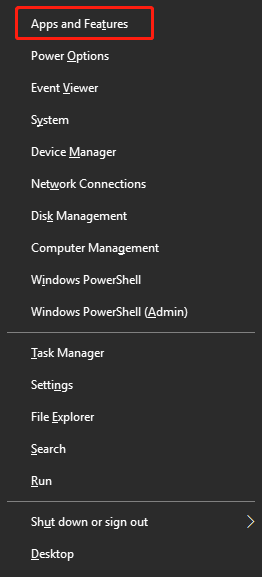
Step 2: You will find a list of contents under apps and features. Scroll down the entire window to find DellSupportAssist
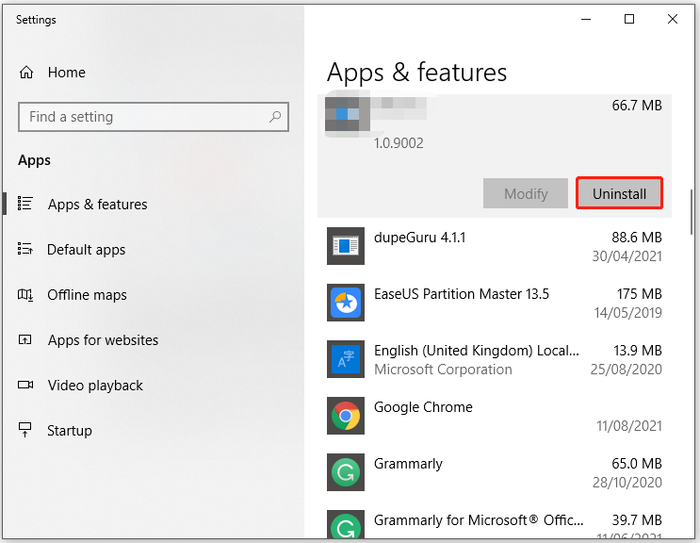
Step 3: Tap on DellSupportAssist and then select Uninstall. Complete the process of uninstallation by following the instructions on the screen
Bonus: Professional PC Cleaner: EaseUS CleanGenius for Windows

PC Doctor Module can make your computer sluggish, which can be enormously frustrating because it would mean slow computer operation and load times. With the help of EaseUS Clean Genius, you can have access to a powerful booster. The tool gives you a one-stop solution for Windows users to increase the speed of their PC and free up disc space and optimize and repair OS.
- With just a single click, the tool helps to quickly and deeply scan and optimize your PC
- It helps clean up and speed up your computer
- Easy management of your computer with Startup Manager, Memory Manager, and shutdown Scheduler
- Keeps your PC safe
The usage of the Ease US Clean Genius
Use this powerful tool to do a quick and deep scan of your computer OS to scan for problems and clean, repair, and optimize your system quickly. You can now get rid of junk files, useless shortcuts, and unwanted software and locate and remove cloned, empty, large-sized, or recently modified files. You can now simplify and manage your startup programs and uninstalled applications and speed up, split, or divide any file.
Wrapping Up
Struggling with constant errors on your computer can be profoundly frustrating, and the PC doctor Module is one such concern that you may be faced with. However, you can now get rid of the PC Doctor Module’s high CPU usage error quickly and effortlessly with the help of several different methods, which have been discussed in the above article. You can either choose to modify optimization settings, entirely disable automatic scan for dell Support Assistant, or uninstall SupportAssistant as per your requirement. Alternately you can just go for an easy one-stop solution and employ the EaseUS Clean Genius for Windows cleaner to get multiple solutions with just a single click.