Как посмотреть предыдущие имена пользователя в Инстаграм

Иногда бывает необходимо собрать информацию о том или ином аккаунте Instagram. При этом необязательно делается в каких-то шпионских целях. Например, Вам нужно проверить аккаунт «на вшивость» и убедится, что это не мошенники. Один из этапов проверки заключается в том, что можно посмотреть предыдущие имена пользователя в Инстаграм, то есть никнеймы, которыми владелец аккаунта пользовался ранее. Очень удобно, что нет необходимости использовать какие то платные сторонние решения — все возможности даёт сам Инстаграм.
Для примера я возьму какой-нибудь аккаунт. Пусть это будет официальная страничка роутеров Keenetic. Главное — чтобы страничка была открыта. Если она закрыта, то придётся на неё подписываться и только потом получится посмотреть предыдущие имена пользователя.
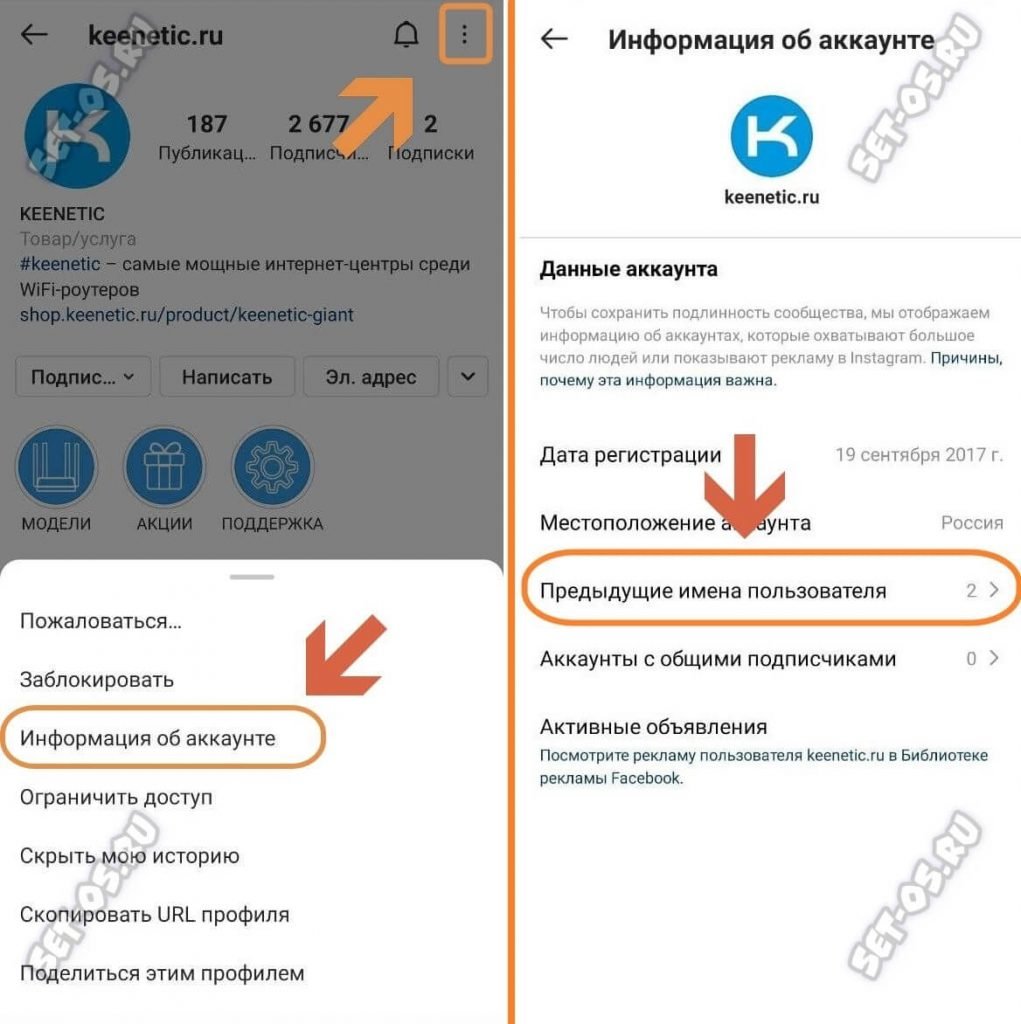
На главной странице аккаунта в правом верхнем углу нажмите на кнопку с тремя точками. Внизу выскочи меню, в котором надо выбрать пункт «Информация об аккаунте».
В следующем окне выбираем строчку «Предыдущие имена пользователя».
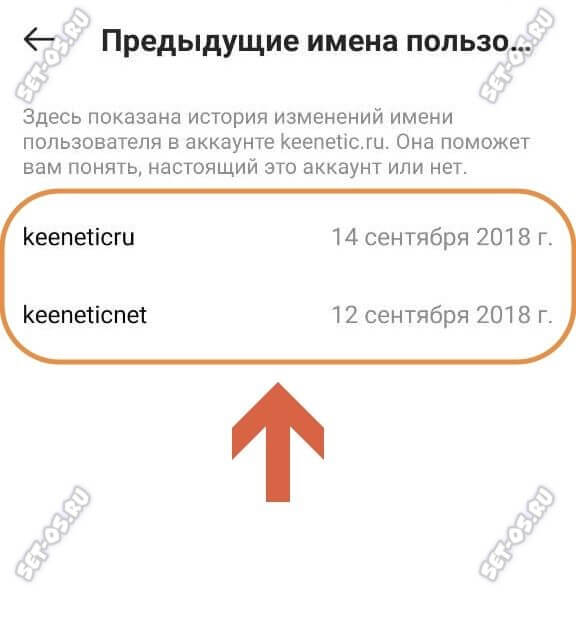
Откроется страничка с историей изменения имени пользователя Instagram за всю историю его учётной записи. В моём примере изменений было два. Справа будут указаны даты, когда выполнялась смена имени.
Как посмотреть предыдущие имена пользователя в Instagram

Тем не менее существует надёжный способ, позволяющий проверить, действительно ли перед нами недобросовестный пользователь и сегодня мы расскажем вам о том, как это проверить.
Почему люди меняют имя пользователя в Instagram?
Первая причина связана с тем, что владельцы магазинов хотят создать запоминающееся название для своих потенциальных покупателей. Тем не менее стремятся сделать они это сразу при создании магазина, поэтому любые махинации с именем пользователя должны вызывать подозрение.
Вторая причина связана именно с мошенниками, которые хотят запутать своих потенциальных жертв, чтобы им потом было сложно вычислить их и потребовать компенсацию.
Если мошенник изменит своё имя пользователя и заблокирует ваш аккаунт, вы больше не сможете найти его.
Как посмотреть историю изменения имени пользователя в Instagram
В Instagram есть простой способ проверить изменения имени пользователя. Для этого вам нужно выполнить следующие действия:
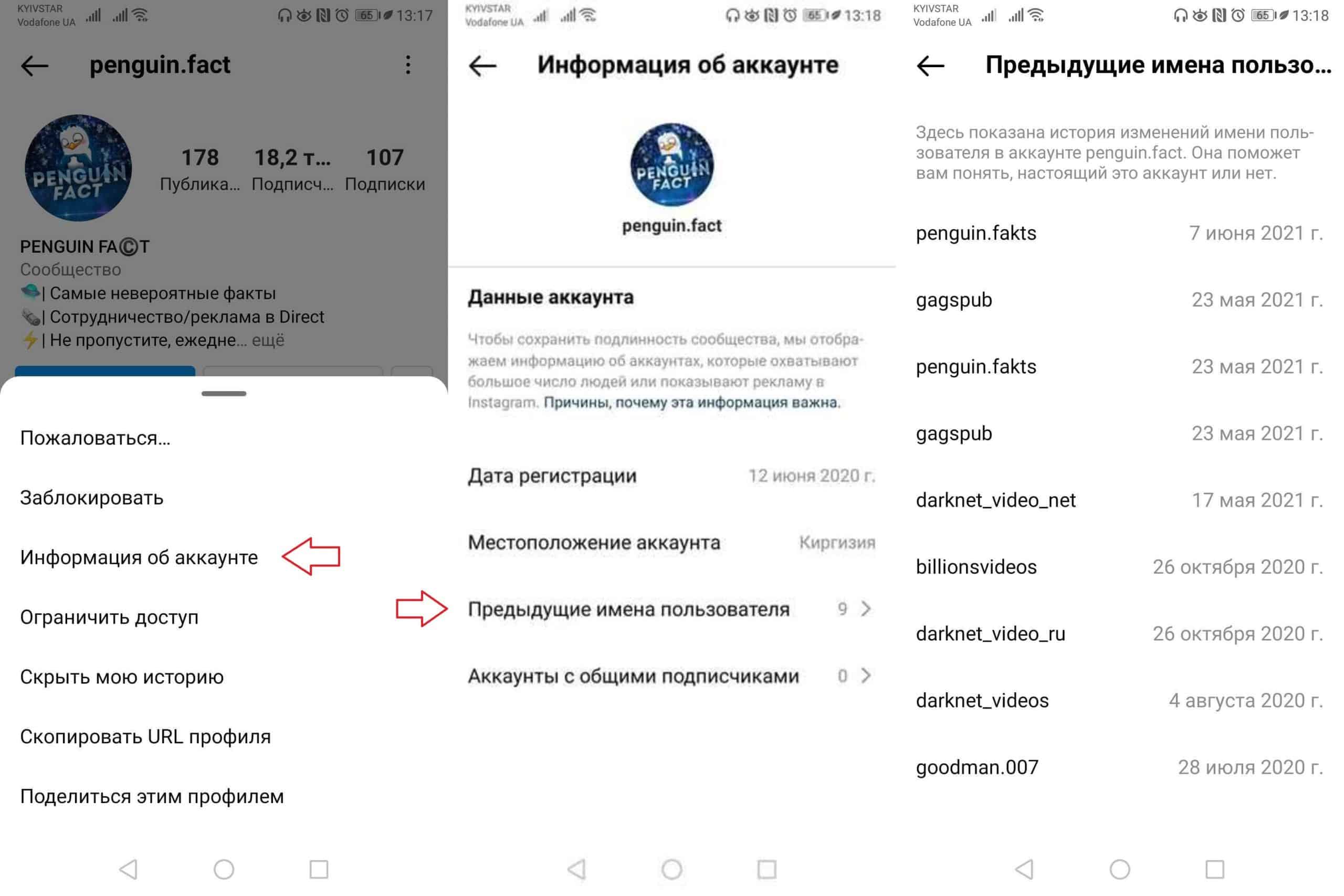
- Зайдите на нужный профиль и нажмите на три вертикальные точки в правом верхнем углу;
- Выберите опцию «Информация об аккаунте» — «Предыдущие имена пользователя»;
- В появившемся окне вы увидите все имена пользователя, которые были у этого аккаунта. Instagram также покажет вам конкретную дату создания определенного имени пользователя.
Надеемся, что эта информация будет полезной для вас! Также рекомендуем вам прочитать эту статью, где мы рассказываем о том, как обнаружить и удалить шпионские программы на Android.
Хотите получить самую актуальную версию Instagram? Тогда скачайте её по этой ссылке и откройте для себя все новые функции!
How to See Previous Usernames on Instagram 2024

But what if you came across a profile and you noticed someone’s username had changed, and you wanted to remember what their username was prior to changing it? This is something that happens periodically.
People change the profile usernames just as much as you check your Instagram feeds every two minutes. Many people want to know if you can see previously used usernames on Instagram. Well, to answer that question, yes, it is possible.
Can You See Previous Usernames on Instagram?
Table of Contents
Yes. You can see previous usernames on Instagram by going to the former usernames section in the account data section in settings. Here, it’ll list all of the account’s former usernames.
How to see Previous Usernames on Instagram
We all have moments where we want to remember an old username that was previously used.
Whether it’s for our Instagram account or for other profiles that we follow, typically, if you don’t change your username, someone that you follow on a daily basis may change theirs.
There are a few incredible ways for you to see their previous usernames. Let’s go ahead and dive into learning about a few of those alternatives right now.
Let’s start with an option that requires you to access a different area of your Instagram account, which is Account Data.
1. Go to View Account Data > Former Usernames
Using the method will allow you to navigate through your Instagram settings with ease to discover previous usernames.
However, this option will only work for you if you are trying to find the former username of another account. So, you won’t be able to use this method when searching for your own information.
To search for the former username of another account through your settings, you must log into your Instagram account on your personal device. Once logged in, navigate to a random account on your Following or Followers list.
Once the profile page is open, in the top right-hand corner of your screen, you will see three vertical dots. Tap on the dots to open the account settings for that profile. After opening the settings, there will be a menu that pops ups.
In that menu, select the option for About this Account. There will be a new window that will appear showing a roster of actions for checking the account.
One of those actions will be Former Usernames. Tap on the option for Former Usernames.
Once you tap the option, another new window will appear, showing a database of all usernames that person has used from the past to the current names. Also, there will be a number showing how many times that user has changed their username.
Using this alternative will also allow you to ensure that the account you are following is a legit profile. Some people tend to copy-cat others.
So, there are hackers out here that can steal another person’s information and pretend to be that person for as long as they can.
So, if you see how many times someone hand changed their username, you will know if you are following the original creator of the profile or an imposter.
This is the same information that will be presented to you once you open the option to view Former Usernames.
So, as you can clearly see, not only will you be able to find another user’s previous username, but you will be able to see if they are who they say they are. The last issue you need is to accidentally friend a hacker because you thought they were your best friend or family member.
2. Ask Them What Their Former Usernames Are
If you want to know someone’s former username, sometimes, the best approach is the instant approach.
Meaning, that if you want to know, the best option for you to proceed with is to ask the other person for their former username simply.
This is something that doesn’t take a lot of energy, nor do you have to do anything special to reach out and ask for this information. You can do this in one of a few ways. To ask for their previous usernames, you can contact the user via their DMs on Instagram.
If you follow the person on other social media platforms, you can contact them on their alternate social media pages. So, if they have a Facebook, TikTok, Snapchat, YouTube channel, Patreon, etc., reach out to them through direct message for information on their previous account names.
The following alternative for reaching out would be to contact them via text message or phone call. This would be more feasible if you have the person’s direct contact information outside of social media.
Using this method would be more profound amongst close family and friends. So, if you are in doubt about knowing their previous usernames, definitely reach out via phone if you feel compelled to do so and if you have the other person’s personal contact information. It can never hurt to ask.
3. If You’ve Followed Each Other For A While, Dig Through Old Screenshots and See If You Screenshotted Their Profile that Contained Their Former Username
This next option is something that you can do from the comfort of your own account. We all have those followers or people who we have been following since the dawn of time. In other words, we all have the OG follower and following teams.
If you have original followers that have been following you and vice versa for a while, you can check through their previous pictures that were posted. Also, you can check screenshots of their pictures if you have taken screenshots that are saved in your camera roll.
When you follow through with the method to check through their previous pictures, you must be aware that it is strongly possible that the old username may not be shown on the old posts.
What you can do is to first login to your Instagram account and navigate to a random person’s profile (or someone in particular); once the profile is open, scroll down until you see previous posts.
Look for posts that were posted when you can recall the user having a different name. If the user had already changed their account username, once again, it may be possible the former username may not be visible.
Typically, once a username has been changed, the username is changed on all posts, both past, and present.
However, if you encounter an issue where the current username has out shadowed the previous username you were looking for, you can check your camera roll to see if you are able to ID the former username.
Mostly, if someone follows a user that has popular content that is likable, that person would screenshot the post to save the images to their camera roll for keepsakes.
So, you can scroll back through your screenshots in your gallery to see if you can locate the previous photos of that user with the former username.
These are two methods in one that you can take advantage of to find out the former username of a certain Instagram user.
This is why keeping screenshots can be beneficial. It’s not because you want to air out someone’s dirty laundry. It’s because you’ll never know if you have to find out someone’s former username.
Tip: If you want to hide your former usernames, you can do that with a few steps.
Instagram Username History Checker Online? NO this isn’t a thing
If you think there’s an online tool that shows you someone’s previous instagram usernames, there isn’t. Any tools posing as a username history checker, it’s fake and it doesn’t work.
Why Can’t I See Someone’s Previous Usernames on Instagram?
If you encounter a problem where you are on Instagram and are curious why you can’t see their former username online, just know there is some reasonable explanation for this.
I know there are some individuals that don’t want to go through any alternative not only to find the username but want answers because they cannot see someone’s previous usernames.
Well, let’s investigate some of the findings that can answer that question burning deep in the soul of your Instagram app.
1. They Don’t Have Any
If you are looking to see someone’s former username and you haven’t found any leads, it may be possible that the user doesn’t have any former usernames.
Let’s take a look back at one of the previous methods mentioned in this article, which was going to Account Data and viewing Former Usernames. Those steps were as follows:
“For you to search for the former username of another account through your settings, first you must log into your Instagram account on your personal device.
1. Once you are logged in, navigate to a random account on your Following or Followers list.
3. Once the profile page is open, in the top right-hand corner of your screen, you will see three vertical dots.
4. Tap on the dots to open the account settings for that profile.
5. After opening the settings, there will be a menu that pops ups. In that menu, select the option for About this Account.
6. There will be a new window that will appear showing a roster of actions for checking the account.
7. One of those actions will be Former Usernames.
8. Tap on the option for Former Usernames.
9. Once you tap the option, another new window will appear, showing a database of all usernames that person has used from the past to the current names.
Also, there will be a number showing how many times that user has changed their username.”
10. Now, as it was stated in the alternative, there will be a number indicating how many times that user changed their username.
If you use this method and you see that it says “This user changed the username 0 times”, or something of that sort, this typically means the user you are investigating doesn’t have any previous usernames.
So, you may want to consider that you may have a case of mistaken identity and were looking for someone else.
2. Instagram Has Temporarily Stopped You from Seeing Their Previous Usernames
Now, if you have used all of the methods listed in this article, particularly the methods that allow you to maneuver within your account to find your answer, and there is still no progress, Instagram may have but a block on you from seeing the previous usernames.
This is something that can be done by the user, by Instagram, and there could be a technical issue you may have to look into.
If someone has blocked you on Instagram, you won’t be notified of this occurrence. You would only know if you log into your account and navigate the person’s page.
And once you are on that person’s page, you can no longer see the user’s past or current posts and information.
If you encounter this issue, what you can do is log in with another account (if you have an alternate account).
And once you are logged in with the alternate account, navigate back to the user’s profile to see if you can view their information.
If you are able to see their profile, then your existing account may be blocked by the user.
But, if you have logged in and viewed their account through an alternate account and you still can’t see the previous usernames, then this has more to do with the account setting the person has set up through Instagram.
For users who don’t want certain people or all users to view their former usernames, this is a setting that is adjusted by the user in their account settings.
David Johnson is a freelance writer with 9 years of experience writing for Techzillo and other established tech outlets like iMore. His focus and key interests are Apple and accessibility as well as consumer technology in general. Read our Editorial Guidlines and Fact Checking process.
Как узнать мои предыдущие имена в Instagram

Как узнать мои предыдущие имена в Instagram — хороший инструмент, так как эта социальная сеть становится все более и более популярной, и иногда необходимо проверить, какой тип учетной записи является той, с которой вы не связываетесь, или той, на которую вы хотите подписаться.
Вы должны четко понимать, что Аккаунты, созданные в этой социальной сети, не всегда честны, поэтому проверка их последних изменений имени может дать вам представление о правдивости лица, управляющего учетной записью.
В этой статье мы даем вам метод, чтобы вы могли без проблем узнать предыдущие имена Instagram других учетных записей. А также помнить о имена пользователей предыдущие, которые вы использовали в своей учетной записи Instagram.
Какова важность изучения предыдущих имен в Instagram?
Смена имени пользователя в аккаунтах Instagram может быть вызвана многими причинами, один из них может быть для создать более простой и легкий для запоминания как маркетинговая стратегия. А также избежать путаницы с учетными записями, которые имеют похожие имена пользователей и хотят выбрать что-то уникальное.
Но причины не всегда могут быть вескими: Есть люди, которые занимаются изменением имен в Instagram, чтобы обмануть пользователей этой социальной сети. Отсюда важность знания предыдущих названий Instagram, так как это может помочь вам определить, является ли это подозрительной учетной записью. Имея возможность идентифицировать если это подозрительная учетная запись, вы можете заблокировать ее чтобы они не пытались связаться с вами.

Как узнать предыдущие названия Instagram с моего мобильного телефона?
Узнать прежние названия Instagram с мобильного не так уж и сложно. Вот шаги, которые вы должны выполнить, чтобы достичь этого:
- Первое, что вы должны сделать, это откройте приложение на своем мобильном умный.
- Теперь ты должен найдите профиль учетной записи, которую вы хотите подтвердить пользовательские изменения.
- Однажды в профиле нажмите на меню который расположен вверху справа и имеет форму трех точек.
- Войдя в это меню, вы заметите, что есть несколько опций, одна из них «Информация об этом аккаунте».
- При вводе информации об этой учетной записи вы заметите, что в этом разделе есть несколько опций. Один из вариантов «Предыдущие имена пользователей».
- Когда вы вводите опцию предыдущего имени пользователя, Instagram сообщит вам, сколько раз имя пользователя учетной записи было изменено.
Вы должны принять во внимание, что в зависимости от частоты смены пользователя, Instagram покажет вам только самые последние. Если смена пользователя произошла не так давно, вы не сможете увидеть ее в этом разделе. Это очень хороший вариант, так как вы можете определить, какие опасные учетные записи пытаются вас обмануть.

Шаги, чтобы запомнить предыдущие имена Instagram с мобильного телефона
Существует метод, который также позволяет знать предыдущие имена Instagram вашего аккаунта. Это хороший вариант, если вы хотите вспомнить, какие имена пользователей вы использовали раньше, и хотите вернуть их. Чтобы достичь этого, вам просто нужно выполнить следующие шаги:
- Первый шаг, который вам следует сделать, это откройте приложение Instagram и войдите в свой профиль пользователя. Для этого вы должны нажать на свою фотографию профиля в нижней правой части.
- Когда вы находитесь в своем профиле, вы должны перейти в меню, который находится вверху справа (три горизонтальные линии).
- При входе в меню необходимо перейти к опции конфигурация и, таким образом, иметь возможность войти в настройки инстаграма.
- Когда вы уже вошли в настройки Instagram, вы увидите меню с несколькими вариантами, на этот раз вы должны перейти в «Безопасность».
- Оказавшись в разделе безопасности, вы должны найти раздел под названием «Данные и история».
- В этом разделе вы должны найти опцию «Данные доступа», где вы можете увидеть все данные, которые Instagram собирает о вас.
- При доступе к данным вы сможете увидеть полные имена пользователей, тексты биографий и ссылки, которые у вас были в вашей биографии. В этом разделе следует искать раздел «информация профиля».
- После того, как вы войдете в параметр информации о профиле, вы должны нажать на параметр, с которым хотите ознакомиться, в этом случае имя пользователя и приложение направит вас к тексту, который вы можете скопировать и вставить в другое приложение.
Следуя этим шагам, вы сможете получить искомую информацию об именах пользователей, которые вы использовали ранее и которые вы точно не помните.

Шаги, чтобы запомнить предыдущие названия Instagram из Интернета
Если вы хотите как узнать предыдущие имена Instagram вашей учетной записи из Интернета, вам просто нужно выполнить шаги, которые мы даем вам ниже.
- Первое, что вы должны сделать, это войти на страницуInstagram и вы должны войти в систему со своими данными.
- Когда вы вошли, вы должны коснитесь своего изображения профиля, который находится выше и правее.
- После того, как вы войдете, вы увидите большое количество вариантов, но тот, который вас интересует, это «конфигурация», который находится на третьем месте.
- Когда вы уже вошли в параметр конфигурации, вы заметите, что экран был разделен на две части. Слева вы увидите разделы, а справа они предоставят вам содержимое выбранного вами варианта.
- В этом разделе вы должны нажать опцию «Конфиденциальность и безопасность», расположенный на левом экране, чтобы вы могли видеть информацию в этом разделе справа.
- Оказавшись в опции конфиденциальности и безопасности, вы должны найти опцию «данные аккаунта».
- Находясь в разделе данные аккаунта, вы сможете увидеть данные, которые Instagram собрал о вас. Среди них: полные имена, имена пользователей, тексты биографий, ссылки и другие данные. Чтобы увидеть данные, вам просто нужно найти опцию и нажать опцию просмотра, чтобы вы могли получить информацию об именах пользователей.

Хотите ли вы узнать предыдущие имена подозрительного пользователя в Instagram или хотите запомнить свои имена пользователей, вам просто нужно выполнить шаги, которые мы вам даем, и у вас не возникнет проблем.
Содержание статьи соответствует нашим принципам редакционная этика. Чтобы сообщить об ошибке, нажмите здесь.
Полный путь к статье: Руководства по Android » Instagram » Как узнать мои предыдущие имена в Instagram
Будьте первым, чтобы комментировать