How to get games for PPSSPP
PSP games are games originally created for the Sony Playstation Portable, or PSP for short. They are normally sold as either small plastic «UMD» discs or as downloadable content. To use them with PPSSPP, we must turn them into files. An «ISO file» is a raw copy of a disc, which can optionally be compressed into a «CSO», or compressed ISO. For instructions on how to do this yourself, see the instructions on dumping games.
PSP games that have been downloaded from PSN onto a real PSP can be copied off the PSP through USB and played directly.
If you are running the PC version of PPSSPP and you have the game you want to run as an ISO, just do File-Load, or use the Games tab to navigate to your game. Clicking the up arrow moves up a directory level.
How do I get them onto my Android device?
If you want to play on your Android device (or other portable), then follow these steps:
- Install PPSSPP on your Android device
- Connect the device to your PC where you are storing the ISO or CSO file. Android devices can be easily connected via USB cable.
- The device should show up in Windows Explorer. Now simply copy over the files to somewhere easy to remember — for example, create a folder called «PSP ISO» and copy your ISO and CSO files there.
- Now, start PPSSPP, navigate to your new ISOs on the Games tab, then click the game, which now should show up with an icon.
- The game should now start. That’s it!
How to move PSP games to your Android device
First, make sure you have your games as ISO files. See How to get games and How to dump games.
The following instructions apply identically for PPSSPP and PPSSPP Gold.
- First, install the PPSSPP app. (There will be a link to a separate guide here soon).
- Connect your Android device (phone, tablet, etc) to your PC using a USB cable. Likely, the one you charge the device with will work just fine.
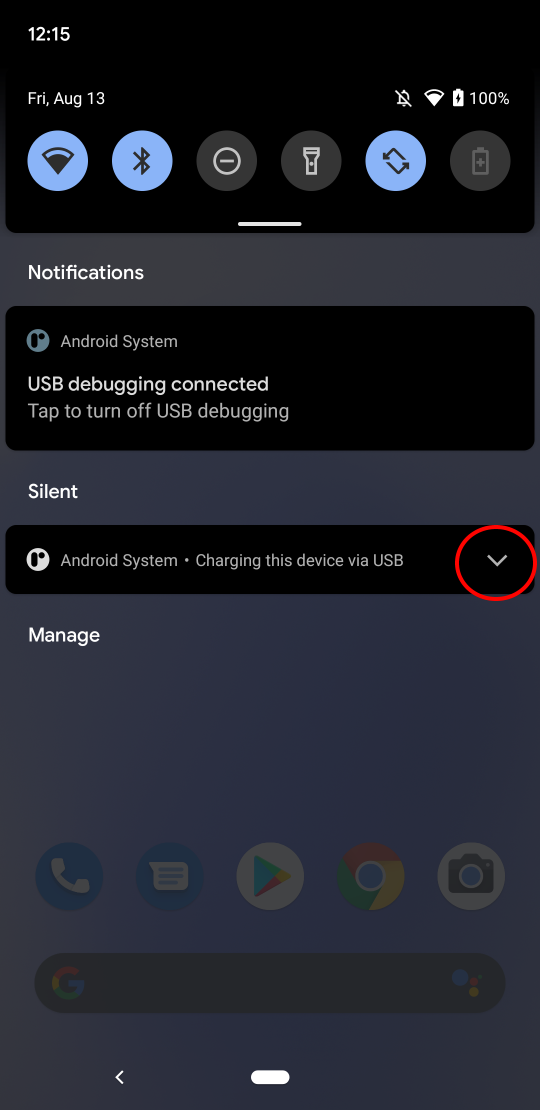
- On your device, pull down the menu and click the circled arrow:
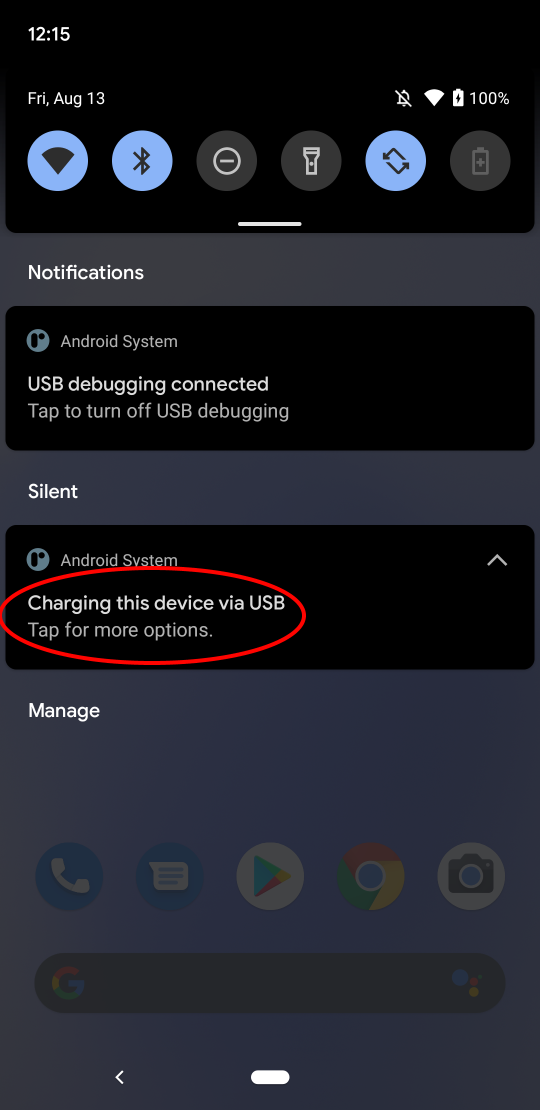
- Then click the circled item, «Tap for more options».
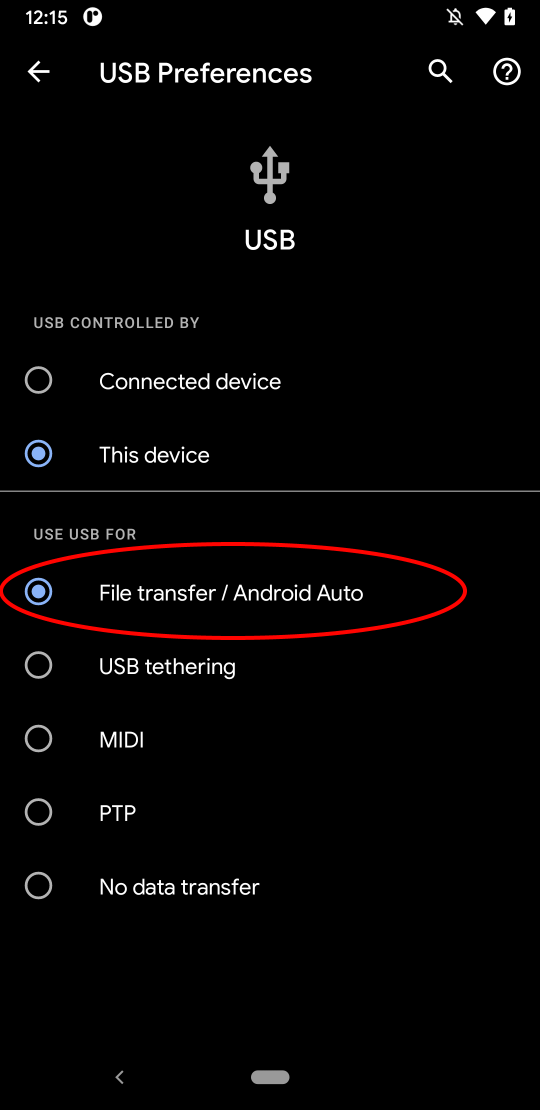
- Next, you’ll be at this screen, where you can now enable USB file sharing:
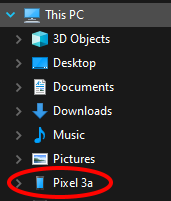
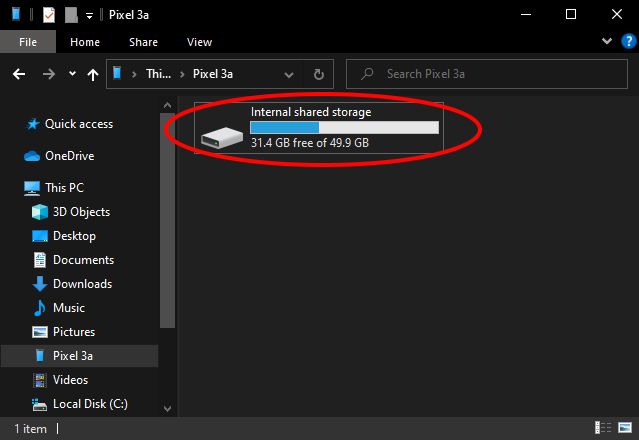
- On your PC, you’ll now be able to see the device’s storage in Explorer:
- You can now create a new folder to store your ISOs in, if you haven’t already (it’s recommended that it’s separate from the «PSP» folder where system files and save games go, but it does work to use the same folder). A quick way is by pressing Ctrl+Shift+N and typing the name of your new folder.
- Finally, after starting PPSSPP on your device, you’ll be able to either directly browse to it (Android 10 or older, or old installs), or you’ll be able to click Browse. and select it.
How to get games for PPSSPP
PSP games are games created for the Sony Playstation Portable, or PSP for short. They are normally sold as either small plastic discs or as downloadable content. To use them with PPSSPP, we must turn them into files. An «ISO file» is a raw copy of a disc, which can be compressed into a «CSO», or compressed iso. For instructions on how to do this yourself, see the instructions on dumping games.
PSP games that have been downloaded from PSN onto a real PSP can be copied off the PSP and played directly.
How do I get them on my device?
If you are running the PC version of PPSSPP and you have the game you want to run as an ISO, just do File-Load, or use the Games tab to navigate to your game. Clicking «..» moves up a directory level.
If you want to play on your Android device (or other portable), then follow these steps:
- Install PPSSPP on your device
- Connect the device to your PC where you are storing the ISO or CSO file. Android devices can be easily connected via USB cable.
- The device should show up in Windows Explorer. Now simply copy over the files to somewhere easy to remember — for example, create a folder called «PSP ISO» and copy your ISO and CSO files there.
- Now, start PPSSPP, navigate to your new ISOs on the Games tab, then click the game, which now should show up with an icon.
- The game should now start.
Playstation Portable (PSP) ROMs
Play and Download Playstation Portable ROMs for free and available in high quality. We have the entire list of PSP ROMs for you to download and run within an emulator on your computer. Browse popular PSP titles such as Spider-Man 3, Naruto Shippuden Ultimate Ninja Impact, Dragon Ball Z Shin Budokai 2 and Tekken 6! Begin playing the top Playstation Portable games and be sure to vote for the emulator games you liked playing!
- Mario Emulator
- Sonic Emulator
- GTA Emulator
- Zelda Emulator
- Pokemon Emulator