Перейти на бизнес акк facebook — Изменить

Что делать, если ведение блога в фейсбук переросло в профессиональную деятельность, а лимит на добавление друзей давно исчерпан? Необходимо переходить на новый уровень. Сегодня поговорим том, как перейти с личного аккаунта на бизнес, что необходимо предусмотреть при переходе………
Мы покажем вам как это сделать легко и просто чуть ниже Буквально — Моментально
Профиль и страница — в чем разница ?
Для того чтобы начать работать в фейсбуке, необходим личный профиль. Это обязательное правило для всех. Он представляет собой аккаунт, принадлежащий только одному лицу.

—Профиль:
- по правилам сети, он должен иметь настоящее имя своего владельца. Также по желанию пользователи указывают свои личные данные: города, места учебы и работы, и т.д.;
- пользователь не имеет права вести профессиональную деятельность, представлять продукт, услуги или бизнес в личном профиле, за это могут забанить;
- все публикации ведутся от имени пользователя ;
- предельное количество друзей в профиле 5000 человек.
—Страница – это бизнес аккаунт. Она создается только человеком, имеющим личный профиль на фейсбуке. Страница может представлять публичную личность, компанию или просто тематический паблик.
- все материалы бизнес-страницы и информация о ней являются общедоступными, уровень конфиденциальности менять нельзя;
- управлять таким аккаунтом может целая группа пользователей: для этого назначаются роли с разными полномочиями;
- права на управление можно передать другому человеку;
- владелец может делать публикации как от своего имени (тогда они будут размещены среди постов посетителей), так и от имени страницы (такие посты размещаются в основной ленте);
- у fun-page нет друзей, есть только подписчики, они могут добавляться без одобрения владельца, их число не ограничено;
- самое главное отличие: только для страниц на фейсбуке доступно платное продвижение (реклама), а также полный набор инструментов статистики (охват, посещаемость, просмотры и т.д.)
Пример ⇓
Важно: алгоритмы построения персональных лент новостей работают так, что пользователь в первую очередь видит посты своих друзей. Иными словами, страницам стало сложнее попадать в ленты подписчиков. Но для исправления ситуации есть реклама.
Инструкция как переделать
Итак, взвесив все плюсы и минусы разных типов аккаунтов, и приняв положительное решение, попытаемся переделать личную страничку на новый тип.
Перед тем, как изменить аккаунт фейсбук на бизнес, необходимо учесть главные условия .

- Переключить тип аккаунта можно только один раз.
- Процедура необратима.
- По завершению процедуры вы получите два аккаунта: личный профиль и созданную на его основе бизнес-страницу. Профилем вы можете и дальше пользоваться в личных целях, отбирая друзей и уровень конфиденциальности информации. Страница будет общедоступным местом коммуникации.
- Название профиля станет названием страницы, фото аватарки и обложки по желанию будет перенесено.
Сама процедура трансформации выглядит так:⇓

- Перейдите по ссылке https://www.facebook.com/pages/create/migrate
- Проверьте, что вы вошли в нужный профиль и нажмите «Начать».
- Выберите подходящую категорию. Для этого начните вводить ключевые слова и выбирайте варианты из выпадающего списка. Или выберите из рекомендаций. Доступно 3 категории одновременно.
- Откроется список ваших друзей, они будут все отмечены галочкой, вы можете отметить выборочно. Эти люди сразу станут подписчиками вашей новой странички и поставят ей лайк.
- Перейдите к вкладке «Подписчики и запросы», здесь аналогично. Отмечаем всех, и они станут подписчиками вашего нового паблика.
- Отметьте галочками фото, видео и альбомы, которые необходимо перенести.
- Перед тем, как нажать «Создать страницу», проверьте внимательно, что вы хотите перевести в бизнес аккаунт фейсбук: люди, фото, видео, какая категория будет установлена. Здесь еще можно скорректировать неточности: для этого нажмите на карандашик напротив каждой строки.
- Снимите галочку со значения «Опубликовать автоматически».
- Нажмите «Создать», вы перейдете в свой новый бизнес аккаунт. На этом этапе страничка еще не будет опубликована, это сделано для того, чтобы вы могли проверить оформление и настройки.
- По желанию добавьте аватар, обложку, краткую информацию. Если все готово, нажмите синюю кнопку «Опубликовать» в верхней части экрана, все готово.
Все выбранные вами друзья, подписчики и отправители неподтвержденных заявок получат уведомление о том, что вы создали бизнес-страничку. Друзья и люди, чьи заявки вы еще не одобрили, останутся в вашем профиле в тех же ролях. Если у вас были настроены подписчики, они станут подписчиками страницы, но исчезнут из профиля.
How To Change FaceBook Page Owner?
With the new Facebook design, it is now possible to change owner of a Facebook page using the Facebook business settings.
- Various methods to change FB page ownership — and different meaning over time
- Change owner of a Facebook page in Facebook Business Manager
- How to change owner of Facebook page?
- How to transfer ownership of a Facebook page 2020
- How to make admin in Facebook page?
- How to transfer ownership of Facebook page?
- How to remove myself as admin from Facebook page?
- Admin vs moderator Facebook
- How to change owner of Facebook page?
- How to add admin to Facebook page?
- How to transfer a Facebook business page
- How to change owner on Facebook page?
- How to find Facebook page owner?
- How to change admin on Facebook page simply
- Go further with Facebook page administrator
- Frequently Asked Questions
- Facebook page change admin / owner: remove and add a page administrator — video
- Comments (39)
Various methods to change FB page ownership — and different meaning over time
With the new Facebook design, it is now possible to change owner of a Facebook page using the Facebook business settings.
Previously, in 2020 and with previous FaceBook setup, the page admin were acting as page owners — however, with the apparition of the Facebook Business Manager interface, the Facebook pages ownership can be claimed by a business registered on Facebook, thus moving the Facebook page ownership from page administrators, which are Facebook accounts, to registered Facebook businesses, which can be declared as Page owners, and transfer this ownership from one registered Facebook business to another.
Let’s see in details all these different methods: the new method to change ownership of a Facebook page in Business Manager, in case you have a registered business, but also the previous methods, by modifying current Facebook page admins if the page is not owned by a registered business in Business Manager interface.
Change owner of a Facebook page in Facebook Business Manager
First of all, you have to go to the Facebook page business settings, under Accounts menu and the Pages entry.
From there, click on the big blue Add button, and select the action you want to perform depending on your current relationship to the Facebook page for which you want to claim ownership:
Add a PageYour business already owns this Page or you need to own it. For example, another company created the Page for you. Claiming a Page moves in into Business Manager.
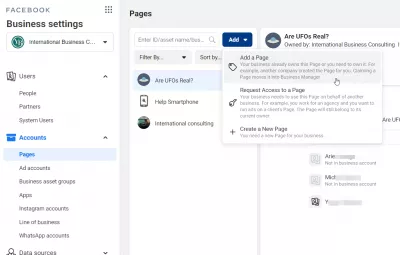
Then, find the Facebook page for which you want your current business to claim ownership of that Facebook page, by either becoming the sole page owner if it hasn’t been claimed yet, or by asking the current owner to transfer the FB page ownership to your currently selected business in Business Manager.
By simply typing either the page handle, or the FB page name, the auto completion will offer relevant possible matches. Keep looking until you find the page for which you want to claim ownership, and select it.
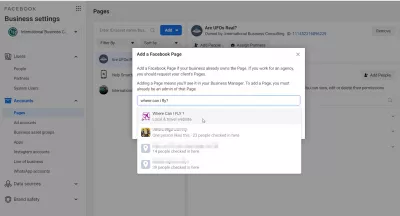
Once the page has been found, you can request to add the FB page to the list of pages owned by current business.
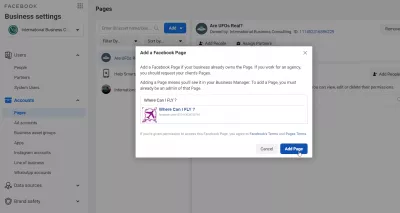
If an Instagram account has been linked to that Facebook page, you will be requested to confirm that you are actually asking to become page owner of both the FB page and the Instagram page, and you will have to enter the Instagram account password, which can be different than the one used on the Facebook page.
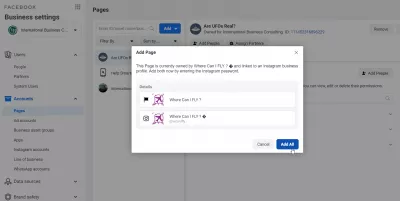
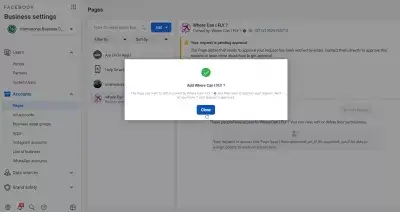
If the page is not already owned by another business, your business will become the Facebook page owner of that page.
However, if that is not the case, it will be necessary first to approve the change owner of the Facebook page operation by the current owner.
How to change owner of Facebook page?
The owner of a Facebook business page is the first administrator of the page – there might be more than one of them. If you are the one to create a Facebook page, then you’ll be able to perform operations such as turn on FaceBook page reviews, like as your page other Facebook business page, to see who likes your Facebook page, but if you are not the admin, or want somebody else to have the same possibilities, you need to add another admin on the page. However, you don’t need to do anything to use a Facebook page widget for WordPress or to invite your friends to like your FaceBook page, as anybody can do that!
Facebook page admin = Facebook page owner. The administrators of a Facebook business page are the owners of the page.
A page ownership on Facebook can easily be transferred from one Facebook account to another. It is not possible to change the page owner, but switching from one admin to another one does the trick.
In order to do so, another Page Admin has first to be defined for the page, and then the other Admin has to be removed, even when it is oneself.
Facebook page owner vs admin: both are the same. Admins are owning Facebook pages. Having created a page does not provide more access than being a page owner.
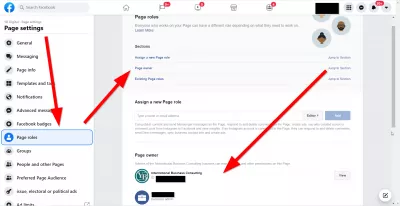
First, open the Page from the administrator’s profile, and find the Settings menu.
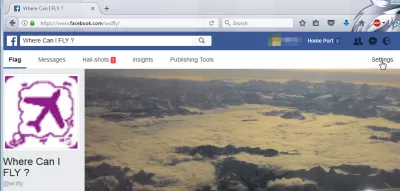
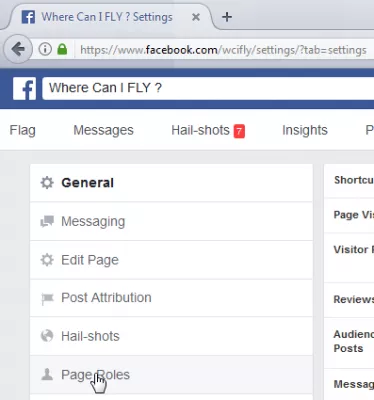
There, find the Page Roles menu entry :
How to transfer ownership of a Facebook page 2020
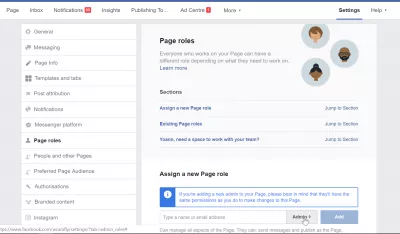
Scroll down to the Assign a New Page Role section, and look for the person that has to be added as Admin.
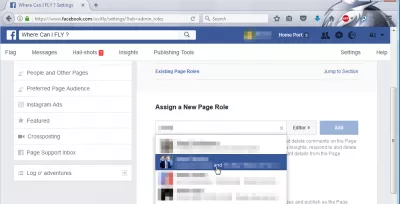
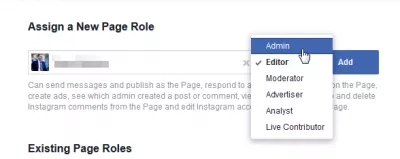
Select the corresponding role, Admin, and click on Add :
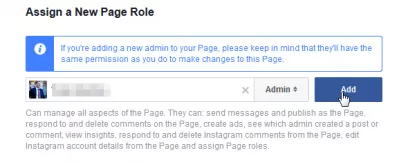
There are now 2 admins — the previous and new one, and it is possible to delete the previous one by pressing Edit button, and then Remove button in the options uncovered
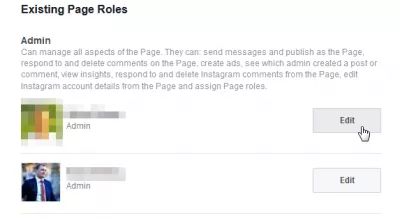
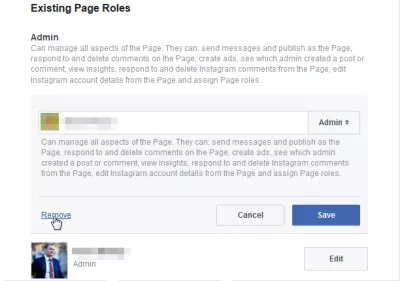
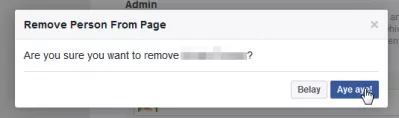
Confirm the operation — and it is done ! The new Admin can now administer the page, and the previous admin has no access to it anymore.
How to make admin in Facebook page?
How to make someone an admin on Facebook group ? The procedure described above is also how do i add an admin to a Facebook page, and is the way to make someone admin on Facebook page.
How to transfer ownership of Facebook page?
Adding an admin to a Facebook page is how to change Facebook page owner. When you add an admin to Facebook page, it is the way how to add page owner to Facebook page.
Learn SEO Basics: Enroll Today!
Boost your website’s visibility and traffic by mastering the fundamentals of SEO with our easy-to-follow Basics course.

When you remove admin from Facebook page it will change ownership of Facebook page, this is how to transfer ownership of Facebook business page – or how to change ownership of a Facebook page.
How to remove myself as admin from Facebook page?
To transfer Facebook business page ownership, add an admin to Facebook page your are an admin of, and then see above how to remove myself as an admin on Facebook page. This is only possible after you’ve add new admin to Facebook page.
How to remove myself as an admin on Facebook page: Add ad another admin, and remove myself from administrators list
Admin vs moderator Facebook
A Facebook group moderator can also be defined there. What is a Facebook group moderator ? He can send messages from the page in the Facebook message manager, manage Facebook comments, access Facebook ads manager, see which admin created a post or comment, view analytics. An admin is a page owner, he can do everything.
How to change owner of Facebook page?
Your admin page Facebook basically means the owner, as he all all rights on the page.
To change owner of Facebook page, simply add another administrator, and remove the previous one.
This is how to change ownership of Facebook page, doing a Facebook page change owner by switching admin.
How to add admin to Facebook page?
See above, a Facebook page admin change is the same as a Facebook page owner change.
Add admin to Facebook page as describe above in the page settings, and then remove admin from Facebook page for the previous owner.
How to transfer a Facebook business page
Transferring ownership of a Facebook business page is very easy, by changing the page administrators. To transfer a Facebook business page, simply add a new administrator, using a page administrator account, and remove the first admin from the Facebook page account.
This is how to remove the Facebook page admin and replace the owner, by adding a new admin, and removing previous administrators from the business page administration, to change the Facebook page ownership.
How to change owner on Facebook page?
Open the Facebook page with an administrator account, go to settings > page roles > new page role, add the new owner as an administrator, and remove current owner from page administrator list.
How to find Facebook page owner?
It is only possible to find the owner of a Facebook page if the page administrator has enabled the about section of the page, which will display the page administators.
If they haven’t displayed the page owners, then the only way to find the owner of a Facebook page is to contact the business page in question and ask them who is the owner.
How to change admin on Facebook page simply
To change the admin on Facebook page, add a new admin, and remove the previous one in the page settings > page roles options.
Open the page with the existing admin account, go to the page settings > page roles > assign a new page roles, and add a new admin.
Then, simply change role of the previous admin to anything else than admin – and you will have changed the page owner and page admin.
Go further with Facebook page administrator
- How to add administrator to Facebook page?
- How to add a admin to Facebook page?
- How to add admin to Facebook page?
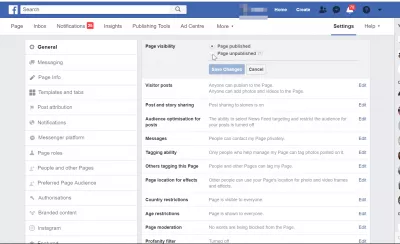
To remove Facebook page from Facebook, simply open the page settings as administrator, go to general options, and there, change the page visibility option from page published to page unpublished. That’s all, the page is not visible anymore on Facebook!
How to change page owner on FaceBook? Q and A How do I make myself the owner of a Facebook page? How do I make myself the owner of a Facebook page? To make yourself the owner of a Facebook page, you must be set at the administrator of the Facebook page. After that, remove all the other administrators of the page, and you will be the only owner and administrator of the page. How to change page owner on Facebook? You cannot make yourself as a Facebook account the owner of a Facebook business page, as the business itself is the owner of the page. The first admin of a Facebook page, and the last one if other persons remove themselves as page admin, will always be the page owner. Who is more important than page owner vs admin Facebook? If we compare the owner of the Facebook page and the administrator, then they are both the same. Administrators own pages on Facebook. And it doesn’t give page creators more access than the page owner. How can I change the admin on my Facebook Business Page? To change the admin on a Facebook Business Page, go to your Page settings and click ‘Page Roles’. Find the ‘Assign a New Page Role’ section and type the name or email of the new admin. Then, from the dropdown menu, select ‘Admin’ and click ‘Add’. The new admin will need to accept the role invitation to complete the process. How do I make myself the owner of a Facebook page? On Facebook
How do I take ownership of my Facebook business page? How do I take ownership of my Facebook business page? The only way to take ownership of your Facebook business page, is to remove other administrators and to be the last administrator remaining on the business page. How To Change FaceBook Page Owner? Once you will have removed other administrators from your page, you will have claimed ownership of your page. Other contributors can be added with other roles if you do not want them to be able to take ownership on your behalf. How to remove page owner on Facebook? To remove a page owner on Facebook, you must be admin of that page, and remove the admin role of the current page owner to remove from Facebook page ownership. The remaining page admins will thus become the new Facebook page owners. How to edit admins on Facebook page? How to change administrator on Facebook business page To edits admins of Facebook page, you must be admin yourself, or page owner, which is the same. Then, open your admin Facebook page settings by going to Settings > General > Page roles, and change the admins roles from there. How to make more than one admin on Facebook page? Once you are in the admin Facebook page settings, simply add another person in the list of page roles, and give this person the admin role. You will then have more than one admin on your Facebook page. How to add admins to Facebook page? Adding admins to a Facebook page is simply done by another admin or page owner by going in the Facebook business page settings, in the Page Roles section, by adding new users to the list of profiles with specific page roles, and setting them as admin Facebook page. How do I take ownership of my Facebook business page? On Facebook
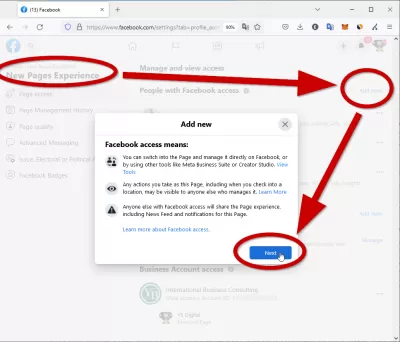
The New Facebook page administrator management panel is situated under settings > New Pages Experience > Page Access. There, you can add or remove people with Facebook access (private profiles), and people with task access (company pages) from managing or moderating your Facebook business page.
★★★★★ How To Change FaceBook Page Owner? Easy solution on how to change admins on Facebook page in a few steps
Frequently Asked Questions

Facebook page change admin / owner: remove and add a page administrator

About the author — Yoann Bierling
Yoann Bierling is a Web Publishing & Digital Consulting professional, making a global impact through expertise and innovation in technologies. Passionate about empowering individuals and organizations to thrive in the digital age, he is driven to deliver exceptional results and drive growth through educational content creation.
Learn SEO Basics: Enroll Today!
Boost your website’s visibility and traffic by mastering the fundamentals of SEO with our easy-to-follow Basics course.
Comments (39)
2018-11-05 — Anushaan
@ybierling I am looking to change the PAGE OWNER and not Page admin. @Anon @Molly did you guys find if you can change the Pager owner ? I having difficulty creating an Ad Account for a client because I am the Page owner.
2018-11-05 — admin
Hello, admin is the highest role — if the page creator (at first the only admin) adds an admin and removes himself, ownership has been been fully changed. This is what is shown in the article with a complete example.
2018-11-05 — Tablante
Ummm you do know your post has nothing to do with page ownership which people are having trouble with. Your title is misleading and should be changed to Admin instead, if you know how to help with ownership then go for it.
2018-11-05 — Anon
agreed — only shows admin NOT ownership removal. Poor article.
2018-11-05 — Molly
Agreed that this page is misleading. I am also looking for how to remove ownership, not remove admin status. Has anyone determined how to transfer page ownership to another user?
2018-11-05 — admin
Hello, this is what the page is explaining. Admin owns the page.
2019-03-29 — Kata
Where can I report fraud?
2019-03-29 — admin
Hello, you can report a fraud by going to the page > three dots menu > give feedback or report this page
2019-11-06 — Валерия
This is all nonsense !! There is no answer to the question of how to change the owner of a business page! Not the administrator, it is clear to any student how, namely the owner!
2019-11-06 — admin
Valeria, admin = owner, as written)
2020-03-24 — Aurel I. Bacean
I haven’t worked with Facebook yet and recently I made a small personal profile, to which I want to attach a page already made, currently with another admin. The tips in your materials are extremely useful and professionally crafted. Thank you A. I. Bacean
2020-04-14 — Pauline
Hello, I accidentally became the owner of a page. I deleted myself as administrator. How can I delete myself as owner and there is no more owner please?
2020-04-14 — admin
It is not possible not to have an owner. You can nevertheless unpublish the page by going to the page with your administrator account => settings (top right) => general => unpublish the page => save the changes. The page will only be accessible by the sole existing administrator.
2020-08-07 — Henry koch
Hi, my company has an employee who has created a Facebook page and is now a page owner. But will not create business owner as administrator. What opportunities do we have!
2020-08-07 — admin
Hi Henry, the only option you have is to ask the employee to give you administrator privilege. There is no other way except to take legal action against him and prove that he stole your intellectual property mark. I know it’s not what you’re looking for, but that’s how it works.
2020-09-16 — Greta
Hello, the company has a Facebook business page that was built last year, but no one knows who did it or who owns it. Is it possible to take over the page or at least remove and create a new one
2020-09-16 — admin
Dear Greta, unfortunately there is no way to find the admin of a business page or to delete it if you are not the administrator. The best way to get around the issue would be to create a new page.
2020-11-18 — Magi
Hello, a month ago I was removed as an admin from my personal page. I saw my account logged in from an unknown device and removed it and changed my passwords. At the moment my page has it, but it is not used and I do not have access to it and I think that no one is an administrator or at least I do not know who, but I think it is my property. Please help me because this is my main business and I am in a very difficult situation.
2020-11-18 — admin
Dear Maggie, only another administrator can do that. If the business is yours and you can prove it, you should contact Facebook support and ask them about it. Otherwise, there is no way to get it back, unfortunately. Change your password to strong, create a new page, and don’t let anyone else be your administrator. » More information on this link
2020-11-19 — Magi
Thank you for the quick feedback. How can I prove that the business is mine? I contacted FB support and they told me that they would review the case several times, but I have no answer. Can you help me, will I pay what I need?
2020-11-19 — admin
@Magi: you have to be patient for the answer for Facebook support, you have nothing to pay. You can prove that it is yours by showing the registration of your company or trademark. » More information on this link
2021-01-02 — József
How can I contact customer service? I lost my administrator access (I accidentally deleted myself in permissions) how I don’t know how. In that case, what, can’t anyone access the site anymore? Thanks for any help.
2021-01-02 — József
I managed to solve it, I just had to add the page and permission to the merchant account, I just had a very hard time finding the opportunity. Maybe it can be useful to someone else.
2021-01-04 — Ivy
I would like to ask if I accidentally deleted myself as an administrator, and now there is no administrative user on this homepage, how should I apply for it back?
2021-01-06 — admin
@Ivy it is not possible to remove yourself as the last admin of a Facebook page. The only thing you can do is contact Facebook support. » More information on this link
2021-01-20 — Natalia
Hello. I have a little problem. I wanted to add another administrator on the Facebook page. It turned out that an error occurred. Then I thought there must be only one. And now I can’t do anything like that because I’ve made myself an editor. Can it be undone somehow? After all, the other administrator didn’t add. Please help. Regards, Natalia
2021-01-20 — admin
@Natalia, you cannot delete yourself if you are the only administrator. You must ask another administrator to change your role. Sincerely
2021-07-21 — Adrien
Hi, i’m the creator and the actual administrator of a facebook page that has been used for a electoral campaign in France. I choose the Politicians template and the page was labelled as community. I never saw the owner tabs in the page roles. So My question is simple : do i own the page by being the creator and the only admin ? Or does it belong to anyone else ? If i’m the owner does his mean i can shut the page down ? Thank you
2021-07-21 — admin
Absolutely, the page is yours if you are the only administrator. On the old version of Facebook, admin = owner. On the new version, as you can see above, owner and admin are differentiated. » More information on this link
2021-11-08 — John Tarrow
I changed my legal name and deleted my previous Facebook page. This was linked as owner to a Facebook business. I am still admin of this group with the new name, but I cannot find anywhere to allow me access to be the page owner. Several requests to Facebook have been ignored. Is there any way I can contact Facebook to do this?
2021-11-08 — admin
Unfortunately, only current page owners can access this setting. Our best guess at getting support for business page is to reach out to Facebook Business Support page » More information on this link
2022-04-21 — Tristan
My Personal Profile was taken over by someone else. In the process, I was deleted as an administrator on my company’s Bymarkant page. How do I become an administrator again when there is no administrator using the page?
2022-04-22 — admin
@Tristan, if you have been removed from administrators of a Facebook page, you have no way to get back page access. The current administrators must add you back.
2022-05-06 — Tomek
Is it possible to change the owner of the page on facebook. The tab shows the data of the former owner of the company with whom he is no longer in contact. I am added as an administrator but I do not see the option to change the owner, is it possible at all?
2022-05-09 — admin
@Tomek: No it is not possible. All you can do is change the current administrators — and remove the previous owners.
2022-06-13 — Michèle
Hello, I would like to change the owner of a FB page but I would like to be sure not to lose anything that is on the page. Could you help me ? Thanks
2022-06-14 — admin
@Michèle: Just give the account the right to administer the page, and remove the other accounts from the list of administrators.
2023-01-09 — Bogdan
Why can’t I find the settings for appointing a new administrator on my page?
2023-01-09 — admin
@Bogdan try to go to settings > New Pages Experience > Page Access. There, you should be able to add or remove people or business account pages from administrator access to your Facebook Business page. » More information on this link
Leave a comment
As an Amazon Associate we earn from qualifying purchases.
We get a commission on sales originating from our links at no extra cost for you, ever
Learn SEO Basics: Enroll Today!
Boost your website’s visibility and traffic by mastering the fundamentals of SEO with our easy-to-follow Basics course.
Get Awesome updates delivered directly in your inbox.
Just Type Your Email Address Below And Click Subscribe!
Сменить владельца бизнес страницы Facebook
Аккаунты в социальных сетях становятся инструментом бизнеса, а право на них – важный юридический вопрос. Фейсбук предусмотрел все нюансы, которые могут возникнуть при управлении страницей и передаче прав на нее……
Кто он такой ?
Страница на фейсбук – это публичный общедоступный аккаунт, он может быть создан только человеком, имеющим личный профиль в этой социальной сети. Таким образом, человек, создавший страницу, автоматически становится ее владельцем и администратором, а также в дальнейшем может изменить роли по своему усмотрению.

Так как страница является общедоступной, фейсбук стремится делать информацию о ней максимально прозрачной, однако узнать владельца страницы для стороннего пользователя не всегда возможно.
Где посмотреть ?
Вот что можно посмотреть: ↓

- Перейдите на страничку, пролистайте хронику вниз.
- В левом столбце найдите блок «Прозрачность».
- Нажмите «Все» в правом верхнем углу блока.
- Здесь всегда указываются страны, из которых люди управляют аккаунтом, а также дата создания и все названия, которые когда-либо использовались.
- Если есть официально подтвержденный владелец страницы на фейсбук – он также будет указан. Это может быть личность или компания.
- Обязательно указывается, ведется ли рекламная кампания, и запускалась ли реклама общественной или политической значимости.
- Также могут быть даны пояснения по источникам финансирования рекламы.
Если возникла необходимость смены хозяина аккаунта, дальнейшие действия зависят от того, есть ли привязка странички к бизнес менеджеру.
Простая Инструкиция — Без бизнес менеджера
Важно: поменять владельца страницы в фейсбук может только администратор, так как другие роли не предусматривают подобных полномочий.

- Откройте страничку, перейдите к разделу «Настройки» (в левом столбце снизу).
- Выберите блок «Роли».
- В строке «Назначить» впишите имя человека (он обязательно должен быть вашим другом или поставить «нравится» страничке).
- Справа от строки при помощи стрелочки выберите роль администратора.
- Человеку, которого вы указали, будет направлено приглашение (найти можно в уведомлениях, значок колокольчик). Он должен его принять.
- Теперь новый администратор самостоятельно может открыть страничку и отредактировать роли.
- В разделе «Существующие роли» нужно выделить старого администратора и нажать «Удалить», действие необходимо подтвердить своим паролем от фейсбука.
- Запрос будет направлен на предварительную проверку !
- Старый админ получит уведомление о редактировании ролей, он должен его одобрить, операция обязательно требует введения пароля.
- Когда проверка будет завершена, новый админ получит уведомление об этом.
- Единственный администратор странички автоматически и становится ее обладателем .
Итак, небольшой итог вышесказанному: последние обновления фейсбука внесли долгожданную ясность в процесс передачи прав на аккаунт. Появилась некоторая защищенность авторов, так как теперь удалить владельца страницы facebook невозможно без его согласия и личного одобрения.
Через Business Manager
Если вас интересует, как сменить владельца страницы фейсбук, привязанной к ВМ, следуйте инструкции:
Важно: для успешного завершения процедуры вы должны быть и администратором и бизнес менеджера, и бизнес-страницы.
- Перейдите в Business Manager.
- Откройте компанию, которая на данный момент привязана к страничке.
- Отобразится список страничек, которые привязаны к компании. Выделите нужную и нажмите кнопку «Убрать».
- Теперь у странички нет подтвержденной компании владельца, вы можете оставить так, как есть или привязать ее к другой.
- Откройте другую компанию в бизнес-менеджере.
- Нажмите синюю кнопку «Добавить», впишите название или вставьте ID бизнес-страницы, подтвердите.
- Вы успешно сменили владельца
Примечание: если вы не являетесь создателем или администратором аккаунта, вы можете запросить доступ от своего бизнес-менеджера для ведения рекламной кампании, но при этом хозяин не меняется.
Экспертный Администратор Страницы Facebook: Рассказываем, Как Удачно Перенести Страницу

Facebook — это сайт социальных сетей, где пользователи могут оставлять комментарии, делиться фотографиями и публиковать ссылки на новости или другой интересный контент в Интернете, чат и смотреть короткие видео.
Если вы используете инструменты администратора страницы Facebook, вы можете значительно расширить функциональность своей учетной записи и заработать на нем хорошие деньги.Люди предусмотрительные понимают, что экспертный администратор страницы Facebook нужен задолго до того, как она выйдет в тренды. В противном случае ситуация «сам себе жнец и на дуде игрец», т.е. совмещение статусов владельца страницы и ее менеджера приводит к неоправданно высоким рискам виртуальных краж.
- передача кому-то возможности управления страницей снимает с Фейсбук любую ответственность;
- все споры по поводу последствий передачи доступа к странице решаются в инициированном владельцем судебном порядке;
- жалобы на несанкционированное владельцем удаление аккаунта его менеджером Фейсбук не рассматривает — только при наличии соответствующего судебного решения.
Если Ваша уверенность в собственных силах базируется на особых знаниях СММ и огромном практическом опыте — можете прочесть эту статью просто как лишнее напоминание о бдительности. Но если причина отсутствия на Вашей странице в Facebook экспертного администратора в экономии расходов или в легкомыслии («все обойдется», «плохое случается с другими, и только не со мной», «и так сойдет») — пожалуйста, не пожалейте 20 минут на прочтение.
Возможно, эта короткая статья замотивирует Вас на решительный шаг сохранить вложенные силы и средства в создание и раскрутку страницы!
Экспертное администрирование страниц Facebook: зачем и почему
Администратор страницы Facebook — это ее главный менеджер, т.е. лицо, получающее инструменты управления аккаунтом — его пароли или ключи доступа к размещенным данным, в том числе и касающиеся их изменения/удаления/обновления. Одно дело, когда такую функцию берет на себя сам владелец страницы.
Но со временем становится понятно, что функционал главного менеджера отнимает очень много сил, и собственник страницы делегирует полномочия ее администрирования другому лицу. Хорошо, когда на роль администратора подыскивают исполнителя прямо на официальной странице Фейсбука: он исключает мошенничество и другие неприятности. Такие риск вырастают в разы, если администраторов ищут, где попало. Последствия такой непродуманности плачевны. Вот почему сам Фейсбук убеждает добавлять только тех администраторов, которым пользователь доверяет на 100%.
Цели и задачи экспертного администрирования страницы Facebook
Почему не просто администрирование, а управление уровня «эксперт»? Ответ лежит на поверхности: это максимальная защита конфиденциальности сведений, передаваемых главному менеджеру и высокая результативность его работы.
- назначение/распределение ролей и доступ к настройкам страницы;
- опубликование материала и удаление публикаций на странице делать её видимой для всех пользователей;
- рассылка сообщений от имени страницы;
- регулярное просматривание статистики;
- размещение рекламы, промоакций, включая понятие (актуализирование) «старых» публикаций;
- блокировка нежелательных пользователей, установка ограничений доступа по возрасту, полу, государствам;
- генерирование прямых эфиров;
- модерация комментариев (в том числе — их цензура в виде блока мата и других нежелательных словоформ);
- удаление и редактирование страницы (плюс сделать её видимой для всех пользователей), в том числе созданием и добавлением приложений.
Это предельно широкий функционал, доверить который можно только эксперту — независимому компетентному лицу, заведомо разбирающемуся в перечисленных вопросах лучше, чем самый крутой профессионал. Очень желательно, чтобы менеджером были как можно меньшее число исполнителей. Как раз на такую непростую роль подходит именно эксперт.
Исследуйте свой бизнес -потенциал: Откройте для себя нашего диапазона преобразующих курсов сегодня!
Раскрыть силу знаний с нашим разнообразным набором курсов, от оперативных закупок в S/4HANA до SEO Essentials. Повысьте свой опыт и успешны в своих деловых предприятиях.
Где такого найти? Конечно, на специализированных сайтах, дорожащих репутацией или по «железным», не подлежащим сомнению, рекомендациям.
Если главное дело с поиском доверенного лица успешно завершилось, пора приступать ко второму шагу: изменить владельца страницы Facebook с помощью его специального инструмента — настройки Facebook Business Manager.
Когда аккаунт размещен на стороннем ресурсе, нужно перенести страницу в Facebook, кликнув по одноименной кнопке «добавить страницу». Это новый метод изменения права собственности уникальной учетной записи.
Как сменить собственника страницы Facebook: самая точная инструкция
Чтобы назначить экспертного администратора страницы в Фейсбук, удостоверьтесь в том, что это будет делать уполномоченный менеджер страницы! «Эксперта» желательно сделать «другом», введя его имя в контакты страницы.
Если по каким-то причинам экспертного администратора нельзя сделать контактом, при введении адреса электронной почты зарегистрированного в Фейсбуке претендента на управление аккаунтом могут возникнуть сложности.
Далее нужно кликнуть по «Настройки» (верхняя часть страницы) и нажать на размещенную в левом столбце «Роли Страницы». Теперь очередь выбора типа администратора: просто нажмите на «редактор», затем в раскрывающемся меню кликайте по подходящей роли, не забывая об их иерархии и значимости.
Все, теперь клик по «Добавить» и введение пароля (он совпадает с тем, по которому осуществляется вход в личный профиль Фейсбука).
Что делать, если нужно добавить «сторонние» страницы в аккаунт
Для собственников «левых» ресурсов нужно знать всего лишь одну вещь: как перенести страницу Facebook с помощью его настроек. Войдите в них и откройте страницу из профиля администратора. В пункте меню «Роли страницы» нажмите на «Назначить новую страницу» и укажите лицо, которое добавляете в качестве администратора. Присвойте ему роль «Администратор» и подтвердите действие.
Исследуйте свой бизнес -потенциал: Откройте для себя нашего диапазона преобразующих курсов сегодня!
Раскрыть силу знаний с нашим разнообразным набором курсов, от оперативных закупок в S/4HANA до SEO Essentials. Повысьте свой опыт и успешны в своих деловых предприятиях.