Добро пожаловать в службу поддержки Logitech
Наш сайт поддержки претерпевает улучшения для лучшего опыта. Во время этого обновления услуги поддержки будут кратко недоступны. Мы извиняемся за любые неудобства. Вы можете продолжать просматривать часто задаваемые вопросы, но агенты будут недоступны. Мы скоро вернемся в Интернете. Спасибо за ваше терпение! —>
- Зарегистрироваться
- Начало работы
- Вопросы и ответы
- Файлы для загрузки
- Видео
- Гарантия
- Технические характеристики
- Запасные части
- Связаться с нами
Logi Bolt
Для данного продукта пока нет загружаемых файлов
Для данного продукта пока нет вопросов и ответов
К данному продукту нет документов. Если у вас остались вопросы, ознакомьтесь с темами слева.
На данный товар нет запчастей
Для этого продукта нет доступного видео
Функции из приложения Logi Bolt были перенесены в Logi Options+, что позволяет вам управлять программными потребностями вашего устройства c одной платформы. Для подключения и настройки своего устройства установите Logi Options+ или щелкните здесь для получения подробной информации.
Общая информация и практическое руководство
- Операционные системы, совместимые с беспроводными устройствами Logi Bolt
- Какой тип USB используется для приемника Logi Bolt?
- На какой версии базовой спецификации Bluetooth основана технология Logi Bolt?
- Какой радиус действия обеспечивает технология Logi Bolt?
- Какие протоколы защиты использует Logi Bolt для сопряжения, связывания, шифрования и проверки подлинности с подписью данных?
- Используются ли PIN-коды для аутентификации в Logi Bolt?
- Используется ли в Logi Bolt режим безопасности Just Works?
- Если устройство Logi Bolt поддерживает несколько сопряжений, какие коды используются — случайные и уникальные или статические?
- Обнаруживаются ли устройства Logi Bolt при активном запуске?
- Можно ли установить исправления для встроенного ПО устройств Logi Bolt в случае обнаружения уязвимости?
- Отвечает ли технология Logi Bolt требованиям безопасности большинства компаний в отраслях, где установлены стандарты, таких как финансовые услуги и здравоохранение?
- Проводила ли компания Logitech испытания безопасности реализации стека протоколов Bluetooth в устройствах Logi Bolt?
- Исправила ли компания Logitech проблемы с безопасностью беспроводной связи Logitech Unifying в Logi Bolt?
- Корпоративная политика запрещает использовать Bluetooth-подключения. Можем ли мы выполнять развертывание беспроводных устройств Logi Bolt?
- Какие устройства поддерживают подключение к Logi Bolt?
- Обладают ли беспроводные устройства Logi Bolt межплатформенной совместимостью с беспроводными устройствами Logitech Unifying?
- Как использовать несколько беспроводных устройств Logitech на одном компьютере?
- Почему устройства Logi Bolt и Logitech Unifying несовместимы друг с другом?
- Можно ли подключить несколько устройств к одному приемнику Logi Bolt?
- Продолжит ли компания Logitech продавать беспроводные устройства Logitech Unifying?
- Продолжит ли компания Logitech предоставлять стандартную поддержку для устройств Unifying через Интернет, по телефону и электронной почте?
- Как узнать, какую технологию поддерживает мое устройство — Logitech Unifying или Logi Bolt?
- Я потерял приемник Logi Bolt, как я могу заказать новый?
Подключение и сопряжение
- Подключение устройства Bolt
- Подключение нескольких устройств Bolt к одному приемнику
- Установка и отмена сопряжения для клавиатуры Logi Bolt с помощью приложения Logi Options+
- Установка и отмена сопряжения для мыши Logi Bolt с помощью приложения Logi Options+
- Установка и отмена сопряжения для устройства Logi Bolt по Bluetooth в ОС Windows
- Установка и отмена сопряжения для устройства Logi Bolt по Bluetooth в ОС macOS
- Установка и отмена сопряжения для клавиатуры Logi Bolt с помощью приложения Logi Bolt или Logi Web Connect
- Установка и отмена сопряжения для мыши Logi Bolt с помощью приложения Logi Bolt или Logi Web Connect
Часто задаваемые вопросы, касающиеся использования приложений Logi Bolt, Logi Web Connect, Logitech Options
- Установка и удаление приложения Logi Bolt в Windows
- Установка и удаление приложения Logi Bolt в macOS
- Изменение настроек общего доступа к данным диагностики и использования в приложении Logi Bolt
- Изменение языка в приложении Logi Bolt или Logi Web Connect
- Проверка версии и наличия обновлений в приложении Logi Bolt
- Отключение автоматического запуска приложения Logi Bolt при загрузке Windows
- Отключение автоматического запуска приложения Logi Bolt при загрузке macOS
- Что изменилось в Options версии 9.20 в комплекте с Logi Bolt?
- Почему при установке или обновлении приложения Logitech Options установилось также приложение Logi Bolt?
- У меня нет устройств с поддержкой Logi Bolt. Можно ли удалить приложение Logi Bolt?
- Я не хочу, чтобы приложение Logi Bolt постоянно работало в фоновом режиме, можно ли удалить это приложение, а затем загрузить снова, если потребуется?
- В приложении Logi Bolt включена отправка данных диагностики и сведений об использовании, хотя при установке Logitech Options эта функция была отключена.
- У меня есть беспроводные устройства Logi Bolt, и я хочу использовать Options.
- Приложение Logi Bolt — заметки о выпуске
- В каких браузерах реализована поддержка приложения Logi Web Connect?
- Какие операционные системы поддерживают использование приложения Logi Web Connect?
- Может ли приложение Logi Web Connect работать в автономной режиме?
- Заметки о выпуске Logi Web Connect
Устранение неполадок
- Поиск и устранение неисправностей устройств с поддержкой Logi Bolt в операционных системах Windows и macOS
- Как работает клавиша диктовки на клавиатурах Logi Bolt?
- Как пользоваться клавишей диктовки на клавиатурах Logitech?
- Как пользоваться диктовкой, если эта функция не поддерживается для моего языка?
- Будет ли работать диктовка в моей стране / для моего языка? На упаковке есть рекламная информация о функции диктовки.
- Я попробовал(-а) воспользоваться функцией диктовки в ОС Microsoft Windows, но мой язык не поддерживается. Теперь текст вводится с ошибками или искажается.
- Как включить функцию диктовки для Microsoft Office в Logitech Options?
Ознакомиться с гарантией Logitech можно здесь
Используйте гарантию наилучшим образом
Вопросы и ответы
Onboard Memory Manager is out of date. Please update to the most recent release.
Select Operating System to show Downloads.
There are no Downloads for Operating Systems not listed.
There are no Downloads for this Version.
Отобразить все загруженные файлы
Отобразить все загруженные файлы
Compatible Product
Телефонные номера для справки по определенному продукту
Номера телефонов для связи
Была ли эта статья полезной?
Пользователи, считающие этот материал полезным: 0 из 0
webcontent=productfaq popularfaq webproduct=de4423c1-e84f-11eb-955e-67581151119d webproduct=186e1c4c-eb81-11eb-a000-e9e0cfd5267b webproduct=9d26b3a9-1ab3-11ec-b614-3b98df07b389 webproduct=a345d021-622b-11ec-905b-85a25a877941 npi_translation_completed webproduct=b2069f91-b055-11ec-8a90-a13b4b0aa2f5 webproduct=cd1e652e-b056-11ec-a93f-a18ac328115d webproduct=292bbc88-18b6-11ed-a31b-d1583d4c4039 websortorder=2022-09-28T14:45:58790 webcontentid=43f460d3-3f3c-11ed-93a6-89a4ffc5ba06 webproduct=0319ad56-04ff-11ee-b013-b741b05a88ea
Logi Bolt Wireless Technology
It’s Logitech’s next-gen wireless technology — delivering a high-performance, secure wireless connection when compatible mice and keyboards are connected via Logi Bolt USB receiver.
FULL ENCRYPTION AND SECURE CONNECTIONS ONLY
Logi Bolt is a cutting-edge wireless protocol, engineered to meet rising enterprise security expectations. It combines Bluetooth ® Low Energy wireless technology Security Mode 1, Security Level 4 — sometimes called U.S. Federal Information Processing Standards (FIPS)U.S. Federal Information Processing Standard 140-2 (FIPS) is a cryptography standard recognized by the Canadian government and the European Union. Mode — with additional Logitech security features designed to reduce vulnerability when devices are paired to a Logi Bolt USB receiver.
CUT THROUGH CONGESTION
Logitech MX Keys for Business and MX Master 3 for Business

Paired to a Logi Bolt USB receiver on a Windows ® computer

Paired to a Logi Bolt USB receiver on a Mac computer
Competing Wireless Mice & Keyboards

Company A paired to USB Receiver on a Windows computer

Company B paired to USB Receiver on a Windows computer

Company C paired to USB Receiver on a Windows computer

Company D paired via Bluetooth on a macOS computer

Measured in milliseconds
TWO WAYS TO CONNECT
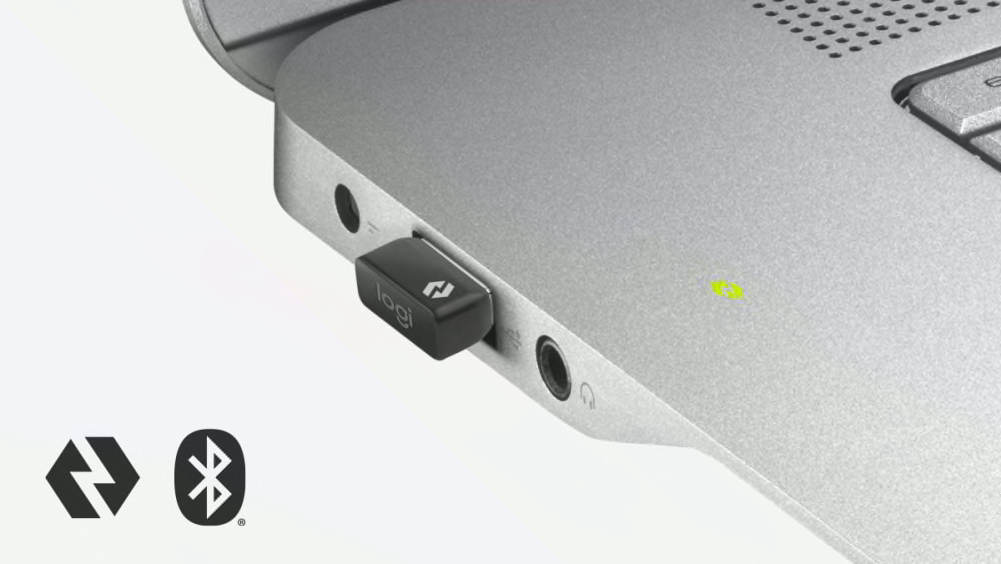
When it comes to wireless, users want the flexibility to connect the way they want. With Logi Bolt, you can rest easy knowing those connections are always reliable and secure. Users can either connect via Bluetooth Low Energy wireless technology or via the tiny Logi Bolt USB receiver, locking in an FIPS-secure connection even in congested wireless environments.

NEXT-LEVEL COMPATIBILITY
PLUG-AND-PLAY CONVENIENCE
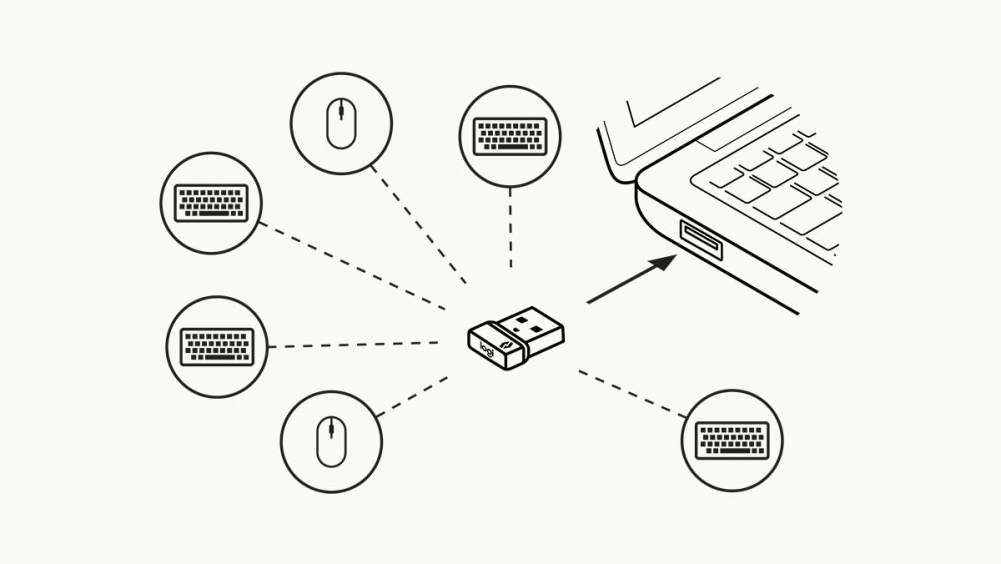
Logi Bolt products are pre-paired to their Logi Bolt USB receivers in the factory, so set-up is truly a plug-and-play experience — virtually eliminating any need for Help Desk support. Plus, people can pair up to sixRequires Logi Options+ App available on Windows and macOS at logi.com/optionsplus Logi Bolt wireless mice and keyboards to a single Logi Bolt USB receiver — saving precious USB port space and eliminating the need to move mice and keyboards between different work setups.
GREATER PRODUCTIVITY WITH LOGI OPTIONS+
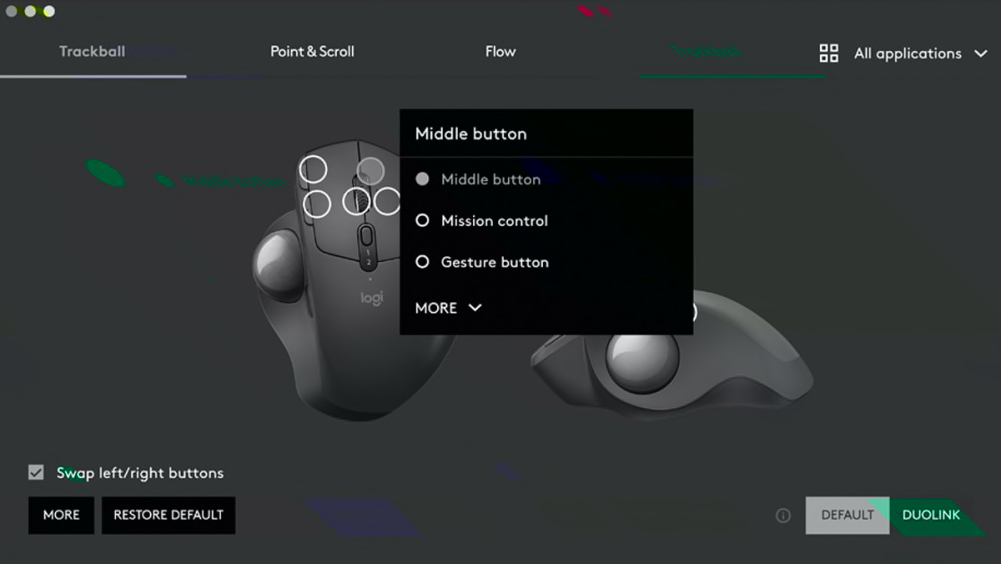
Do more with Logi Bolt devices using the Logi Options+ App that allows users to effortlessly take control of their workflow and is designed to transform how they work. With Logi Options+ users can speed up work using Gestures, work across devices and operating systems using Flow, set tracking speed, customize individual buttons or keys, and use predefined app-specific customizations and Smart Actions to optimize nearly every aspect of their workflow.
Available on Windows and macOS.
FAQS
How do I know what type of Logitech wireless technology I have?
On which version of the Bluetooth core specifications is Logi Bolt connectivity based?
What type of USB port does Logi Bolt require?
What Security Manager Protocols does Logi Bolt use for pairing, bonding, encryption and signing?
Corporate policy does not allow use of Bluetooth connections. Can we deploy Logi Bolt wireless products?
What is the effective range of Logi Bolt?
Are Logi Bolt wireless products cross-compatible with other Logitech wireless products?
How do I know what type of Logitech wireless technology I have?
How do I know what type of Logitech wireless technology I have?
If you have a USB receiver, start by identifying which type of USB receiver you have.
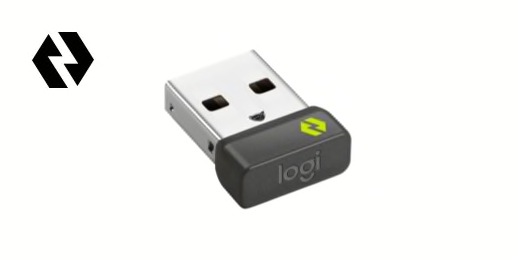
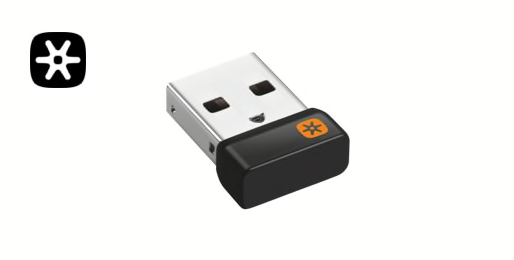
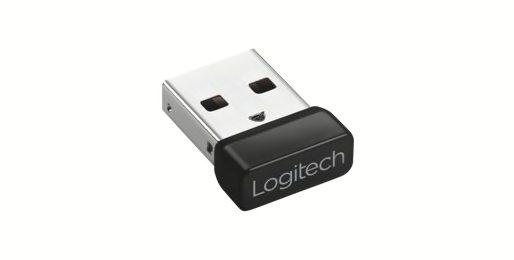
Next, if unsure what type of wireless mice and keyboards you have, look for a matching logo mark on the bottom (the side that rests on the desk surface) of your Logitech wireless products.
If your Logitech wireless device did not come with a USB receiver, your wireless keyboard or mouse may have Bluetooth wireless connectivity or is Logi Bolt enabled. Look for a Logi Bolt logo on the bottom (the side that rests on the desk surface) of your Logitech wireless products. If you see a Logi Bolt logo that means your device is compatible with a Logi Bolt USB receiver even if one did not come in the box. If you’d like a high-performance, secure connection with Logi Bolt, you can purchase a Logi Bolt USB receiver on Logitech.com or at leading retailers that carry Logitech products.
On which version of the Bluetooth core specifications is Logi Bolt connectivity based?
On which version of the Bluetooth core specifications is Logi Bolt connectivity based?
Our Logi Bolt wireless devices are Bluetooth Low Energy 5.0 or higher. We actively use all the security mechanisms introduced in Bluetooth Low Energy Core Specification 4.2.
From a backward compatibility standpoint, Logi Bolt wireless devices are able to communicate with Bluetooth Low Energy 4.0 hosts or higher when in direct Bluetooth connection.
Logi Bolt Wireless Technology
It’s Logitech’s next-gen wireless technology — delivering a high-performance, secure wireless connection when compatible mice and keyboards are connected via Logi Bolt USB receiver.
FULL ENCRYPTION AND SECURE CONNECTIONS ONLY
Logi Bolt is a cutting-edge wireless protocol, engineered to meet rising enterprise security expectations. It combines Bluetooth ® Low Energy wireless technology Security Mode 1, Security Level 4 — sometimes called U.S. Federal Information Processing Standards (FIPS)U.S. Federal Information Processing Standard 140-2 (FIPS) is a cryptography standard recognized by the Canadian government and the European Union. Mode — with additional Logitech security features designed to reduce vulnerability when devices are paired to a Logi Bolt USB receiver.
CUT THROUGH CONGESTION
Logitech MX Keys for Business and MX Master 3 for Business
Paired to a Logi Bolt USB receiver on a Windows ® computer
Paired to a Logi Bolt USB receiver on a Mac ® computer
Competing Wireless Mice & Keyboards
Company A paired to USB Receiver on a Windows computer
Company B paired to USB Receiver on a Windows computer
Company C paired to USB Receiver on a Windows computer
Company D paired via Bluetooth on a macOS ® computer
Measured in milliseconds
TWO WAYS TO CONNECT
When it comes to wireless, users want the flexibility to connect the way they want. With Logi Bolt, you can rest easy knowing those connections are always reliable and secure. Users can either connect via Bluetooth Low Energy wireless technology or via the tiny Logi Bolt USB receiver, locking in an FIPS-secure connection even in congested wireless environments.
NEXT-LEVEL COMPATIBILITY
PLUG-AND-PLAY CONVENIENCE
Logi Bolt products are pre-paired to their Logi Bolt USB receivers in the factory, so set-up is truly a plug-and-play experience — virtually eliminating any need for Help Desk support. Plus, people can pair up to sixRequires Logi Options+ App available on Windows and macOS at logi.com/optionsplus Logi Bolt wireless mice and keyboards to a single Logi Bolt USB receiver — saving precious USB port space and eliminating the need to move mice and keyboards between different work setups.
GREATER PRODUCTIVITY WITH LOGI OPTIONS+
Do more with Logi Bolt devices using the Logi Options+ App that allows users to effortlessly take control of their workflow and is designed to transform how they work. With Logi Options+ users can speed up work using Gestures, work across devices and operating systems using Flow, set tracking speed, customize individual buttons or keys, and use predefined app-specific customizations and Smart Actions to optimize nearly every aspect of their workflow.
Available on Windows and macOS.
FAQS
How do I know what type of Logitech wireless technology I have?
On which version of the Bluetooth core specifications is Logi Bolt connectivity based?
What type of USB port does Logi Bolt require?
What Security Manager Protocols does Logi Bolt use for pairing, bonding, encryption and signing?
Corporate policy does not allow use of Bluetooth connections. Can we deploy Logi Bolt wireless products?
What is the effective range of Logi Bolt?
Are Logi Bolt wireless products cross-compatible with other Logitech wireless products?
How do I know what type of Logitech wireless technology I have?
How do I know what type of Logitech wireless technology I have?
If you have a USB receiver, start by identifying which type of USB receiver you have.
Next, if unsure what type of wireless mice and keyboards you have, look for a matching logo mark on the bottom (the side that rests on the desk surface) of your Logitech wireless products.
If your Logitech wireless device did not come with a USB receiver, your wireless keyboard or mouse may have Bluetooth wireless connectivity or is Logi Bolt enabled. Look for a Logi Bolt logo on the bottom (the side that rests on the desk surface) of your Logitech wireless products. If you see a Logi Bolt logo that means your device is compatible with a Logi Bolt USB receiver even if one did not come in the box. If you’d like a high-performance, secure connection with Logi Bolt, you can purchase a Logi Bolt USB receiver on Logitech.com or at leading retailers that carry Logitech products.
On which version of the Bluetooth core specifications is Logi Bolt connectivity based?
On which version of the Bluetooth core specifications is Logi Bolt connectivity based?
Our Logi Bolt wireless devices are Bluetooth Low Energy 5.0 or higher. We actively use all the security mechanisms introduced in Bluetooth Low Energy Core Specification 4.2.
From a backward compatibility standpoint, Logi Bolt wireless devices are able to communicate with Bluetooth Low Energy 4.0 hosts or higher when in direct Bluetooth connection.
Logi Bolt Wireless Technology
It’s Logitech’s next-gen wireless technology — delivering a high-performance, secure wireless connection when compatible mice and keyboards are connected via Logi Bolt USB receiver.
FULL ENCRYPTION AND SECURE CONNECTIONS ONLY
Logi Bolt is a cutting-edge wireless protocol, engineered to meet rising enterprise security expectations. It combines Bluetooth ® Low Energy wireless technology Security Mode 1, Security Level 4 — sometimes called U.S. Federal Information Processing Standards (FIPS)U.S. Federal Information Processing Standard 140-2 (FIPS) is a cryptography standard recognized by the Canadian government and the European Union. Mode — with additional Logitech security features designed to reduce vulnerability when devices are paired to a Logi Bolt USB receiver.
CUT THROUGH CONGESTION
Logitech MX Keys for Business and MX Master 3 for Business
Paired to a Logi Bolt USB receiver on a Windows ® computer
Paired to a Logi Bolt USB receiver on a Mac computer
Competing Wireless Mice & Keyboards
Company A paired to USB Receiver on a Windows computer
Company B paired to USB Receiver on a Windows computer
Company C paired to USB Receiver on a Windows computer
Company D paired via Bluetooth on a macOS computer
Measured in milliseconds
TWO WAYS TO CONNECT
When it comes to wireless, users want the flexibility to connect the way they want. With Logi Bolt, you can rest easy knowing those connections are always reliable and secure. Users can either connect via Bluetooth Low Energy wireless technology or via the tiny Logi Bolt USB receiver, locking in an FIPS-secure connection even in congested wireless environments.
NEXT-LEVEL COMPATIBILITY
PLUG-AND-PLAY CONVENIENCE
Logi Bolt products are pre-paired to their Logi Bolt USB receivers in the factory, so set-up is truly a plug-and-play experience — virtually eliminating any need for Help Desk support. Plus, people can pair up to sixRequires Logi Options+ App available on Windows and macOS at logi.com/optionsplus Logi Bolt wireless mice and keyboards to a single Logi Bolt USB receiver — saving precious USB port space and eliminating the need to move mice and keyboards between different work setups.
GREATER PRODUCTIVITY WITH LOGI OPTIONS+
Do more with Logi Bolt devices using the Logi Options+ App that allows users to effortlessly take control of their workflow and is designed to transform how they work. With Logi Options+ users can speed up work using Gestures, work across devices and operating systems using Flow, set tracking speed, customize individual buttons or keys, and use predefined app-specific customizations and Smart Actions to optimize nearly every aspect of their workflow.
Available on Windows and macOS.
FAQS
How do I know what type of Logitech wireless technology I have?
On which version of the Bluetooth core specifications is Logi Bolt connectivity based?
What type of USB port does Logi Bolt require?
What Security Manager Protocols does Logi Bolt use for pairing, bonding, encryption and signing?
Corporate policy does not allow use of Bluetooth connections. Can we deploy Logi Bolt wireless products?
What is the effective range of Logi Bolt?
Are Logi Bolt wireless products cross-compatible with other Logitech wireless products?
How do I know what type of Logitech wireless technology I have?
How do I know what type of Logitech wireless technology I have?
If you have a USB receiver, start by identifying which type of USB receiver you have.
Next, if unsure what type of wireless mice and keyboards you have, look for a matching logo mark on the bottom (the side that rests on the desk surface) of your Logitech wireless products.
If your Logitech wireless device did not come with a USB receiver, your wireless keyboard or mouse may have Bluetooth wireless connectivity or is Logi Bolt enabled. Look for a Logi Bolt logo on the bottom (the side that rests on the desk surface) of your Logitech wireless products. If you see a Logi Bolt logo that means your device is compatible with a Logi Bolt USB receiver even if one did not come in the box. If you’d like a high-performance, secure connection with Logi Bolt, you can purchase a Logi Bolt USB receiver on Logitech.com or at leading retailers that carry Logitech products.
On which version of the Bluetooth core specifications is Logi Bolt connectivity based?
On which version of the Bluetooth core specifications is Logi Bolt connectivity based?
Our Logi Bolt wireless devices are Bluetooth Low Energy 5.0 or higher. We actively use all the security mechanisms introduced in Bluetooth Low Energy Core Specification 4.2.
From a backward compatibility standpoint, Logi Bolt wireless devices are able to communicate with Bluetooth Low Energy 4.0 hosts or higher when in direct Bluetooth connection.