Hon Hai Precision Ind. Co.,Ltd. — что это за устройство?

Современные производители основаны не только на собственных технологиях. Они также используют и разработки других компаний — устройства закупаются большими партиями.
Такие компании помогают крупным и известным брендам, сами при этом остаются менее известными.
Что за устройство?
Hon Hai Precision Ind. Co.,Ltd. — фирма, торговое наименование которой Foxconn. У вас в ноутбуке например от данного производителя может быть сетевая карта, вай-фай.
Также они создают и точки доступа, материнские платы и другие устройства.
Сегодня Foxconn — тайваньская фирма, крупнейший в мире производитель электроники. Создает комплектующие, разьемы, корпусы, сетевые устройства, часть из всего уходит другим компаниям, которые собирают потом все это под своим брендом. Мое мнение — компания качественная.
Полное описание компании:
Сетевые администраторы могут в некоторых программах по анализу сетей заметить Hon Hai Precision Ind. Co.,Ltd. — это означает что устройство фирмы Foxconn. Пример подобной программы — Wireless Network Watcher:
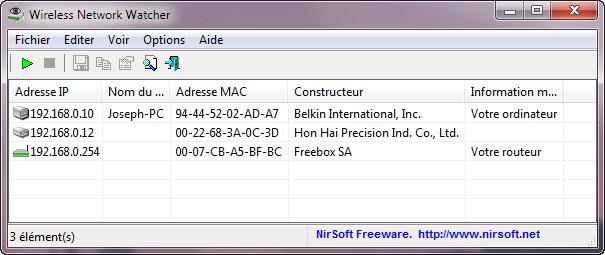
Второй пример, здесь присутствуют и другие производители:
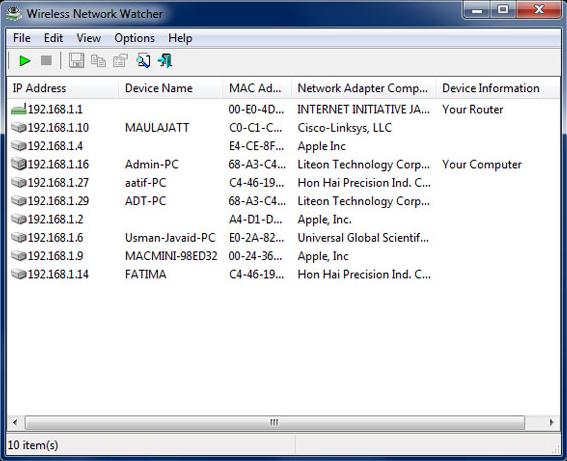
В данном списке может быть и Murata Manufacturing Co., Ltd — устройство компании Maruta — японский производитель электронных компонентов. Серьезная компания, информацию можно узнать здесь:
Заключение
Мы выяснили, Hon Hai Precision Ind. Co.,Ltd. это на самом деле Foxconn. Производители иногда используют другие варианты своих названия — возможно такие правила.
Если вы заметили что устройство с таким названием подключён к вашему Wi-Fi — не стоит волноваться, ничего опасного здесь нет — это просто сетевой адаптер. Другими словами кто-то со своим ноутбуком/ПК подключился к вашему Wi-Fi.
Murata Manufacturing Co., Ltd. — что за устройство в сети?

- Описание
- Разбираемся
- Вывод
Приветствую уважаемые друзья! Поговорим про железо, а точнее про одно название устройства, которое вы можете увидеть например… при использовании вай фай роутера. Или в другом сетевом оборудовании.
Описание
Murata Manufacturing Co., Ltd. — японская компания, производит разные электронные компоненты, включая модули Bluetooth, Wi-Fi.
Устройство компании Murata Manufacturing Co., Ltd. — не является популярным типом. То есть это только встроенные решения, и думаю что не так часто можно встретить в ПК или ноутах. Например компания делает беспроводные модули к источникам питания, которые например могут использоваться в слуховом аппарате.
Кроме беспроводных модулей компания также производит монолитные керамические конденсаторы, многослойные керамические устройства, индукторы микросхемы, фильтры на ПАВ, кристаллические фильтры, ЖК-фильтры, керамические резонаторы и прочее не особо интересное обычному пользователю))
Разбираемся
- К сожалению информации о том, что это за устройство точной нет. Но выяснил, что Murata это мировой бренд электронных компонентов, которые также создают модули Блютуз, может даже и Вай Фай (информации реально просто нет).
- Что это может быть за устройство? Это вряд ли какой-то роутер или ноутбук известного производителя. Это может быть устройство умного дома, возможно кто-то сканирует вашу сеть, пытается подобрать пароль. Также некая современная бытовая техника может иметь разные беспроводные модули.
- Что в итоге делать? Самое правильное и разумное решение — подумать, какие устройства могут иметь Wi-Fi модуль в ближайшем окружении, но самое правильное решение — блокировать по маку устройство. Если он постоянно меняется, то это уже интересно, может действительно кто-то пытается подобрать пароль и меняет мак, чтобы устройство не было заблокировано.
Вот пример, который говорит что компания Murata производит беспроводные модули:

Но судя по интерфейсу модуля — он может быть установлен в каком-то специфичном оборудовании, то есть не компьютеры или ноутбуки. А например телевизор, принтер, или устройство, которое используется в промышленности.
Заключение
- Murata Manufacturing Co., Ltd. — это скорее всего специфическое устройство, например девайс умного дома, встроенный модуль в телевизоре, промышленном оборудовании. К сожалению точной информации нет.
Удачи и добра, до новых встреч друзья!
Murata Manufacturing Co. Ltd on my Network: What is it?

Usually, when your phone connects to a Wi-Fi network, you expect your phone brand along with its model name to show on your Wi-Fi Network.
But what if you don’t see it and instead find an unknown name connected to your home Wi-Fi.
I recently connected my brand new smartphone to my Wi-Fi network, and to my surprise, I saw the device name as “Murata Manufacturing Co.Ltd” instead of the actual brand.
At first, I thought my Wi-Fi network had been compromised and decided to do some research and try to understand what really caused such a strange occurrence.
After quite a bit of research, here’s what I found about the problem.
The Murata Manufacturing Co.Ltd on your Network is very likely to be wireless module components found in your smartphone, and they are harmless.
This led to the appearance of the manufacturer’s name on my network. I further realized that it’s not a matter of concern and can be resolved by manually configuring the address on the device.
If you face a similar problem as I did, read on to understand more about this issue.
What is a Murata Manufacturing Co. Ltd Device?

Murata Manufacturing Co.Ltd is a Japanese company producing electronic devices and components used in the telecom, mechanics and electric sectors.
So any device produced by the above company is known as Murata Manufacturing Co.Ltd device.
Some of the electronic components and modules churned out by Murata Manufacturing Co.Ltd include multilayer ceramic capacitors, sensors, and timing devices, to name a few.
Why is there a Murata Manufacturing Co. Ltd on My Network?
If you see Murata Manufacturing Co.Ltd on your Wi-Fi network, it is because one of the devices such as your router, modem or Wi-Fi dongle is produced by them.
Moreover, you will also receive a notification saying, “Murata Manufacturing Co.Ltd is connected to your network”, even if you have not given any permission to connect.
This is because the Murata Manufacturing device is connected to your router through a wired internet connection that allows it to access your network.
Another reason why Murata Manufacturing Co.Ltd reconnects automatically to your network is due to your Android app trying to establish a connection between the Murata device and router.
What Devices Identify Themselves as Murata Manufacturing Co. Ltd Devices?

Murata Manufacturing produces a range of products for commercial and home use, such as capacitors, resistors, and inductors used in almost every electronic device.
But as far as home devices are concerned, you can find Murata Manufacturing in your home routers, modems, Wi-Fi dongles and your smartphones.
As mentioned earlier, any device directly connected to the internet will pop up a notification identifying itself as Murata Manufacturing Co.Ltd devices.
Should I be Worried about the Murata Manufacturing Co. Ltd Device on my Network?
Having an unknown device connected to your network can cause concern.
However, in this case, you are just seeing the name of the IP device associated with the manufacturing company, which could be your mobile phone, smart TV, router etc.
You need not worry about it, as it is not a security threat like you imagined it to be, and there are solutions to deal with such issues.
If you want to know how to access and remove Murata Manufacturing devices from your home network, then read on.
How to Access the Murata Manufacturing Co. Ltd Device on my Network?
You can access the Murata Manufacturing device by logging in to your router and making the necessary changes in the configuration.
Here are the router login instructions to access the device.
- Firstly you need to connect to the Murata router upon which you need to access the Murata router’s set up pages.
- You can establish the connection by using an ethernet cable or Wi-Fi.
- Launch the web browser and enter the router’s IP address directly into the address field.
- Murata routers’ most common IP address is 192.168.1.100, and if it doesn’t work, you need to search for the default address assigned to that specific model in use.
- Once you have access to the home page, sign in to the Murata router using your username and password.
By following the above steps, you can access the Murata device that appears on your network.
Activate your Antivirus

The most sought approach in blocking unknown devices such as Murata Manufacturing Co.Ltd is to utilize your AntiVirus.
Using an antivirus with Wi-Fi protection can help you protect against intrusion into your home Wi-Fi networks by unknown devices.
How to Remove the Murata Manufacturing Co. Ltd Device from my Network
If you are annoyed by seeing the notification message, you can easily do away with it by following the two steps.
- Firstly, you need to manually configure the address so that the manufacturing company’s name does not get broadcast on the phone device.
- The next step is to cross-check your device with your phone’s MAC IP along with the MAC address of your home network router.
- You need to ensure that this MAC IP is the one you use to access the internet service so that you don’t have to see the notification.
Block an Unknown Murata Manufacturing Co. Ltd Device on my Network

The easier option to deal with a Murata device is to block by identifying its MAC address. Here is how you block an unknown Murata device.
- Launch the browser and enter the router IP address.
- Login to the router using valid credentials.
- Look for tabs such as network or attached/connected devices, and once you find the list, you will be able to see the IP addresses and the MAC address of the listed device.
- Choose the MAC to address the device you want to block on your network and proceed accordingly.
Manage the Devices on your Network
If you have multiple devices connected to your Wi-Fi, it is high time you take control over your network.
One way of doing this is by managing the devices on your network, i.e. you get to see the devices connected along with the data usage.
There are several apps, such as Google Home, and several third-party software developed for this purpose.
Using such apps can be beneficial in keeping track of devices connected to the internet, thereby helping you identify unknown devices.
Boost your Internet Security
Apart from using antivirus to protect your home networks, you can also use much more advanced home security solutions such as the Fing app to boost your internet security.
These IoT based apps come with several features such as network scanners, syncing various network configurations, conducting internet tests etc.
This will help you monitor your network and improve security, thereby increasing overall protection to your home Wi-Fi.
Contact your ISP
Finally, if the problem persists, I strongly recommend you reach out to your ISP and seek their assistance.
With its pool of qualified technicians, your ISP can help you solve this issue and offer you professional advice in dealing with the above issue.
Final Thoughts on Murata Manufacturing Co. Ltd Devices
Though the solutions are a handful in addressing this issue, the real challenge lies in identifying the Murata device, especially if you have a smart home.
One easy way of finding the device is by Google searching the MAC address on your network.
This will give you the details of the manufacturer and the name of the device.
Another way of identifying a Murata device is by disconnecting the devices individually from your Wi-Fi network until you don’t see the notification.
You May Also Enjoy Reading:
- Honhaipr device: What is it and How to Fix
- Arris Group On My Network: What Is It
- Shenzhen Bilian Electronic Device On My Network: What Is It?
- Huizhou Gaoshengda Technology On My Router: What Is It?
- How to Check Bluetooth Radio Status not fixed
Frequently Asked Questions
What devices does Murata Manufacturing make?
Murata Manufacturing produces components and modules that are used in electronic devices. They also produce components used in telecom, mechanics and electric sectors.
What is a Murata Manufacturing phone?
If your phone contains RF components, module products, sensors, etc., that Murata Manufacturing produces, it is called a Murata manufacturing phone.
This is because the phone, when connected to the Wi-Fi, will show the manufacturer’s name of the RF module instead of the phone brand.
Does Murata make Samsung Smartphone Components?
You can find Murata in Samsung’s suppliers list. So, yes, Murata does make components for Samsung Smartphones.
Who does Murata supply?
Murata’s two major customers are Apple Inc and Samsung Electronics Co Ltd. Murata also supply their components to Chinese smartphone makers.

RobotPoweredHome.com is a participant in the Amazon Services LLC Associates Program, an affiliate advertising program designed to provide a means for sites to earn advertising fees by advertising and linking to Amazon.com. © 2024 Robot Powered Home | Privacy Policy
What Is Meant By Murata Manufacturing On My WiFi?
As technology has advanced at such a rapid rate in the last decade, it is becoming nearly impossible to keep a track of what’s what. There are thousands of companies building millions of new devices and gadgets.
Each one fills an apparent need that we may not have even realised we had. This can lead to some confusion at times. For example, every now and then it is totally natural to have a look at the devices connected to your Wi-Fi – only to end up not recognising at least one of them.
In most cases, people are led to assume that someone is leeching off their connection or that something else even more malicious might be afoot. This gets even more suspicious when the name of the device being picked up is a little vague.
For many of you, that’s precisely what has happened when you’ve noticed the unfamiliar ‘Murata Manufacturing’ making an appearance on your network. So, to save some confusion, we decided to explain a little about this company and what they do so that you can track which device it is. So, here’s what we’ve figured out!
What Is Meant By Murata Manufacturing On My WiFi?
A Little Bit About Murata Manufacturing
Murata Manufacturing Co, LTM. Are a brand that are involved in the manufacture of a pretty vast array of electronic devices. So, the good news is that it is a legit entity.
They are a Japanese company which aren’t all that well-known yet, despite the fact that their components can show up in all sorts of devices you wouldn’t expect them to be in. For example, when this happened to one of us recently, it turned out that the device it was related to was actually a Trane thermostat.
For the most part, their components will be found in mechanical devices, telecommunications products, and things of that nature. Within that, there are actually a huge list of bits and pieces that will bear the name Murata Manufacturing.
There are multilayer ceramic capacitors, communication modules, noise countermeasure components, sensor devices, high-frequency components, powerful batteries, and a whole host of other devices. Because of this, the company’s reach is not just limited to Japan, and their components can show up pretty much anywhere in the world.
What Should I Do About The Murata Manufacturing Device On My Wi-Fi?
We’ve already seen how this brand name is likely to show up on any network anywhere in the world. So, if you are seeing it on your system, the first thing we would advise is not to worry too much about it just yet. The chances are that it is totally harmless and nothing to do with spyware or anyone stealing your Wi-Fi.
For the more curious among you who want to engage in a little bit of detective work (it’s actually a bit of fun), here is how we would suggest you go about it. We’ve found that the easiest way to isolate the device and identify it is to block that particular device from the network.
Then, you can systematically go around your home and try to operate all of your internet-enabled gear. If any of your stuff has ceased functioning entirely, this is nearly definitely going to be the culprit and the one bearing the Murata name. More often than not, the device will be a smart home one.
How To Get Rid Of The Murata Manufacturing Notification On My WiFi
For many of you, you will now want to simply shut out the notification. The bad news is that it won’t simply disappear. So, you will need to actively do something about it, but this won’t take all that much time. All you will need to do is configure the address manually.
So, you will need to verify this Murata device with your phone’s MAC IP address as well as that of your router. This way, the device will no longer be a source of mystery to your network and trigger notifications.
- Shenzhen Bilian Electronic On My WiFi
- A Device On Your WiFi Is Casting: What Does It Mean?
- Does IP Address Change With WiFi? (Factors And Its Types)
- Huizhou Gaoshengda Technology On My WiFi
- 7 Different Types of WiFi Antennas (WiFi Antenna Guide)